Businesses are growing, and visits to e-commerce sites explode in the fourth quarter. During these last three months of the year, good remarketing techniques and targeting are essential for visibility.
What to do? Why do we pay more attention in the fourth quarter ? What are the factors to take into account to make the difference?
The fourth quarter corresponds to the months from September to December. During this period, Internet users are doing more product research, and your audience and traffic will increase.
That’s why your targeting needs to be extremely well thought-out, and your digital communication needs to be effective.
With the arrival of the cold and bad weather, and especially the festive season, consumers are spending more time in front of their screens (computers and mobiles).
The seasons motivate us to change our wardrobe or make changes at home. Find family gifts or prepare orders for sales or Black Friday; It’s the perfect time to be visible and present to meet demand.
November and December are the most important gift-buying months of the year, and the search for gifts begins as early as the beginning of October.
Mintel 2018
Important dates at the end of the year
From September to December, there are several major events to boost sales: Halloween, New Year’s Eve, Black Friday and Cyber Monday. This is a time when consumer spending is at its peak. It’s essential to create communication campaigns and target your audiences.
If we talk about Black Friday alone, we should remember:
growing French interest in the event
Black Friday didn’t slow Christmas growth in December 2018
Mobile accounted for 69% of the traffic for clothing websites during Black Friday and Cyber Monday
Evolution of Black Friday and sales from 2017 to 2018
To keep up with the competition, one of our tips is also to review your keyword targeting and the themes you want to cover.
Consumers conduct new searches and are more likely to buy your products.
Why not combine your audience parameters with keywords such as “Christmas gift ideas”, “black friday promotions” or “50% cyber monday”.
During these end-of-year months, you need to implement a remarketing strategy. You need to re-engage Internet users who perform a certain number of actions on your site.
Without the act of buying, the prospects who came to your site must not forget your existence. and be visible as soon as your prospect is ready to buy.
Your online store needs to establish itself as the expert in your industry. With Facebook Ads and Google Ads, you can easily target these pre-qualified audiences, who mustn’t forget you.
Be responsive to ensure the customer experience
The biggest orders arrive during Black Friday and the month of December. As demand increases, e-tailers need to be ready. Black Friday isn’t just about sales on the day.
The effect of this event lasts over time: we’re no longer talking about a day, but rather a week of promotion. All these factors need to be taken into account if you are to have enough stock on hand for the boxes 😉
Purchases can also be extremely well thought-out. Some consumers spot before and then buy during promotions. We need to take advantage of this practice with remarketing on Google and Facebook.
They need to see the product, but also feel that it’s an exceptional offer that won’t be repeated. The fear of not taking advantage of the discount motivates them to buy.
During the fourth quarter, e-tailers have great sales opportunities. To be successful, it’s essential to have well-configured remarketing campaigns and target audiences.
What is the average click-through rate (CTR) of a Google Ads ad? When people ask this question, it’s often because they want to evaluate the click-through rate of their own ads.
CTR = Clic through rate => click-through rate
Unfortunately, too many advertisers are content to achieve an average click-through rate and leave it at that.
Here’s an article to help you maximize your click-through rate and triple your performance on the average Google CTR.
What is a good click-through rate (CTR) on Google?
This obviously depends a great deal on your industry, the competition and your objectives. However, you should know that marketers who settle for 2-5% CTR are not up to the job.
We can’t see our competitors’ data, so we don’t know if their CTRs are similar to ours.
What we do know, however, is that whether or not our CTRs are “good” depends largely on the position of our ad. Ads in higher positions naturally have higher CTRs than those in lower positions.
The chart above reflects average CTRs per ad position on Google, based on an analysis of nearly 100,000 advertiser accounts representing $3 billion in annualized spend. This gives a pretty good idea of the big picture when it comes to the CTRs that real advertisers are actually experiencing.
So the ad in second place has an average click-through rate of 4%. You might think that’s good, but it’s just an average. So if that’s what you’re seeing in your account, you’ve got plenty of room for improvement.
Averages are fine, but there’s still a lot of variability between advertisers, as you can see in the graph below. Remember, these are not keywords – each blue dot indicates an advertiser account.
In this chart, you can see the expected or average CTR curve in orange, while the green and purple curves show what you need to aim for if you want to achieve CTRs two to three times higher than average.
These data show us that there are indeed a few accounts that stand out from the crowd and far outstrip their competitors. What does it take to be one of these exceptional advertisers?
The bottom 50% of advertisers achieve average or lower CTRs. If you want to be among the top 15% in the highly competitive Google Ads landscape, you need to achieve an average CTR on your account that’s twice the average (we call these “awesome” advertisers). If you achieve a CTR three times the average, you become a super-awesome advertiser, which is the case for about 1 in 20 advertisers.
You can quickly check whether your own CTR is above or below the average for your sector.
But why not aim for the stars? If you want to be in the top 1%, you need to achieve an average CTR six times the norm – we call these advertisers “Unicorns”. They’re rare, but I promise you that Google Ads unicorns do exist. They’re not inherently better than you; they just work harder and optimize their campaigns better.
So how do these unicorns do it? First, we need to understand…
The importance of quality scores and how Google Ads works
Understanding how AdWords auctions work is essential if you want to optimize and improve your performance.
Google ads are live auctions. Google must determine the ranking position of each ad, as well as the cost of each click, in real time for each ad in the auction.
Google uses ad ranking to determine your position in the auction and your CPC. The latter is calculated by multiplying the maximum cost-per-click bid (the maximum you’re willing to pay for a click) by your Quality Score (Google’s assessment of the quality of your ads).
Note: Google has recently updated Ad Rank to include the expected performance of ad extensions, but the basic principle remains the same.
In this example, you can see exactly how Quality Score can affect your performance in this live auction.
The main advertiser, who obtained the first position, had a maximum bid that was $2 lower than that of his competitor, but his Quality Score and therefore his ranking were much higher, enabling him to obtain a better position and a lower CPC :
Google does this because it doesn’t get paid if no one clicks on its ads, and therefore prioritizes the ads most likely to succeed.
The average Quality Score is around 5.1 out of 10.
If you have an above-average Quality Score, you can get up to 50% off your cost per click. Conversely, if you have a below-average Quality Score, you can pay up to 400% more.
But CPC is only one measure among many. What about the actual cost per conversion? Here, we’ve also seen an inverse relationship, across billions of dollars of ad spend, whereby as your Quality Score increases, your cost per conversion decreases, because your clicks are so much cheaper.
How is Quality Score calculated? In general, the higher your CTR, the higher your Quality Score. However, as you can see from the chart below, there’s a lot of variance, thanks to ad positioning.
As we saw earlier, ads at the top of the page are predisposed to getting more clicks than those further down.
The blue line at the bottom, for example, refers to keywords in positions 1.0 to 1.5. Quality Score is not calculated solely on the basis of your CTR, but on the basis of your over- or under-performance in relation to the expected CTR.
In the following graph, you can clearly see how important your CTRs are in calculating your Quality Score.
It’s all relative.
Your Quality Score, which is the key to getting prominent ad placements and low CPCs and CPAs, isn’t entirely based on your CTR. Rather, your ads and keywords must be above the expected average. This is the key to a high Quality Score.
What about these unicorns? We’ve seen so far that an above-average CTR will help you achieve your goals, but to be better, you need more.
When we see “unicorn” accounts in the AdWords Performance Grader, they share some common characteristics:
– Every keyword in their account has a high Quality Score. – They make effective use of negative keywords to reduce unnecessary expenditure. – Their high impression share shows that Google loves to show their ads. – They have very high, impressive double-digit CTRs that are several times higher than the average. – They target very specific, long-range keyword phrases. – Their account activity is high – they continue to optimize and improve all the time.
If you can focus on ad and keyword combinations that have these above-average CTRs, the rewards are enormous: higher impression shares, higher ad positions, lower costs per click and lower conversions.
The unicorn hunt
By now you know what Google Ads unicorns look like, and you should have a good idea of why they’re so desirable. Let’s take a look at each of these features so you can replicate this success on your own account.
Unicorn keyword strategy
The top 1% of all Google Ads accounts tend to focus on keywords with strong commercial intent. This is not surprising, as people tend to click more when they are already motivated and intend to buy. For example, “best Internet marketing software” or “stainless steel dishwasher” are keyword phrases that demonstrate buying intent.
Branded keywords are another fantastic opportunity for advertisers, but we’re not just talking about your own brand. Target partner brands, competitor brands or other brands that your target market might be looking for when they’re in buying mode.
A third type of keyword that performs well are local keywords, where the searcher’s intention is to find your business – or your competitor’s (for example, “San Diego personal trainer”). These words tend to get high click-through rates, as local searchers often have strong commercial intent.
Avoid informative keywords wherever possible. These are often formulated as questions, such as “What is a dishwasher?” or “Where is Paris?”. These searchers tend to look for Wikipedia-type information and have no intention of buying, which can result in a lower CTR or unnecessary spend.
Warning about dynamic keyword insertion If you want to achieve unicorn status, don’t overuse dynamic keyword insertion, or DKI. This is a strategy that consists of using a certain syntax in your ads to enable Google to automatically substitute the keyword that triggered the ad in the ad’s text or title.
Dynamic keyword insertion is beneficial, but only up to a point, as illustrated below:
Here we have two curves: the red curve corresponds to ads with DKI and the blue to those without. The red curve shows that ads with DKI are relatively more abundant in the top 15%. However, as you move into the top 5% of ads, down to the unicorn ads, you’ll notice that the red curve drops below the blue curve.
Dynamic keyword insertion ads seem to be hitting a wall. This tells us that they should certainly be part of your toolbox, as they tend to produce slightly higher initial returns, but don’t put too much faith in them.
Ad extensions – are they the miracle solution?
Google seems to release new ad extensions almost every week, but what impact does using ad extensions have on ad Quality Score and will it help you become a unicorn?
This graph shows that impact, and it’s not a game-changer. We can see that accounts that used sitelinks on their ads did slightly better than those that didn’t, which is no surprise.
Extensions can increase CTR, but they won’t fix boring text. It’s a modest increase, but it won’t double or triple your CTR rates.
Most ads suck. Create emotional ads.
Additional tip: Optimizing mobile ads
Our research has shown that calls from mobile ads convert 3 times more than clicks to a website. When testing mobile ads, you should base your conclusions on call rates, not CTR or conversion rates.
I’ll say it again: focus on call rates and do everything you can to get people to click on the “click to call” button.
What to remember about CTR optimization?
Deleting the bottom third of your account could be a good idea: your low CTR, low impression share and poor performing keywords. The idea here is to maximize the budget you’re currently spending on useless ads.
As you can see here, the average cost per click can be significantly lower in a number of areas of the Google Display Network than in Google Search.
Similarly, conversion rates for display ads are comparable to those for search ads, especially when using remarketing. In some sectors, such as automotive and travel, conversion rates for display ads can be even higher.
Many search results pages look like this, with boring ads that all look the same. That’s exactly why position can make such a difference, because the only differentiating factor is where an ad appears on the page.
This is a huge opportunity for you.
When you see a bunch of boring, dry, similar ads appearing for a query, you have a chance to stand out and be different. I like to call this the “Google ad jackpot”. The alternative is to find something that stands out from the crowd, that uses emotional triggers.
Create emotionally-charged ads with Swiss army knife brainstorming.
Respected marketer Perry Marshall has devised a structured brainstorming method for creating compelling advertising copy, called the “Swiss Army Knife”. You take different entities such as your customer, something your customer loves, something your customer hates, your customer’s best friend, your customer’s enemy and so on. You then determine how your brand connects or relates to each entity and build from there.
It’s a simple, structured brainstorming process that can help you generate more compelling and emotional ad copy to test, by blending these concepts, like this:
This is a perfect example of a unicorn ad, with a click-through rate of over 30%, that stands out from all the boring divorce lawyer ads.
Your ad copy needs to resonate on an emotional level, and it needs to be different to stand out. You need to test the important elements of your advertising message – things like your guarantee, your unique selling proposition and your offer.
Understanding relative abundance
Unicorns wouldn’t be so special if they were abundant. In fact, only one ad in 100 is a unicorn. The chances of finding it the first time are slim to none; on average, you have to try 100 different ads to find your unicorn.
The more ads you create and test, the more likely you are to come across one that beats the average by 2, 3 or even 6 times!
You don’t test as many ads as you think. You may be thinking, “I already have THOUSANDS of ads on my account! The last thing I want to do is write more ads!”
That may be true, but I can almost guarantee that you’re not testing as many ads as you think. Certainly not all of them were created using the vision and process described above.
Let me tell you a secret: the bar, especially for SMBs, is incredibly low. The average Google Ads account for a small business has just 18 ads. You may not be able to reach 100 ads this month or even this year, but if you work at it and test even 40 or 50, you’re already doing much better than the majority of your competitors.
5% of ads account for 85% of impressions
Here’s more good news: you can get rid of your poorly performing ads, and there are plenty of them.
Across all accounts, we found that the top 5% of ads in an advertiser’s account accounted for 85% of their impressions.
You don’t need to test 100 ads for each ad group in your account.
Instead, choose your top two or three ad groups and concentrate your efforts there. Test them thoroughly, ideally reaching 100 ads to test in each of these top-performing groups.
Of course, you can start by having us audit your Google Ads campaigns. This is an essential first step in determining the health of your Google Ads account and identifying opportunities for optimization. Want to know more? Contact us – Adenlab, your Google Ads Agency
Developing the growth of an e-commerce business often depends on a number of important factors: conversion rate, traffic, average basket, prices…
Attracting a qualified audience, ensuring cross-selling and optimizing pricing and promotions will help you achieve a number of objectives. However, sales don’t happen as a result of a compulsive act or an immediate purchase on your site.
Some customers take time to think before placing an order, especially if the price is high. Indecisive prospects increase the difficulty of converting on your site. What’s more, during this time of reflection, these same consumers will be exposed to other offers for the same or similar products.
How do you make sure they don’t forget you? One strategy: remarketing campaigns via Google Ads and Facebook Ads. If you’re unfamiliar with the concept of remarketing, you’ve probably been confronted with it at least once without knowing it.
The principle is to present an advert to a user who has visited your website or interacted with your social pages (Facebook, Instagram, Linkedin pages).
It may seem intrusive, but this method pays off. How can you set up subtle remarketing campaigns via Google Ads or Facebook Ads without harassing your prospects and customers?
Let’s take a situation you’ve probably experienced. For example, you’ve been looking for a watch or a pair of shoes on a website, and you’ve done some simple scouting on the same site.
In the days that follow, ads for watches and shoes are everywhere: on your Facebook page, Instagram, on your favorite horoscope or weather site …
What a coincidence, you ask? Well, no, it’s not chance, but a remarketing strategy implemented for the site you’ve visited.
In fact, “tracking” the people who have taken actions on your site is commonplace for Ecommerce companies wishing to maximize the ROI of their campaigns, because very often, setting up and distributing retargeting (or remarketing) campaigns is a winning strategy.
Return on investment is almost always guaranteed, because you’re addressing a “pre-qualified” audience whose conversion potential is greater than that of a new visitor.
A subtle example of a remarketing ad: Retarget a visitor who continues to search on Google, with a personalized ad in the Google Search results (Google RLSA campaigns).
Do you find this technique too intrusive? It can be, if it’s not done in the right way. With Facebook Ads and Google Ads campaigns, you can easily retarget your site visitors with different ad formats and ad formats.
What’s more, combining the two platforms will enable you to be more effective in winning over your customers and undecided audiences.
How can Remarketing optimize your conversions?
Invest in “image” and create promotional banners Consistent advertising that reflects the image of your site (color, logo, tone, etc.). Your e-commerce site must be recognizable and attractive.
Test different ad formats! Create several ad formats to see which strategy gets the most clicks and increases your conversion rates. Don’t limit yourself to what’s working: regularly launch new campaigns.
Re-launch your site visitors; as well as anyone who has taken an action on your site (downloaded a freebie, subscribed to the newsletter…).
Apply several targeting strategies with Facebook. You can highlight your content to people who have taken an action on your page (like, comment, share), but also target people who have taken specific actions on your site, e.g. visiting the “Rates” page.
Re-target with a promotional offer, for people who have left their basket without making a purchase.
Reduce your mailing lists to target the most recent prospects, who are most receptive to your offers.
Optimize your product and service landing pages to increase your conversion rates.
Increase your bids and don’t limit the budgets of Remarketing campaigns or ad groups.
Set up remarketing campaigns with Google Shopping.
Usedynamic ad formats to be as close as possible to what your prospects are looking for in Google search results.
Exclude audiences you’re not interested in: it’s sometimes a good idea to exclude web users who have recently purchased and converted on your site. Their keys can be retargeted later via emailing campaigns and become potential buyers and loyal customers.
The aim of these actions is not to be intrusive or to chase after unqualified prospects. The sole aim is to be present at the right time, and for the right amount of time. Your brand needs to present itself as the right solution.
What are the advantages of remarketing strategies?
Although it’s difficult to harness the full power of targeting and remarketing strategies, usually because of limited budgets, the effort is well worth it, as these actions offer many advantages:
Lower acquisition costs
Build customer loyalty and propose new offers
Increase complementary sales
Increase online store visibility
Optimizing return on investment
For example, on 2O accounts in similar sectors that we manage on Google Ads, we have seen a 3.7-fold increase in the conversion rate on remarketing audiences!
Targeting qualified audiences and running remarketing campaigns shouldn’t feel like an intrusion into your prospects’ lives. This type of advertising campaign enables every e-commerce site to become unavoidable and to face up to the competition while communicating with interested consumers.
Conclusion
To help you launch your campaigns and apply effective remarketing strategies, our team of Ecommerces experts will be happy to discuss your needs with you. We’ll work with you to optimize the structure of your accounts and campaigns, to segment and parameterize your target audiences and priority profiles.
Reviewing the architecture of your accounts on Google Ads and Facebook will be a priority to manage campaigns by Audience type. Adenlab, our SEA agency, certified Google Partner Premier and Facebook Ads, is at your service.
When developing your business and e-commerce, you want to reach the widest possible audience to ensure your company’s growth and profitability. But to convert and build loyalty, you need to be able to address the right people with the right message , and not just the general public.
In the article below, we’ll review the principles of targeting and persona, essential for formulating your strategy for acquiring new customers and prospects. We’ll focus on the different audience optimization levers we can implement on your Google and Facebook campaigns.
Audience targeting levers are extremely important in managing campaigns on search engines, the Display advertising network and social networks.
Unlike physical stores, which have a conversion rate of 55%, e-merchant sites convert between 1% and 3% of visitors. So it’s essential to attract visitors with a clear interest in your products and services.
Persona: the key to understanding your customers
To optimize your approach and ensure successful communication, it’s essential to establish one or more customer profiles. These are known as personas.
This has many advantages:
1 Understand their problems and present the ideal solution
2 Identify your audience to target your Google campaigns and Facebook ads
3 Identify their habits to be present in the right place at the right time
The persona study allows you to put yourself in your audience’s shoes and find the right words.
How do you create a persona?
To identify the real problems and habits of your audience, you need to think deeply. Put yourself in the shoes of your ideal customer.
List their demographic and behavioural data, consumer habits, daily problems… One possible approach is to create a typical day: from dawn to dusk, what does your ideal customer do?
There are several sites that allow you to create personas using just a few pieces of data: SurveyMonkey, UseForge, Up Close and Persona or Personapp.
Example: Here’s my simplified persona
Example: Here’s my simplified persona
The process of setting up a persona is not necessarily a simple one, and can take time (brainstorming, teamwork, etc.).
On the other hand, once you’ve done it or redone it, it opens up new possibilities, new ideas for improving your offers and, of course, your acquisition campaigns.
It’s a very rich exercise that I recommend doing as a team.
Creativity: Address your prospects with an attractive message
Convey the right message on the right medium, and maintain the high quality of your advertising.
Now that you know your customers better and want to guarantee a return on investment from your campaigns, you need to convey the right message on the right medium, and keep the quality of your advertising (image, video, content, text) at a high level.
In fact, targeting and persona work won’t be enough if the quality of the ads and advertising creatives isn’t up to scratch.
Nielsen Catalina Research study: 47% of ROI is attributed to the quality of advertising creative
Nielsen Catalina Research study
The quality of the images and the message is still a major factor in attracting new customers. What resonance will the ad have after it has been seen? The Nielson study is clear: 47% of ROI is attributed to the quality of the creative.
With the right design, we can ensure optimal distribution on the various channels: search engines, Display, social networks ….
Consumer behavior has evolved in recent years, and has become increasingly complex.
10 years ago, a customer’s path to purchase was still relatively straightforward, but today there are many more interaction points before a purchase or conversion on your site.
You need to be seen in the right place, at the right time, with the right message.
This means delivering your ads across multiple formats and channels, and paying particular attention to performance, budget allocation and sales/conversion attribution analysis.
In fact, the evolution of cell phones and the number of screens per household are multiplying the points of contact with your customers.
“With nearly 5 billion mobile users worldwide, 6 screens per household in France, and more than half of all searches carried out on Google in France and worldwide from a smartphone, the points of contact between consumers and brands have multiplied.” Roland Duffau, Google
To better understand this evolution, Google and Facebook, as well as agencies like Adenlab, have invested heavily in Machine Learning (AI) technologies.
These learning algorithms enable marketers to make the most of the signals of intent left by Internet users as they navigate the web.
How to leverage audiences and retargeting (or remarketing) with Google Ads campaigns?
The different types of audiences offered by Google enable you to reach individuals along their decision-making paths.
Whether for traffic prediction, virtual assistants, fraud detection… Machine Learning is at the heart of Google Ads or Facebook Ads tools.
The use of Machine Learning algorithms today makes it possible to simplify complex tasks and focus on business objectives, define qualified audiences, and then let the algorithms determine who to engage as relevant prospects.
Below, we’ll illustrate the different types of audiences offered by Google, which enable us to reach individuals along their decision-making paths.
Use an audience-based approach in your Google Ads accounts
In recent years, one of the major challenges for Google Ads has been to break down the silos between ad formats and audiences:
In the past, when we wanted to target an audience with high purchase intent, we preferred the Google Shopping format (and sometimes the text format).
Today, with the right Audience settings, when we target “buyers”, we use Google Shopping, Text Ads, but above all what’s changing is that we also use the Display Network and YouTube!
In terms of targeting, Google Ads technology has clearly evolved, making it possible to use many more formats and distribution channels to achieve your growth and ROI objectives.
What are the main types of Audiences and how can they be used in your targeting strategy?
We leave “traces” everywhere on the web (and anonymously). Every day, we emit signals that are stored (thanks to cookies), analyzed and interpreted; This makes it possible to understand and categorize behavior and people into different audiences.
These audience categories can be used to manage campaigns on Google Ads or Facebook Ads. They enable us to target and prioritize a certain type of person according to our campaign objectives.
Ex: If our goal is to gain more visibility for my brand, I’ll target a demographic audience and an affinity audience.
Illustration of audience typologies in relation to your conversion funnel
Audience demographics
Generally used to target (or exclude) a large audience, they can be used to promote your company by segmenting users according to age, gender, income, profession or family composition (married or not, children…).
Example in Google Ads of a demographic audience selection: here Parental status
Here’s an example in Google Ads of demographic audience selection, by parental status.
Affinity Audiences and Personalized Affinity Audiences
These audiences will enable us to target an audience that is close to your buyers and has been identified as having a real interest in your products and services; in fact, it’s their lifestyle, habits and interests that are analyzed.
Custom affinity audiences will allow you to combine additional parameters in Google Ads, such as keywords to target, Urls and site content, the types of places your prospects frequent, and the applications they’re likely to use.
Example of audience selection by buying behavior
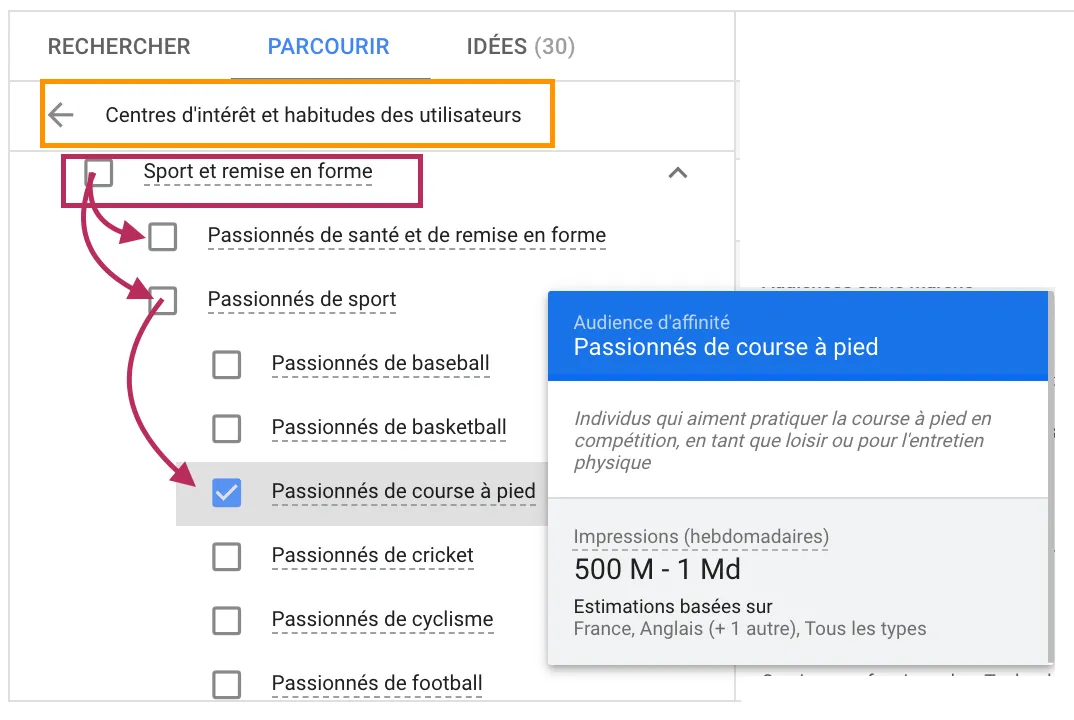
Example of a center of interest
Life event
These audiences allow us to target people who are going through occasional events in their lives, such as weddings, births, but also moves…
Its audiences have multiple needs. If we take the example of a birth, I can assure you that Google searches for “strollers”, “cribs”, “do I make a good father” will be regular searches. Definitely worth implementing!
Market audiences
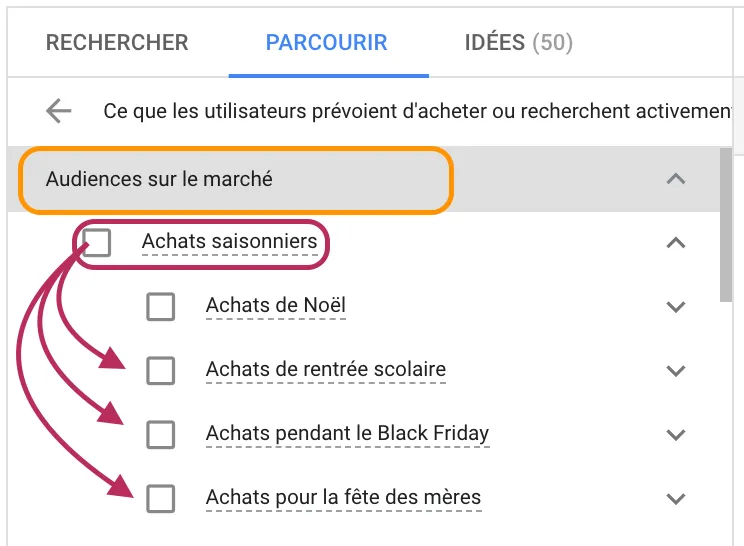
With market audiences, you target people who are actively looking for your products and seriously considering buying them.
This is an audience you must activate in your campaigns, as it’s generally more ROI-intensive and even closer to the profile of your current customers and buyers.
Similar audiences
As the name suggests, similar audiences target people whose behavior is very similar to that of your existing customers;
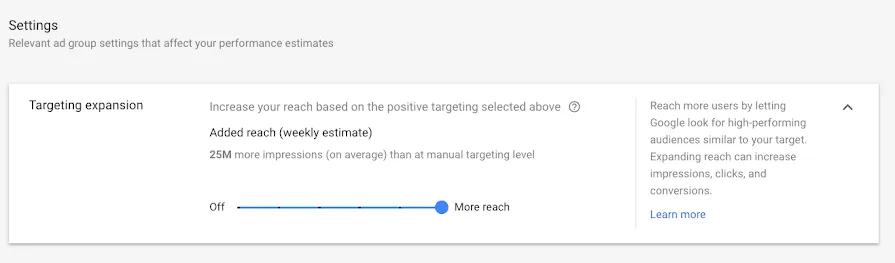
These audience lists are updated in real time! And your ads will be shown to people who have something in common with your ideal customers and prospects.
Selection of audiences similar/similar to your regular site traffic
Retargeting (or remarketing) audiences
Re-targeting “known” audiences who have come to your site is often a winning strategy, and doesn’t require too much budgetary effort.
In fact, the people who have come to your site already have a relatively strong intention to buy, and above all, they know you.
However, not every visitor to your site has the same value: you need to segment and distinguish between visitors who have left without doing anything, and those who have abandoned their purchasing process and are therefore much more likely to convert on your site.
Audience Customer Match
To target and exclude this audience, you first need to import your e-mail database into Google Ads.
This audience will also be very useful for creating similar audiences.
Conclusion
These audience typologies are much the same for Facebook ads. As a result, a wide range of approaches can be devised to develop your sales:
Target by interests
Your competitor’s fans or your fans’ friends
Age groups, professions, Facebook activities, geographical locations…
Family status (children, couple, married): useful for advertising events such as Mother’s Day, Father’s Day or Valentine’s Day.
However, before taking the plunge, we recommend an observation phase on Google Ads and Google Analytics.
Over a relatively short period of time (depending on the traffic of your campaigns) you can identify the audiences that best meet your objectives. This observation phase will enable you to refine your segmentations and subsequently optimize your visibility and budget allocation.
Don’t hesitate to consult us for your acquisition strategies and the implementation of audience strategies on Google and Facebook. Our SEA Agency, certified Google Partner Premier and Facebook Ads, applies different methods and uses various automation tools to develop the accounts of E-Commerce customers.
We specialize in high-volume projects and work on catalogs with a large number of references.
Google launched its Shopping ads on YouTube a few years ago. And just a few weeks ago the Shopping ads were extended:
1. In the Youtube news feed 2. To YouTube search results
This is becoming increasingly interesting for ecommerce advertisers, who will have more options and more space to promote their products via a Shopping feed!
Youtube and videos: sales vectors!
Why is YouTube, in particular, so important for Ecommerces? Well, according to Google**, “nearly two-thirds of shoppers say online video gave them ideas and inspiration for their purchase”, and of those, “90% say they discovered new products and brands via YouTube”.
ROI strategies for e-commerce are essential, and controlling the cost of acquiring a new customer is often the key to success. This is why “Product” formats and the use of shopping feeds for acquisition campaigns are often the most suitable.
With its new options, Google offers merchants an additional lever. Coupled with an appropriate audience strategy, and a bidding strategy consistent with the merchant’s objectives, the format is worth testing!
It’s an option for reaching consumers when and where they’re most likely to “webvitrine”;).
Please note that this is not Retargeting, as the display of Shopping ads depends on the user’s searches and interests. In the example above, a user doing video searches on this or that shoe or on running could be exposed to ads. And it’s the Puma brand whose ads are displayed
What other advertising formats on Youtube are suitable for Ecommerces?
Bumper YouTube Ads
Bumper Ads are short, unstoppable ads lasting up to six seconds. They appear before, during or after the video selected by the user. These ads appear on YouTube videos or on Google’s partner sites and applications. Bumper Ads are an interesting lever for boosting brand awareness and increasing visibility among qualified audiences. It’s a good idea to use them in conjunction with Trueview and other Google campaigns.
Youtube campaign: Trueview
As the name suggests (“True” – “View” => VraieVue), these are videos that are (really;) viewed in their entirety (or almost: more than 30 seconds of viewing). Today, this format seems to be the least “risky” for Youtube, since you only pay when videos are viewed for more than 30 seconds, or if the viewer clicks on the ad. What’s more, you’re not charged for unintentional views.
This format can be found with: Instream ads => shown before, during or after videos on YouTube Video Discovery ads => shown on pages where users discover content, such as the YouTube search results page.
Google offers a number of interactive features to make the most of the Trueview format, depending on your objectives: (more details about interactive video ads on the official Google page)
Trueview for Shopping
You can also showcase products from your product feed alongside TrueView ads on YouTube. It’s a great way to use video content to enhance your YouTube marketing strategy and increase sales.
These purchase ads enable YouTube advertisers to offer products directly in partner videos.
How do True View ads for shopping work?
It’s easy to set up: just connect your Google Ads account to the merchant center and choose the products you want to relay to the video.
This format is particularly effective for cosmetics brands, but also for other ecommerce players.
Objective Maximize the profitability of media campaigns by promoting engagement with products and services
The Plus
there’s no need to create individual ads for each product.
click on the product to be redirected directly to the product sheet
a pleasant user experience that translates into a higher interaction rate
Conclusion
If you’re not sure that your potential customers might be on Youtube, here are a few statistics that will encourage you to work on this increasingly important platform for advertisers and e-tailers:
Figures for YouTube in France:June 2019 (June 2019, source Youtube Festival, newsletter): 46 million users per month in France.
3rd most visited site according to Alexa, youtube.com accounts for between 3% and 4% of global page views
More than half of all views are on mobile devices
Thanks to YouTube, 8 out of 10 French people know everything there is to know about the sport they love.
75% of French people say they use YouTube to learn about subjects that interest them.
37.5 million French people visit YouTube every month, representing 81% of the connected population.
In France, 66% of Bumper campaigns measured generated a 14% increase in brand awareness.
Contact us
Of course, our team is always ready to discuss possible strategies for your site and e-commmerce. Our SEA Agency is here to help you! Don’t hesitate to give us a call at +33183819060 or send us an e-mail at contact@adenab.com.
According to the Francenum.gouv.fr study on the online presence of small and medium-sized businesses “the need for an online presence is understood: 94% of companies surveyed have now integrated the need to be on the Internet, and consider it useful for their business”..
With the widespread use of social networks and the Internet, companies are adapting to consumer habits. To be visible and make their mark on the market, companies need to be present in the right place at the right time.
Taking on the competition also means having the right B2B strategy on social networks. In fact, for many companies, the questions keep coming up: where to start and how to go about it, how to communicate …
How can social networking help your business and your visibility on the web?
According to the same study published on Francenum.gouv.fr, companies have many expectations when it comes to online visibility. Nevertheless, action is minimal. 67% of companies declare that they are not taking any advertising action! Which is rather problematic given the business expectations of these same companies… To reap the rewards of a digital presence, it’s important for your business to use inbound or outbound advertising methods.
Among the various means of communication, social networks have a role to play in your customer acquisition or loyalty strategy. Social networks are real communication tools, accessible and more or less easy to use, with a number of advantages:
Opportunity to use media and social networks to communicate brand image, corporate values and storytelling. This presence offers companies the opportunity to control their communication and e-reputation (an essential element when considering the new customer journey).
Create relevant content with real added value through an inbound marketing strategy. Businesses can establish themselves as experts in their market and become essential sources of information.
Customer relationship management and development. Having visibility on networks and maintaining exchanges on these platforms creates a relationship of trust and proximity between consumers and companies. This digital presence enhances the customer experience and can strengthen customer loyalty.
Gain new customers or acquire leads. Audience-targeted advertising and creative advertising have proven their effectiveness. You still need to make sure that your ad formats are appropriate.
Before diving headlong into all the existing social platforms, review your business objectives and then define the most suitable social networks where you need to be present.
According to Content Marketing Institute :
97% of companies are present on Linkedin
87% are on Twitter, a network that encourages fast, instant communication
86% on Facebook
30% on Instagram
For each platform and social network, the creation of your profile needs to be carefully thought out. Think about your target audience.
For example, as a manufacturer, you may not see the point of having a Facebook page. And yet, your company needs to adapt to the habits of targeted profiles and be present in the right place.
Your future target customer is a user like any other: it’s highly likely that he spends time on his Facebook or Instagram profile and will browse this social network several minutes a day.
By the end of 2021, Facebook will have almost 40 million monthly active users in France. Infrogram
These words need to be weighed up according to your audience and the consumers you’re targeting. If your industrial activity is aimed at young people and new start-ups, your company could leverage an Instagram or TikTok account. Indeed, this target group is present on this trendy network and spends hours discovering content from their “nearest and dearest” and their favorite companies.
This will make it easier to reach these audiences with targeted advertising.
When thinking about your B2B digital strategy, ask yourself the right questions and adapt to your audience. What are their habits? What do they like? What social networks are they on?
“Which social network is part of your marketing mix? ”
Linkedin
Linkedin is the social network for businesses. For B2B communication, a professional Linkedin page for your company is more than recommended. According to Social Media Today, 610 million professionals are registered on LinkedIn worldwide, including over 19 million in France.
Your company has the opportunity not only to make contact with strangers in your sector, but also to recruit sought-after profiles. The advantage here is to expand your circle and your network, develop your reputation and ensure your presence on the market. Linkedin is digital word-of-mouth, but it’s also a platform for promoting your offers with highly targeted, qualified advertising.
In addition to communicating with users, highlight your latest products and news. Highlighting this information invites users to want to know more about you. You can also use the Linkedin Pulse function, which allows you to create articles and thus generate engagement around you.
To take things a step further, Linkedin offers companies the opportunity to invest in advertising. These campaigns should be integrated into your B2B strategy if you want to acquire new leads or work on your brand image.
An interesting and increasingly popular approach is to use influencers to spread the word about your brand or product. Influencers on Linkedin are less well known than the Kardashian’s, but have important communities for your business. You can find this type of profile directly on Onalytica.
The social network Twitter enables companies to communicate quickly and directly. It’s strategic to use it for conferences, events or just to react to news. These elements require immediate action to generate interest. Your company needs to react “on the fly”.
With tweets, beyond communicating about your offer and your entity, you have the opportunity to take a stand on broader issues. To strengthen the link and identification with your company, highlight your values and the causes that are close to your heart.
In France 5.6 million subscribers and potential audience
Facebook & Instagram
Now belonging to the same group, Facebook and Instagram have similarities for showcasing your business and solidifying your online presence. Why are these two networks important for creating a place for yourself in the market? According to a Business Insider study, “in 2017, one in three French companies with fewer than 250 employees still doesn’t have a website”. Take advantage of the lack of development of companies on these networks to become the forerunner in your industry. It’s a fact: consumers are present on social networks. Don’t miss this opportunity to stay ahead of your competitors. These two networks are the most widely used in the world. You have a 99% chance of finding your target.
Two advantages to using Facebook and Instagram:
The ability to create professional profiles. Through them, you can be more precise in terms of audience and have access to statistics on your publications.
Humanize your approach with stories and Live: even if the aim of your B2B strategy is to sell, show that beyond digital there are humans with feelings who put themselves in the shoes of consumers.
How can you differentiate yourself on social networks?
Faced with so many users, you might think it’s a closed territory. A space where you’ll never fit in. But that’s not true! It’s all about differentiating yourself and integrating your business identity into your publications. It’s not easy, and it takes consistency.
😇 3 tips to implement now:
Even if it’s a B2B approach, speak in a friendly, even funny tone. Don’t take yourself too seriously by using a solemn tone. Social networks forge links between consumers and companies. Don’t distance yourself from users.
Don’t scare people away with pop-ups, violent colors or spam. On the networks, the aim is to have a good time and interact with nice companies.
Be consistent and offer coherent content that resembles your company. To make your mark, have a real identity. Depending on your resources and organization, you can focus on creativity and variety in your publications: videos, interviews, photos, montages, infographics, quotes, customer feedback, behind-the-scenes stories, teams… You’ve got carte blanche!
According to Marketing Charts, social media content and blog posts/short articles are considered to be the most influential in the early stages of the buyer’s journey in building brand awareness. (“social media content (95%) and blog posts/short articles (89%), have been found to be the highest performing at the beginning of the buyer’s journey in building brand awareness”).
Put yourself in the consumer’s shoes: what do they need to know about you? What information would you like to have in their place?
As a guide, here are the best times to post :
LinkedIn: from 7am to 8am then from 5pm to 6pm Twitter: at 3pm then from 5pm to 6pm Facebook: at 9am, 1pm and 3pm Instagram: from 8am to 9am and 5pm
Bonus: lunchtime is always a good time to post. While eating or after lunch, the reflex of many people is to consult the networks.
What steps do you need to take to develop your visibility and B2B strategy on social networks?
Determining objectives
What is the purpose of your social networking presence?
Expand your network?
Gain visibility?
New customers?
Generate leads?
Successful new collaborations?
Answer these questions. But above all, be precise. Define numbers and durations (in weeks, months or years). This approach enables you to tailor the actions you take to achieve your objectives. For example, if you want to win leads or increase your visibility, the communication and tasks are different.
Define your personas
Who is the target audience for your offer? Who are the people your company wants to reach? Who is the perfect profile for your business?
To have a successful presence on social networks, you need to know your target’s tastes, interests, connection times, professional activity… The more criteria you have, the more effective your B2B strategy will be.
For example, creating a persona allows you to identify the perfect times to broadcast your message. If your target is 24-35 year-olds, consider that these are people who work all day. They’re not (or not very) connected on social networks during working hours. It’s not part of their daily routine. But that’s not true if you’re reaching people who work in the web, digital and marketing sectors. The use of social networks will then be frequent in these sectors.
In our article on audience strategies, you’ll find the Persona section and examples.
Be present on a regular basis
Many company accounts are inactive. In your B2B strategy, if you can’t manage several accounts, limit yourself to one, or even two maximum. It’s wiser to do less and do it well than to do too much and get no results.
Depending on your objectives, in a B2B strategy, if you have to make a choice: Linkedin has the capacity to generate leads and open up new opportunities. Proximity to the network and recommendations have a real power to build trust. 40% of people use Linkedin to find out more about companies and their reputations.
Twitter is an effective lever, because the tweets are quick and spontaneous. Users have the impression of communicating with companies that are real, transparent and close to Internet users. It’s a far cry from overworked content that consumers can’t identify with.
Facebook has a very large market. Everyone has Facebook today. You can share all kinds of content. Nevertheless, depending on your sector of activity, it may make more sense for your business to be on Instagram (which has the advantage of presenting your offer as a virtual shop window).
If you’re looking to generate leads to boost sales, create a newsletter. Sending e-mail keeps you in touch with consumers. According to 2016’s The State of Pipeline Marketing Report, e-mail is the channel most used by B2B marketers. Even if you have to be different, look at what works.
If professionals use this means of communication, the results and benefits should be interesting. Gaining the trust of Internet users to communicate their e-mail address is the only obstacle to lead acquisition.
Creating an editorial calendar
What type of content do you create?
When to post it?
Where?
What’s the legend?
Integrate #?
The creation of an editorial calendar brings rigor to the publication of content. Optimize production and improve organization. Having ideas in advance enables you to anticipate production and automate publications. These tools save considerable time. Examples includeHootsuite, Buffer, SociallyMap and CoSchedule. Depending on your needs, they all have different functionalities and interfaces:
😇 Buffer can manage multiple accounts. Prepare publications directly through this tool and schedule them according to your calendar.
😇 Hootsuite, in addition to planning, presents analyses concerning publication times, audience and popular content.
😇 Thanks to RSS feeds, SociallyMap automatically publishes news about your site on social networks.
😇 Finally, CoSchedule is easy to use and has everything you need to manage social networks. Its little plus is the republishing option. It allows you to put forward quality content at the best time (defined according to the presence of subscribers).
Conclusion
Creating an effective B2B strategy requires asking the right questions at the right time. It’s not just a matter of creating an account and waiting. Your company needs to take certain actions to differentiate itself, build a digital presence and become a force to be reckoned with.
All our teams are available to discuss with you and propose an appropriate strategy for your social networks and social media campaigns.
Our services
Adenlab combines data analysis, software and automation to boost your company’s growth and profitability across all online sales channels.
Adenlab is a SAS company with capital of €100,000.00, registered 852 682 921 with the Paris trade register and headquartered at 41, rue des jeûneurs – 75002 Paris.
In accordance with the French Data Protection Act n°78-17 of January 6, 1978 and its implementing decrees, , any person requesting a demo has the right to access, modify, rectify or delete any personal data concerning him or her. This right may be exercised by contacting Adenlab at the following address: contact@adenlab.com.
In this article you’ll find a number of tips and detailed steps for setting up your conversion funnels in Google Analytics.
Extremely useful for analyzing customer journeys, we strongly recommend that you set up your funnels to identify friction points in your customer journeys and improve your conversion rates.
Let’s get to the heart of the matter, and to illustrate the point, let’s say you have a promotional video on your B2B site’s homepage, and it’s doing a great job of encouraging your potential customers to give you a call. The only problem is, no one is watching that video… Or maybe you have an Ecommerce store, and you have no problem attracting people who come from social platforms like Facebook or Instagram. Many of them even add items to their Shopping Cart, but halfway through the checkout process your potential customers leave the site.
Surely these two scenarios ring a bell?
Although frustrating, these experiences are commonplace for any website owner. Fortunately, there’s a way to find out what’s stopping people from converting on your site.
All you need to find out is a free Google Analytics account and a good Internet connection. (If you haven’t yet set up Google Analytics for your website, you can do so here).
Then it’s time to set up your sales funnels in Google Analytics. Once you’ve done that, you’ll be able to:
track visitor behavior on your website,
identify problem areas
optimize the user experience to get more visitors to do more of the things you want them to do: like make a purchase, fill in a recommendation form or subscribe to your newsletter.
If all this sounds confusing, don’t worry. Below, we’ll explain what conversion funnels (or sales funnels) are in Google Analytics, why they’re important and how to track them in Google Analytics. We’ll finish with a look at how to take action by leveraging your conversion funnel data.
What is a conversion funnel?
A conversion funnel (or Conversion/Order Tunnel) is a sequence of steps that a user follows to complete a conversion. A conversion funnel on an Ecommerce site might look like this:
The customer arrives on the website.
Once there, the customer browses a few pages of different products.
The customer then adds an item or two to the shopping cart.
Finally, the customer buys the item(s).
The sales funnel is different for different types of website and different types of customer. That’s why it’s important to know who your customers are, and to describe the series of actions they can take on your website.
All sales funnels (or conversion tunnels) end with a conversion. A conversion can have different definitions, depending on the business you’re in and the type of website you’re running. Traditionally, when people think of a conversion, they think of completing an order on a website. But a conversion can be broader than that, such as signing up on a site or downloading a white paper. Ultimately, a conversion is any type of behavior you want your customer to adopt that results in some value for your business.
Why should every site owner care about conversion tunnels?
Conversion tunnels or sales funnels are essential for understanding the steps your customers take before reaching their final conversion, and the obstacles that prevent them from doing so.
You can think of each stage of your sales funnel as a central touchpoint that you want people to reach on their way to conversion. Once you’ve defined each of these stages, you can identify the friction zones: the places where people get stuck, leave or don’t continue the conversion process. When you have this information, you can optimize your page design and site flow, adjusting the right elements to capture more conversions. And suddenly, you know what’s working on your website and what’s not – so you can start adjusting and improving.
Here’s an example to illustrate the value of sales funnels (or conversion tunnels). Let’s say you’re a business coach. As part of your assessment process, you offer a free 30-minute consultation, so that customers can get an idea of what you do and what you can bring to the table. You advertise this consultation throughout your website with a prominent CTA (Call To Action) button. To sign up, visitors click on a separate registration page and fill in a form.
When you analyze your sales funnel in Google Analytics, you’ll see that your CTA button has a high click-through rate. Whatever page they clicked from, the number of people who see the CTA button, compared to those who click on it to go to the sign-up page, hovers around 50%. This indicates that you’re doing an excellent job of generating interest in your free consultation.
However, once people reach the page with the registration form, less than 1% fill it in. Given the high interest rate, what explains this sudden loss of interest? Your consultation is free. What do people have to lose?
Well, maybe your registration form could have too many fields, discouraging prospects from filling out your form. Or, the sign-up form is too far down the page and people can’t find it. Maybe the page loads far too slowly and people give up and leave.
Each of the above could be an opportunity to improve your sales funnel. Right now, one or more of these elements turns people off and forces them to leave. Once they’re gone, they may be gone forever. It’s up to you to test different changes to see what motivates the 1% who convert.
Thanks to Google Analytics, you know exactly where the problem lies: the page with the form. People click through to the page with the form, but stop there. The sales funnel helps you pinpoint the problem so you can stay focused and make changes that lead to improvements – instead of wasting your time working on things that aren’t part of the problem, like changing your ad copy or increasing the consultation time from 30 to 60 minutes.
What is conversion funnel analysis?
Funnel analysis turns your conversion tunnel into something you can monitor and analyze. Let’s use an e-commerce site as a hypothetical example. Below are the potential stages in your funnel:
People arrive on your website.
People navigate to a product page.
People add a product to their shopping cart.
People arrive at the payment page.
People are finalizing their purchase.
Funnel analysis involves quantifying each of these steps, and seeing how many people made it to each one. Essentially, you want to know two things: the percentage exit rate from one step to the next, and the cumulative percentage of the total. This gives you a very good overview of the friction points in your sales tunnel.
Set up these steps in Google Analytics, and you can literally see the friction points. For our hypothetical Ecommerce site analysis, here’s what the data might look like in Google Analytics:
The blue blocks represent the total number of people reaching each stage, while the red arrows point to and indicate the number of people exiting at each stage. This data tells us several things:
Of all the people who access the website, 80% leave without browsing the product pages. This represents a great opportunity for you. We might ask, does the home page do a good job of directing people to the product pages? Are product categories listed in the main menu? Are “Best of” items highlighted on the home page? These are all things we could test to encourage more people to visit the product pages.
Of those who visit a product page, 75% end up taking the next step and adding the item to their shopping cart. Nice! It’s a good sign that among the people who are interested enough to visit the product page, we’re doing a great job of convincing them that they should buy it.
Unfortunately, only around 6% of these people complete their order. So there’s something wrong. Maybe there’s a technical problem with the payment page, or people don’t feel they can trust the site with their credit card information. Maybe there are too many fields to fill in, or it asks for information unrelated to their purchase. Whatever the reason, it’s an issue worth investigating. The fact that people have added the item to their shopping cart indicates a strong intention to buy, so if none of them are converting, there must be something preventing them from validating their order.
Just by looking at the raw data, we suddenly have a ton of information to work with to optimize our website. That’s what makes funnel analysis so reliable. Once you start thinking of your website as a journey/journey for your customers, you can get into their mindset and consider the incremental steps that move them forward.
Next, let’s talk about how to apply this strategy to your site.
Use for e-commerce sites
In the case of e-commerce sites, Target ROAS maximizes the return on advertising campaigns by targeting products or categories with the best profit margins. This helps you achieve your business objectives while maintaining control over advertising expenditure.
Good to know: A well-defined Target ROAS can significantly increase profitability without requiring a proportional increase in the advertising budget.
How to visualize sales funnels for your website?
Before you even open Google Analytics, the first step is to fully understand your site and what you want your future customers to do. I recommend a brainstorming session where you map out your funnels. If you have an Ecommerce site, your funnels probably look like the ones we described above.
If you have a blog, the funnel concept still applies. There may be no product page or “add to cart” button, but you still have a home page, category pages, and blog posts. These blog posts should be considered as the “products” of your site.
You really want to think about your site, the journey you want users to take and their ultimate destination or goal. Is the goal to get people to read your blog? Figuring out how to direct them to your blog posts would be the top priority.
Remember that you could have multiple funnels within the same site. Maybe you’re a blogger who sells products on the side, so you’d have different sales funnels for your blog content versus your online store.
By the end of this brainstorming session, you should know what you want people to do, and break it down into steps (e.g. get to the site, visit a blog page, download a white paper).
How to configure sales funnels in Google Analytics
Once you’ve got your sales funnels mapped out, it’s time to collect the data. There’s a lot to do, but segments and objectives are the easiest steps to set up, so that’s what I’m going to show you today.
Let’s start with the simplest option: create a segment.
Note: For convenience, we’ll use product pages as an example in the following steps. If you’re setting up funnels for your blog, adjust accordingly.
Creating a segment in Google Analytics
You will create four segments:
one for your home page,
one for your product,
one for your basket and
one for the thank-you page.
In Google Analytics, go to Acquisition > All traffic > Channels. This report visualization shows you all your website’s traffic, broken down by channel (social, organic, direct, etc.).
Create your home page segment.
Creating a segment in Google Analytics
Clicking on “Add segment” takes you to a new screen. Here you’ll see that Google Analytics already offers plenty of relevant options for sales funnels. If you like, you can also click on “Make a purchase” and that would be it for today 😉
But your site is not identical to any other. You’ve already described the specific pages of your site that you want users to be able to browse. The easiest way to create a segment for this specific sales funnel, and avoid Google scrambling the data, is to create a custom segment.
Click on the red “New Segment ” button at top left.
Then click on “Conditions in the “Advanced” menu on the left.
click on “Conditions” in the “Advanced” menu on the left.
In this screen, you’ll define each stage of your sales funnel. Use the drop-down menu to find and select “Page”.
Search and select “Page
Then select “matches exactly in the second drop-down menu. This prevents Google from including other pages with similar URLs.
select ” corresponds exactly to “
Finally, enter the URL of your home page in the text field, or use the / suggested by Google. (In Google Analytics, / is a shortcut for your home page.) Name your segment in the “Segment name” field at top left, and click on the blue Save button.
Name your segment explicitly: here, “Home Page”.
Create your product page segment.
To see how many people go from your home page to the product page, you’ll need to create another segment. To do this, repeat the same steps above. Here they are for your convenience:
1 Click on Add a segment. 2 Click on the red New segment button. 3 Click on Conditions in the advanced menu on the left. 4 Find Page in the drop-down menu.
Then, if you have a single product, or want to create a funnel for a single product, you can continue the same process you used for your home page. Select “exact match” from the drop-down menu and enter the exact URL of the product page in the text field.
Segment creation for a product page
Alternatively, if you sell several products, you’ll want to see how many people visit any given product page on your site. In this case, you would select “contains instead of “exactly matches” in the drop-down menu, and use a common denominator in the text field (for example, if all your product pages include /shop/ in the URL, you’d enter /shop/ in the text field).
Identify the common denominator for grouping all the products on your site
Give your segment a name you can identify, such as the product name, or simply “Product Page”, and click Save.
Save the segment as “Product Page” and save.
Create your shopping cart segment
Follow the same steps again:
Shopping Cart” page segment
Finally, create your purchase confirmation or thank-you page segment
Follow the same steps again:
Click on Add segment.
Click on the red New Segment button.
Click on Conditions in the advanced menu on the left.
Search for the page in the drop-down menu.
Again, since the specific URL may vary from user to user, you’ll want to use the “contains” option and find a common denominator in the URL, such as /thank-you/. Give your “Thank you” segment a name and click Save.
Your Google Analytics should look like this:
Viewing segments in Google Analytics
Each segment is represented by a different colored line, and you can visually see the decline from one step to the next. There’s also a wealth of data for each segment described below. In this example, there appears to be a significant drop-off from the product page to the shopping cart, and again a number of people who don’t complete their order. Either of these would be a good place to start optimizing.
Setting goals in Google Analytics
Let’s move on to the more advanced option of creating and setting objectives.
Once you’ve done this, you’ll unlock other Google Analytics features, such as the Funnel Visualization report (available under Conversions > Goals > Funnel Visualization).
Visualizing Analytics Goals
To define goals, you need to access your Google Analytics administration settings. Click on the equipment icon in the bottom left-hand corner of your screen, then click on Goals.
Creating goals in Google Analytics settings
Then click on the red button “button..
New Analytics objective
Enter a name for your goal, such as “Place an order “, and check “Type: Destination”. Type : Destination. Then click on Continue.
In the last screen, we’ll use our thank-you page as the URL and select “Equals from the drop-down menu:
You now have the option of defining a value for each conversion. If you use your website primarily for lead generation, your revenue is probably not captured by Google Analytics. You can still estimate it by setting the Value field to ON, then specifying an amount. For example, if you’re using this goal to track white paper downloads, you can assume that, on average, each download is worth $100 to your business, so you should enter that. Again, this field is optional.
Objective enhancement
Next, turn the funnel ON. Here, you’ll present the different URLs for each stage of your funnel, just as we did when we created custom segments. Click Save when you’re done.
Finally, click on “Check this goal” to verify your work. Next, return to Conversions > Goals and you’ll see that you can now view the Funnel Visualization report where it shows you a visual representation of your funnel:
Google Analytics funnel visualization
This report tells us a number of things at a high level:
At the top, it shows you how many people have reached the target (120 sessions) and the overall conversion rate for this funnel (14.69%).
On the left, it shows us the previous page that brought visitors to the funnel in the first place. Often, this is the home page. It’s the most popular page for most websites, so it’s logical that it should appear here (indicated by “(entry)”).
On the right, it tells us how many people left the funnel at each stage, and which page they visited next, if they didn’t leave your site completely (indicated by “(exit)”).
Google Analytics will show you this same information at every stage. Where did your visitors come from before entering your funnel, did they leave at any stage and, if so, where did they go?
How can you use Google Analytics funnel data to optimize your site's conversion rates?
Funnel analysis helps you quantify the number of users reaching each stage, and determine the abandonment versus retention rate for each stage. Funnel analysis gives you the “What” (the cause). The “Why” (the reason) is a little harder to decipher.
Let’s take the example of our E-commerce funnel once again.
Our funnel analysis reveals that we have a high percentage of people going from our home page to our product page. That’s great! But if people don’t take that first step (go to a product page), it’s the #1 roadblock.
But many of those who reach the product page abandon their journey before adding anything to their shopping cart. This is where the focus should be. What can we do to improve our product pages?
Is it a design issue? Users don’t know how to add a product to the shopping cart? We may need to change the location, color or size of the Add to Cart button.
Is it a marketing issue? Maybe our positioning needs to be more effective, and we need to do a better job of emphasizing the benefits of this particular product.
Is it a question of price? Maybe the prices are really high compared to our competitors. When web users see it, they look at it and go.
There are all sorts of reasons why you might see friction on the funnel steps. That’s when that quantitative data really works well from a qualitative point of view, like adjusting the user experience, surveying your customers, and A/B testing your changes.
Customer surveys are a great place to start. There are many (and free) survey tools you can use for this purpose. Conduct a survey on the page where the problem arises, asking a simple question: “Were you able to accomplish what you were looking for on the site? If not, why not?”
From my experience with usage testing, you’ll find that a lot of people say they can’t find something or don’t know where to go. It’s a great opportunity to work on it.
If you’re on a tight budget, start with your friends and family. Ask them to follow the buying process on your website, but don’t give them any hints. Do they have any roadblocks along the way?
Turning insights into action with Conversion Funnels in Google Analytics
Conceptually, sales funnels aren’t a very difficult thing to grasp. We’re all consumers and we know how to do business online. We’ve all been in that position where we find ourselves lost on one website, get frustrated and leave for a competitor’s site.
This confusion represents a choke point in your sales funnel, and it can break your site. Funnel analysis helps you find these choke points. Then it’s up to you to experiment and improve the user experience.
Fortunately, setting up sales funnels in Google Analytics isn’t difficult. Follow the steps above, and you might be surprised by what you find.
In this article, we’ve put together some effective features and feed optimizations to boost the performance of your Googel Shopping campaigns during important events such as sales.
The information below is very useful for ecommerce site managers. In fact, if you manage a lead generation and forms site, this content is not for you… Our teams are of course available to discuss it with you in person! Also read: ” Optimizing your Shopping feed “.
How to improve the performance of shopping campaigns on Google, Bing and Facebook?
As you know, the prices you charge on your site and on your various acquisition channels are very important, and sometimes even decisive. To harness the power of crossed-out prices, you need to know and use the following attributes of your feed:
sale_ price
sale_price_effective_date (Google or Facebook)
These are the 2 attributes that can be created and modified, both for your Google and Facebook campaigns. Lowering prices is good for the consumer, but showing it visually with a crossed-out price is much better for your sales and more impactful for the consumer! Communicate effectively on your prices is more important!
Highlight special offers
With Google Shopping and the Merchant Center you can make your product ads even more attractive with SPECIAL OFFERS. There are 2 ways to do this:
Use the Merchant Center promotions configuration tool (in the Merchant Marketing tab)
Using the Merchant Center’s Pomo Flow
Visually, the impact can improve the click-through rate on your ads!! To do this, the first step is to apply to participate in Google’s Merchant Promotions program: Register Google Form here
Work on your rejected products in the Merchant Center?
Sometimes you don’t have to look very far to boost the visibility and performance of your Shopping campaigns on Google or Facebook. Your current offering may already be well developed, yet a large number of products may be rejected by Google’s Merchant Center or Facebook’s Business Manager. That’s a lot of products that your audience won’t be able to see or find on Google or Facebook But it’s entirely possible to identify and correct the errors that are blocking your products.
Go to the Google Merchant Center In: Products > Merchant Diagnostics Here you’ll find the most important errors to correct;
Improve the quality of your product images and visuals
Having a poor-quality or too-small image will not systematically lead to a refusal. On the contrary, it’s a warning we see all too often in Merchant Center diagnostics.
Here are the optimizations and elements to consider for Google Shopping:
Images of non-apparel products: at least 100 x 100 pixels
Images of clothing products: at least 250 x 250 pixels
No images larger than 64 megapixels
No image files larger than 16 MB
Recommendation: Choose images of at least 800 x 800 pixels.
Automatic Image Enhancement
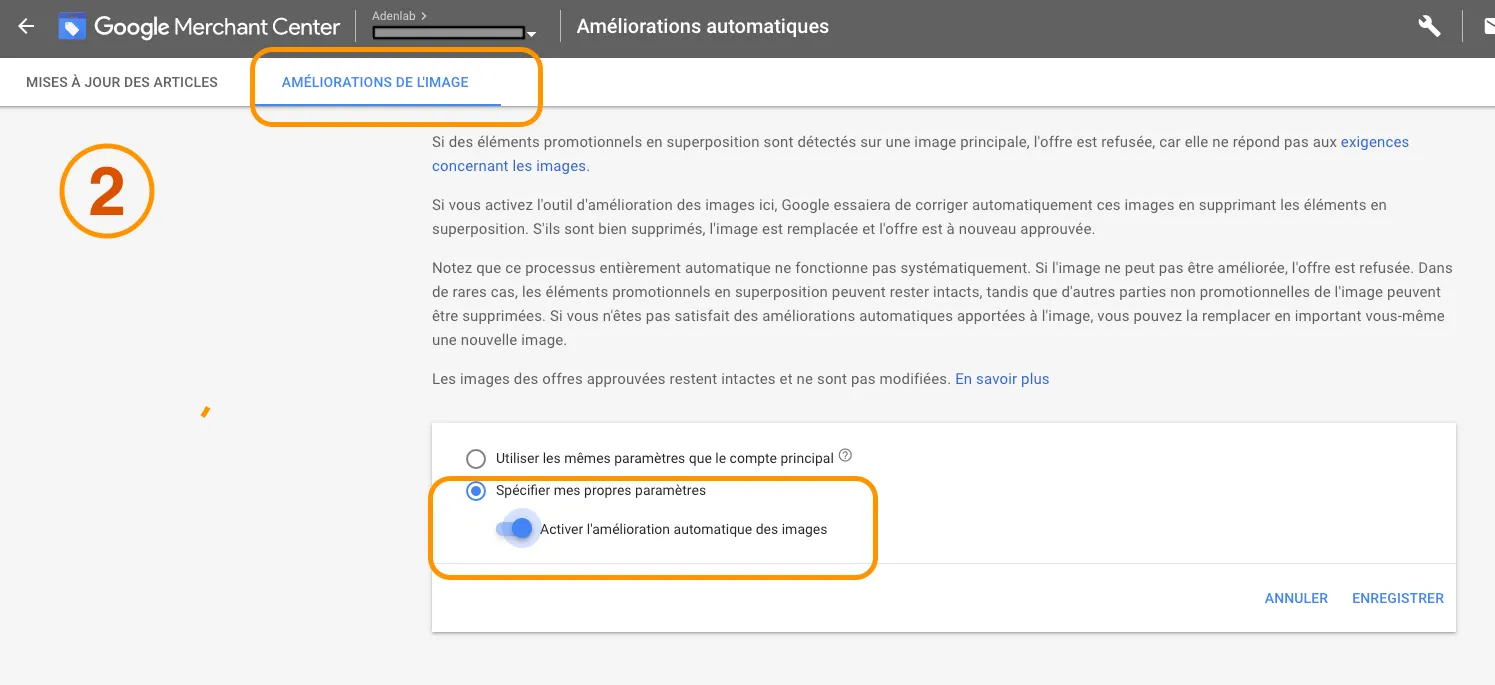
The Merchant Center also offers an automatic “image enhancement” feature; this will not optimize the above information, but will automatically “clean up” your image. Google information: “If you activate the automatic removal tool, Google will try to automatically correct these images by removing the overlaying promotional elements”.
Here are some examples of automatic image enhancement:
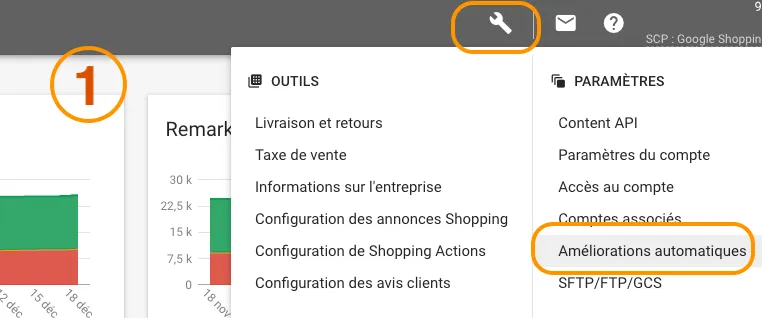
To do this, go to your Merchant Center and activate the “automatic image enhancement” option.
For Facebook, the rules are somewhat different. Here are the optimizations and quality requirements for the Facebook News Feed, for images with a link:
479 x 246 pixels on computer
and a minimum width of 320 pixels on mobile.
However, we recommend a size of 1080 x 1350 pixels.
Optimize your product titles
A quick reminder of the recommendations and structuring of Titles:
The limit is 150 characters for a Title
Include the Top Keyword at the beginning of the title: In fact, the term or main keyword on which you want to position yourself should be present in the title, and rather at the beginning of the sentence.
Include the product type: if your product is a “knife sheath”, include this term in the title. It’s pretty obvious, but very useful, because by including the product type in your title, you’re describing the very product you’re selling.
Color, brand, size, gender: these are elements found in other feed attributes, but which can be added to the Title. Having a Title that’s as close as possible to your customers’ searches will enable you to position your site on more precise terms.
For different sectors, titles can be structured differently. Here are a few examples:
Electronics and household appliances: Brand + Attributes (e.g. size, weight) + product type + model or part number
Fashion and apparel: Brand + gender (men/women/children) + product type + attributes (color + size + material)
Consumables: Brand + product type + attributes
Conclusion
We hope these tips will inspire you for your next operation. As you know, we’re always available to discuss your needs in person. Get in touch with us and let’s discuss your needs in terms of feed optimization, SEA or Google Shopping campaign management or Dynamic Campaigns on Facebook.
To get 2020 off to a flying start, we’ve selected 8 Google Ads evolutions from this year, 2019, that are having and will continue to have an impact on the year ahead.
In addition to presenting these updates, Natalya Donnat – Adenlab’s Director of Operations, comments on each of them and gives you her opinion and the results obtained with these various new features. The article is comprehensive and rich in information that you can use for your own E-commerce or lead acquisition campaigns. Of course, we’re available for face-to-face discussions. So don’t hesitate to contact us and ask for more information on how we can help you manage your Google Ads campaigns and reach your goals in 2020!
New audiences for Google Ads search campaigns
Two new audience segments for more effective targeting
The first update we’d like to introduce to you is the new audience types offered by Google Ads; Indeed, for our teams and our customers, audience targeting offers significant opportunities for growth and profitability, as well as numerous advantages. We’ve made it a priority in our SEA campaign management.
It was in October that Google announced the official launch of new affinity audience segments in Points of Interest and seasonal event segments in “In-Market Audiences”.
Affinity Audiences (user interests and habits)
The Affinity audience segment is a group of consumers who have expressed an interest in a particular subject. To determine whether someone qualifies for this affinity audience, Google takes into account factors such as search history, frequently visited web pages…
In its October announcement, Google used the example of a company selling camping equipment. If this were your company, your goal would be to reach your prospects by retargeting keywords such as “camping tent”. With the affinity audience, you’ll be able to target this keyword while simultaneously associating an affinity audience like “Running enthusiasts.”
In the example below, the “Running enthusiasts” audience segment represents
In other words, affinity audiences for text ads enable you to refine your targeting, make your ads more effective, deliver a more compelling message, and increase your click-through and conversion rates.
Audiences by “User interests and habits
Seasonal Buying Audiences (in Market Audiences)
In-market audiences” allow you to limit the reach of your ads to users who are actively looking for a product or service like yours. In fact, the new seasonal shopping audiences (= Christmas shopping, Back-to-school shopping, Black Friday shopping, Mother’s Day shopping), will allow you to target consumers who are actively looking for a product or service for a specific occasion (= Christmas shopping, Back-to-school shopping, Black Friday shopping, Mother’s Day shopping).
Market audiences and seasonal purchasing segments
“Indeed, this is good news for our customers, whose objectives are often focused on growth and profitability. The affinity and in-market audiences have enabled us to target the right person at the right time, and the creation of these new segments to be all the more refined in our adjustments and optimize budgets and expenditure. Some results obtained: We used affinity and in-market audiences for an advertiser in the Cosmetics sector. Audiences were applied to the Search network and Youtube. Using the “Black friday” segment, the advertiser recorded a 28% improvement in conversions and a 42% reduction in acquisition costs.” Natalya Donnat – Adenlab Operations Manager
We’ve written several articles on the subject of audience strategies. You can, however, read or re-read “How to guarantee the success of your campaigns with Audience parameters and Remarketing“.
A simple new tool for expanding your most promising audiences
With audience enlargement, the objective is clear: reach more buyers with the same budget! “an audience enlargement tool makes it possible to reach more users in order to generate more conversions for the same average cost per acquisition (CPA).“
Like Facebook’s “lookalike” audiences,Google’s audience expansion tool lets you expand your display campaigns by reaching new prospects who behave in the same way as the users you’re already targeting, i.e. increasing impressions, clicks and conversions without affecting your budget.
New audience enlargement parameters for display campaigns
“Audience Expansion is ideal for advertisers who make a minimum of 30 conversions per month, who want to increase their conversion volume while keeping the same acquisition cost, and who have no budget restrictions or restrictions on appearing on different sites. We recommend testing this feature for a minimum of 3 weeks, as the tool is based on historical data and recorded matchings, and we have seen a real increase in conversions with a constant Acquisition Cost after 4 weeks of testing.” Natalya Donnat – Adenlab Operations Manager
"average position" of ads: a metric removed
For more accurate metrics and analysis
It was in February that a big change in google reporting was introduced with the removal of “average position” from Google Ads metrics. This metric has long been tracked and optimized by traffic managers, advertisers and agencies and which has been removed from our metrics on September 30, 2019. Google has decided to remove the metric in favor of a newer, more accurate metric that was rolled out at the end of 2018:
Absolute Top impression rate, i.e. in 1st position.
the “Top” impression rate, which corresponds to the 3 ads at the top of the page.
Since smart bidding solutions are becoming increasingly important, manual bidding strategies are becoming less and less useful.
Google Ads invites advertisers to consult :
the ” Search Absolute top impression share“, which reflects impressions associated with the Top Absolute location
Search Top IS“, a similar indicator but for Top positions, not Absolute positions
“The average position indicator was very important for many of our customers, who wanted to monitor their positioning on the search network. However, this indicator did not reflect real visibility coverage. We may be in 1st position, but only 10% of the time. We worked with our customers to learn how to use this new indicator. Our customers’ campaigns have gained in accuracy and performance.” Natalya Donnat – Adenlab Operations Manager
Lead form ad extension
To facilitate the generation of inbound contacts (leads) via your mobile traffic
Since mobile traffic has overtaken desktop traffic, web users are becoming less patient and more demanding about the quality of your pages and website. Speed and simplicity are the keys to converting new customers and prospects on mobile.
In a bid to help advertisers convert more leads on mobile, Google recently launched a brand new ad extension: thelead form extension For the moment, the extension is still in Beta in France and active only on Mobiles.
With this extension, you’ll be able to collect all the contact details you need from your prospect without it leaving Google’s search engine (search results). The aim is to eliminate as much friction as possible for your prospect. What’s more, if a user is logged into their Google account when they see your ad, they can access the form (by clicking on it) already pre-filled with their details. On the other hand, they don’t need to go to your site: good or bad idea, it’s up to you to test!
Objective: to make your mobile conversion rates take off. Lead form extensions seem like a great new option, but these ad extensions do have some limitations:
Lead form extensions will only appear in search campaigns.
Lead form extensions will only appear on mobile devices and tablets.
You cannot create lead form extensions at account or ad group level. Each lead form extension can only be applied at campaign level.
The use of the personal information you collect using form extensions must comply with the privacy policy provided by your company, with Google’s data collection policies and, of course, with the regulations of your users’ country.
Adenlab Lead Form Extension
“We have tested this new extension on several B2B customers. The advantage of the extension is that we can choose for ourselves the level of detail via the form that we want to have: Surname, first name, e-mail address, telephone number, address, etc. Initial observations: Very little data has been recorded since the launch. We’ve sensed a certain reluctance on the part of Internet users to leave contact details via the form. We’re going to continue the test and will let you know our findings very shortly”. Natalya Donnat – Adenlab Operations Manager
Conversions" taken into account at campaign level rather than account level
To refine and optimize your Google Ads campaign objectives
And yes, “Conversions” can now be taken into account at campaign level, not just at account level.
You may think that this is of little interest or that it doesn’t add much to your management, but beware, it’s a major change for your performance and the optimization of your objectives. Let’s go back to the principle of tracking conversions in your google ads accounts; And I’m going to take the example of a B2B E-commerce site whose conversion objective is twofold:
conversion 1: obtaining leads via a form
conversion 2: sell products directly on your site
These are 2 very important types of conversions for the site, yet totally different to manage in terms of optimization and campaign management. Before this new feature, and the arrival in force of Google’s smart bidding algorithms, it wasn’t really possible to effectively distinguish between these 2 conversions in the account. And I do mean in the account.
Indeed, for these smart (automatic) bidding strategies, there was no way of determining which specific conversion objective was the most useful for a particular campaign. In fact, and to return to the example of the B2B site, if you build a campaign whose objective is to generate leads via a form, and your prospect finally converts by buying a product, this action would be counted as a conversion even if this wasn’t the campaign’s objective (since the conversion objective should have been the validation of a form).
From now on, with conversions at campaign level, you can specify to Google that the only conversion objective that counts for this campaign is the validation of a form, and that the other objectives set up in your account have no importance for this campaign.
Bumper video creation tool - 6-second video
To improve the effectiveness and impact of your video and Youtube campaigns
The tool was unveiled at the Google Marketing Live conference. It allows anyone with a video under 90 seconds to create a series of ready-to-use 6-second Youtube video ads. Given the cost of editing a video, this is a pretty powerful tool. The real problem is the production of the 90-second video, which for many advertisers on Google is neither a reality nor an exploited means of communication due to its cost. However, this lever seems to have proved its effectiveness (at least for Lipton 😉 You can find thecase study carried out by Lipton Ice Tea, Google and Marketing Scan:** 13% more sales thanks to Bumper Ads**.
Given the amount of time spent by Internet users on YouTube, we advise you to position yourself on this platform. Don’t hesitate to reread our article on Youtube: An advertising channel for Ecommerces?
Example of Renaud Scenic’s Video Bumber:
Videos in Responsive Display Ads
Make your Display ads even more attractive
A reminder about Google’s responsive display ads: this feature allows you to prepare your images and ads so that they can adapt and be displayed automatically on the multiple formats and inserts available on Google’s network of partner sites. I.e. image ads in formats such as :
Different formats for Google Display Network images and ads
Google’s algorithms combine the images and automatically optimize them according to the content of the web page and the size of the user’s screen.
However, until March, content for these formats could only be images and gifs. Since then, advertisers have also been able to use video content in their responsive display ads.
Video integration in Display Responsive format
Here are three reasons to use this feature:
Get more impressions: Google prefers responsive display ads to standard banners.
More clicks: Responsive display ads – especially those with video content – are more attractive than standard banner ads.
More accessible and simpler: Unlike standard banners – which require time, resources and expertise to constantly optimize – responsive banners are semi-automated.
A visual format to be tested on Google search engine results (SERP)
This is the brand-new mobile advertising format unveiled at Google Marketing Live and currently available in beta version to selected advertisers.
Here is the example given by Google at the time of the official announcement:
Example of a Gallery Ads ad
As you can see, an Illustrated Ad appears at the top of the search results (SERP) with a carousel of eight images that can be scanned. There’s a clickable title and a display URL, and below each image is a brief description. What’s more, you can submit three titles for your ad, giving you the opportunity to test different ad combinations to optimize your click-through rate.
Google’s initial tests have shown that illustrated ads generate 25% more engagement (measured by clicks and swipes) than standard Text ads.
“For our part, at Adenlab, we’ve been able to implement it on several customers. The tests are quite convincing, with an improvement in the click-through rate of +18% and an improvement in the conversion rate of +12% on average. Image quality plays a vital role, and we recommend testing this type of ad with high-quality images.” Natalya Donnat – Adenlab Operations Manager
Find out more about Google’s official information on Gallery Ads.
Conclusion
In recent years, Google Ads has undergone many changes and evolutions. Testing and choosing the right options is the key to developing your campaigns and your Google Ads account. At Adenlab – SEA Agency, we know that it’s necessary to work on these new features and share our experience with our customers. Don’t hesitate to contact us if you need :




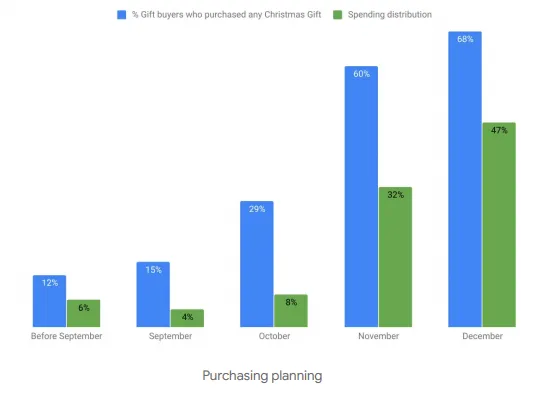
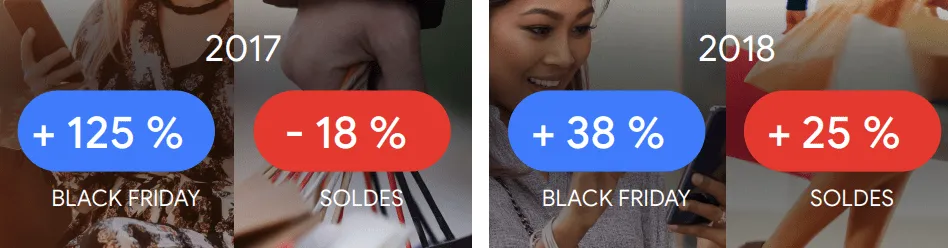

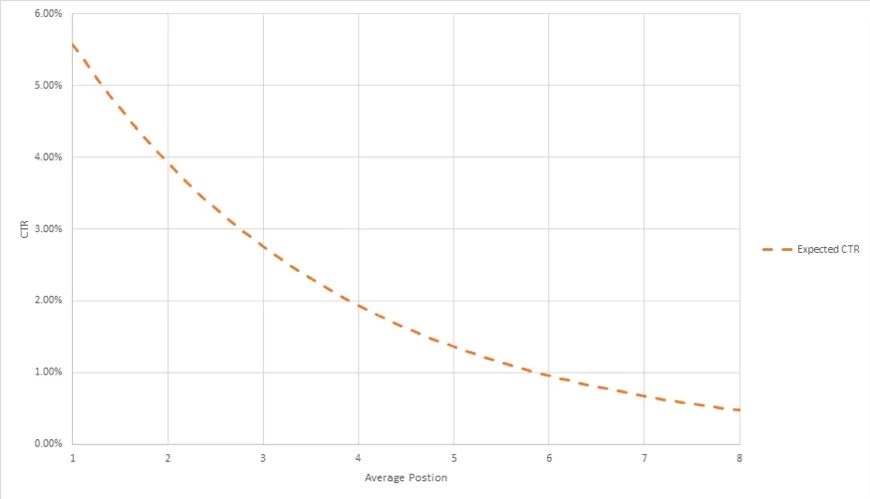
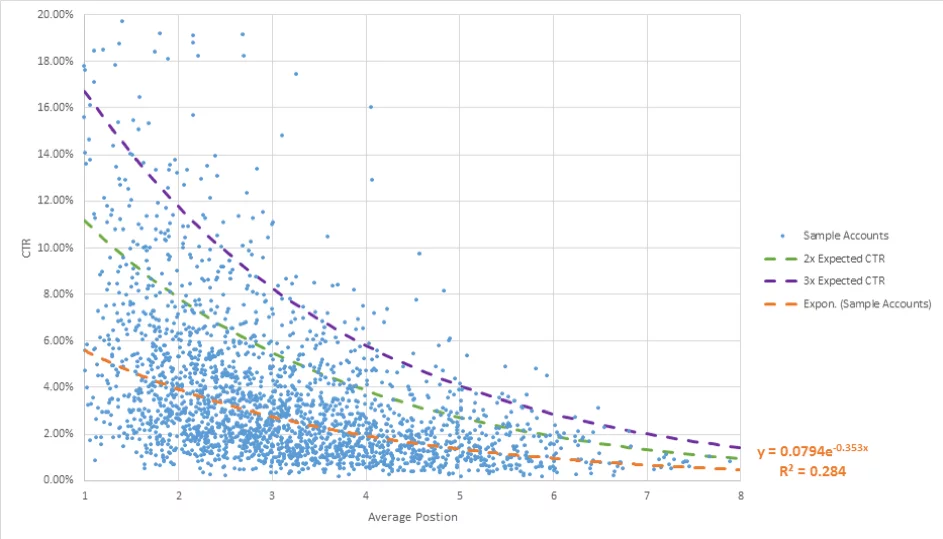

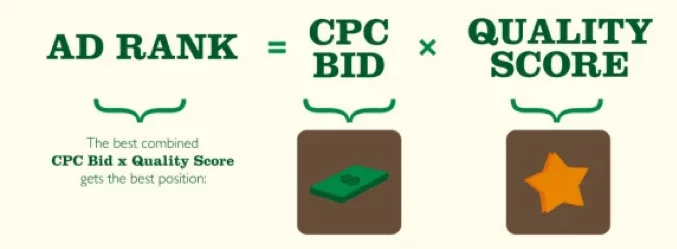
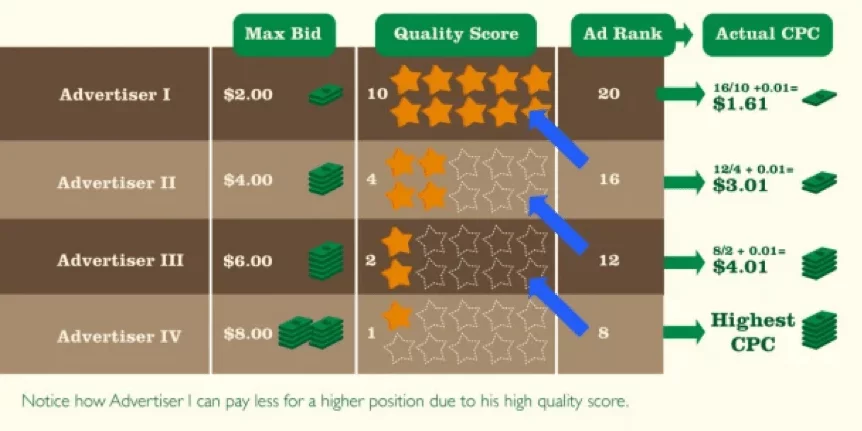
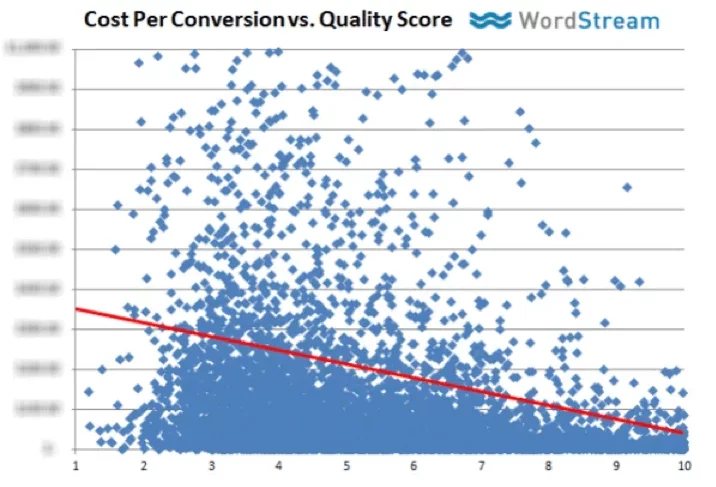
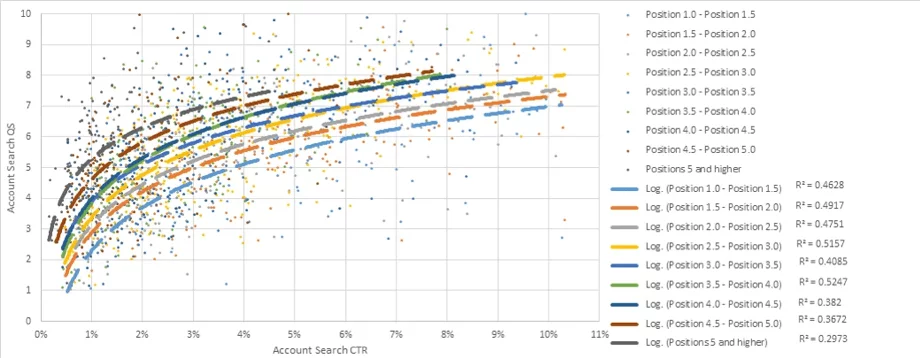
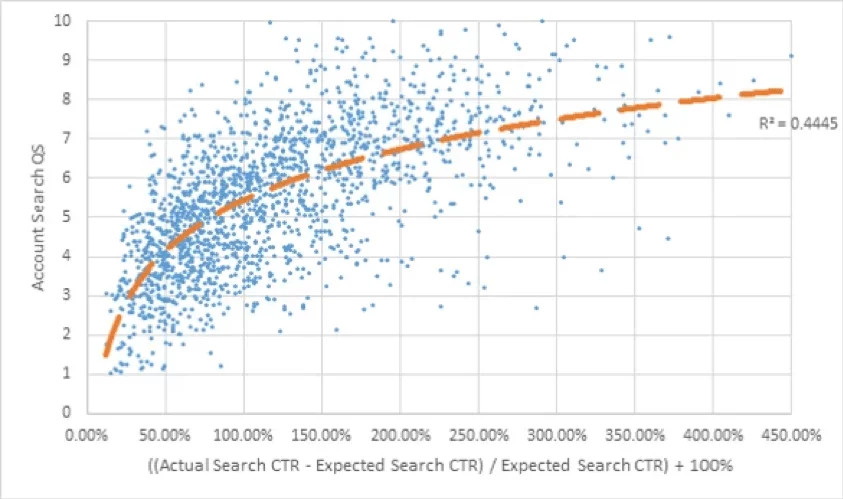

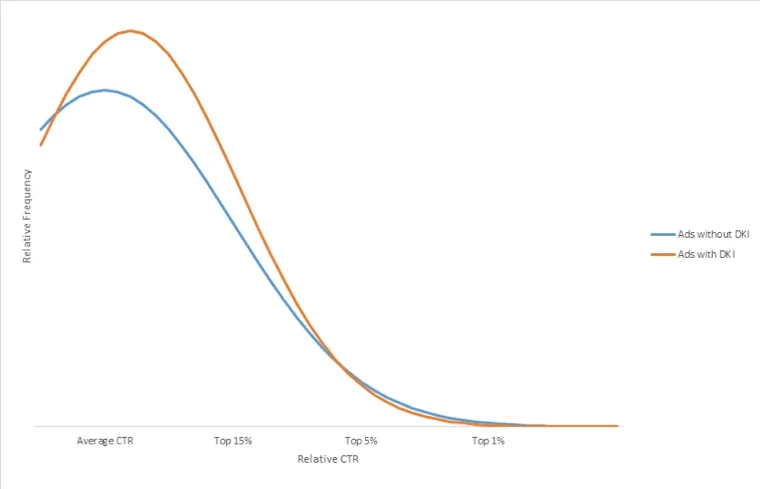
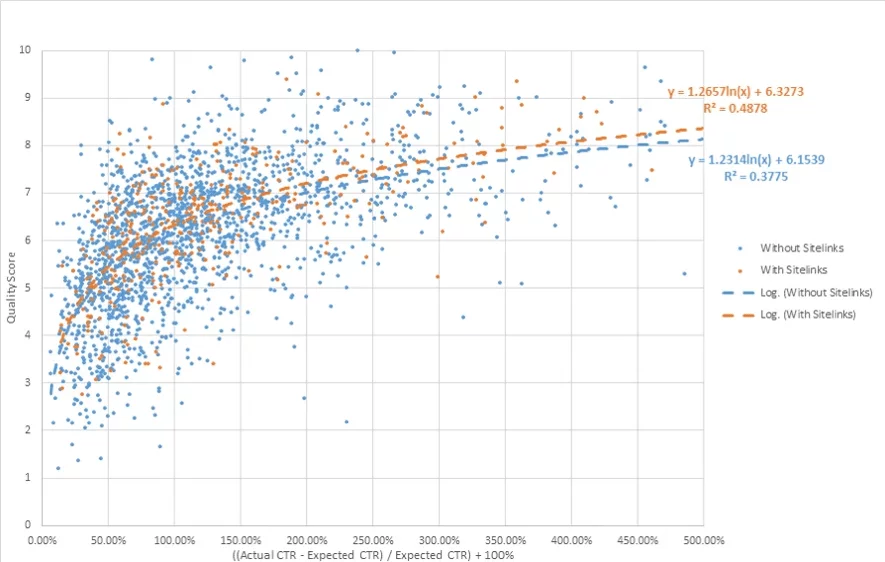
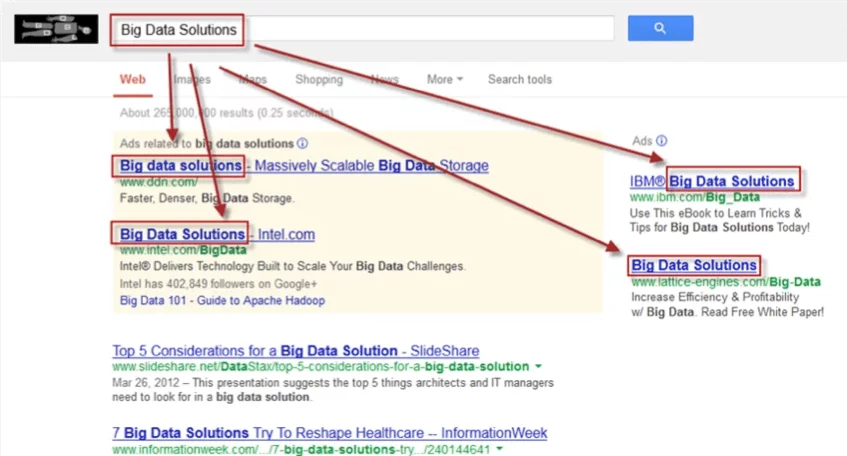

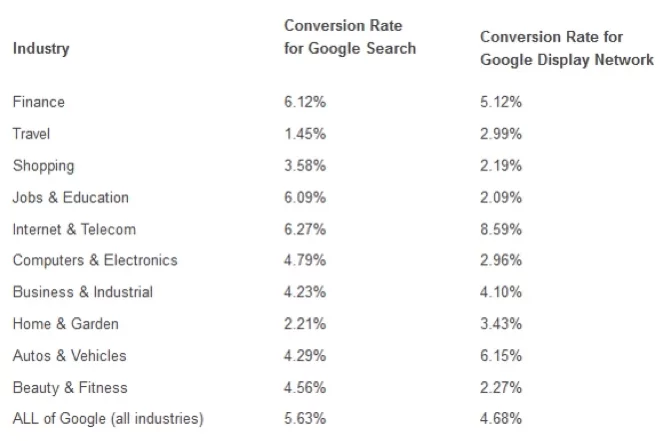

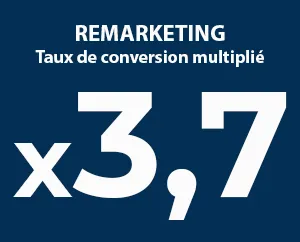


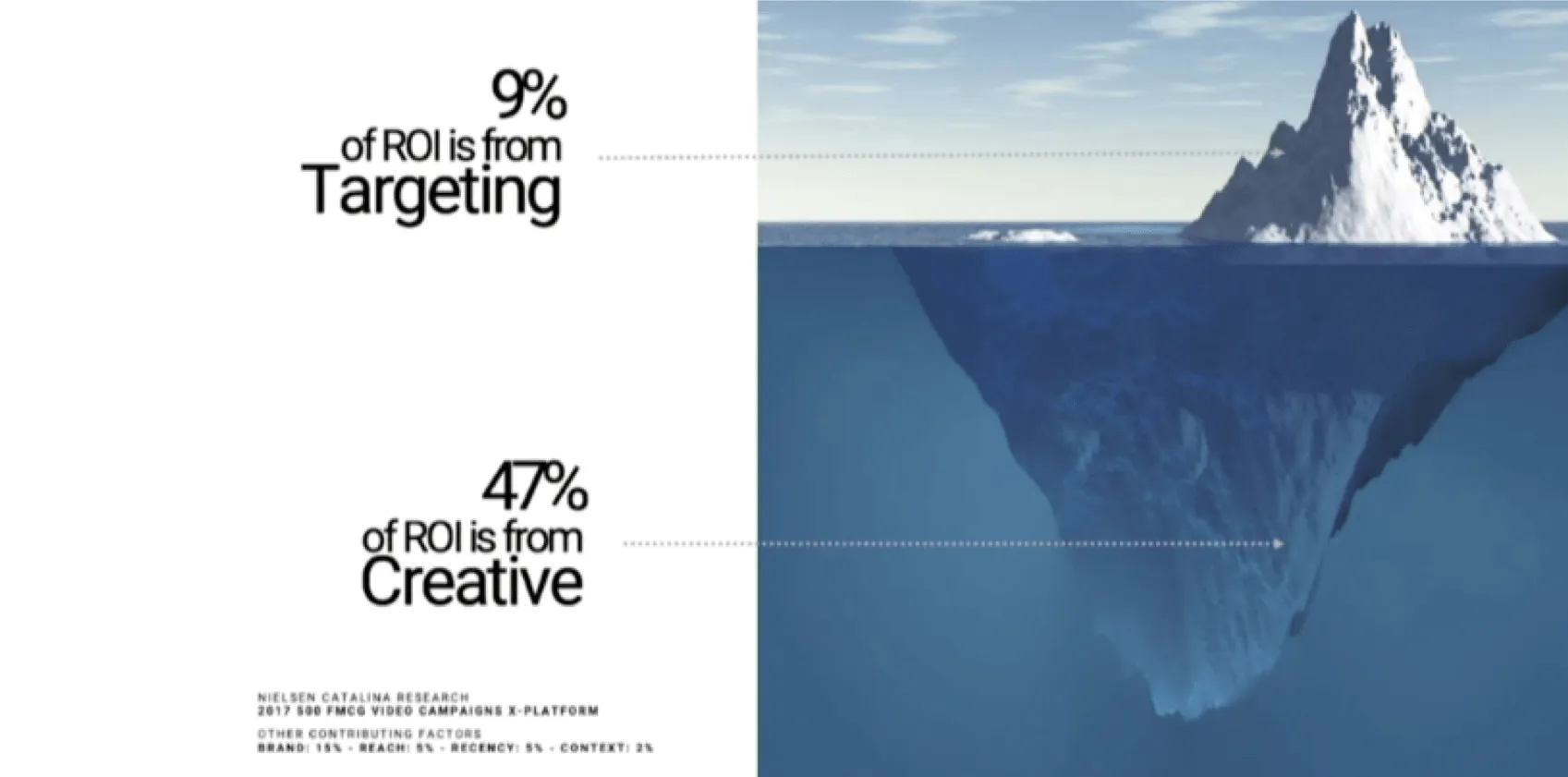
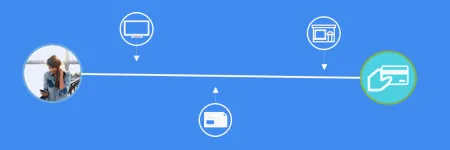
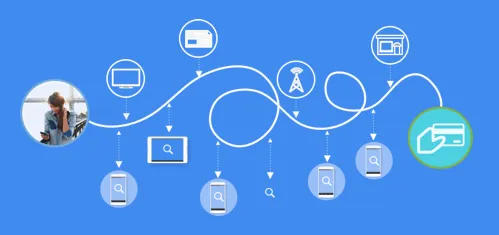
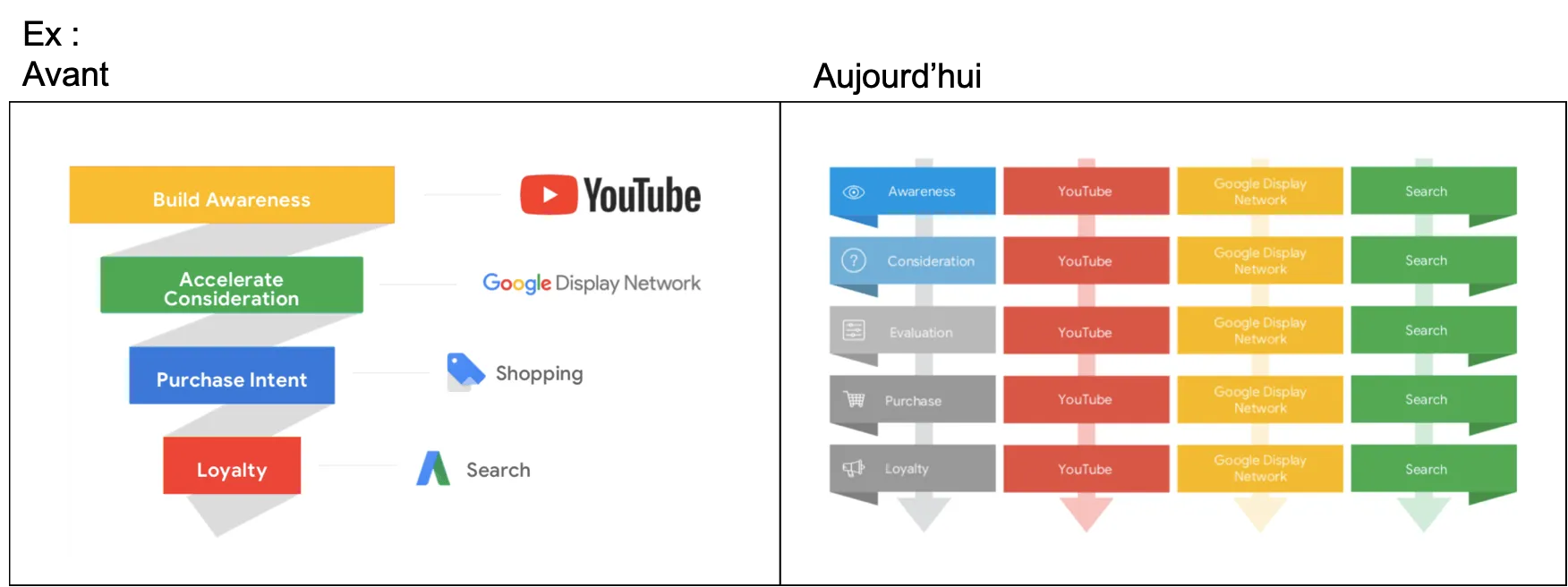
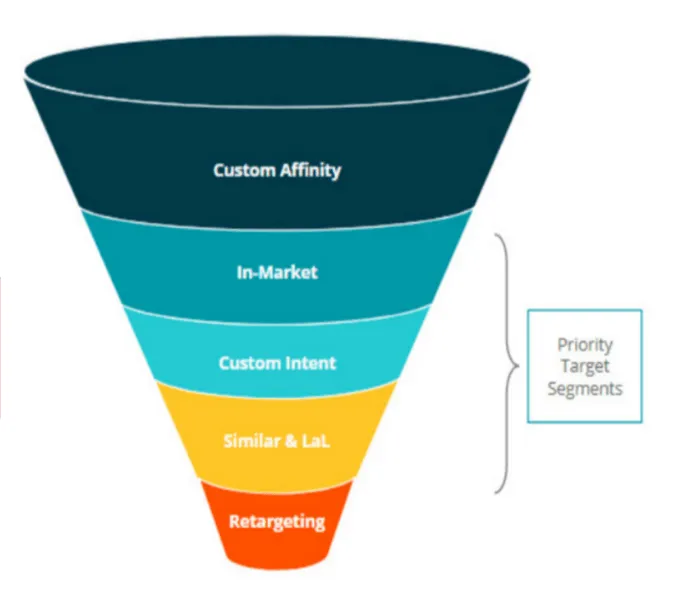
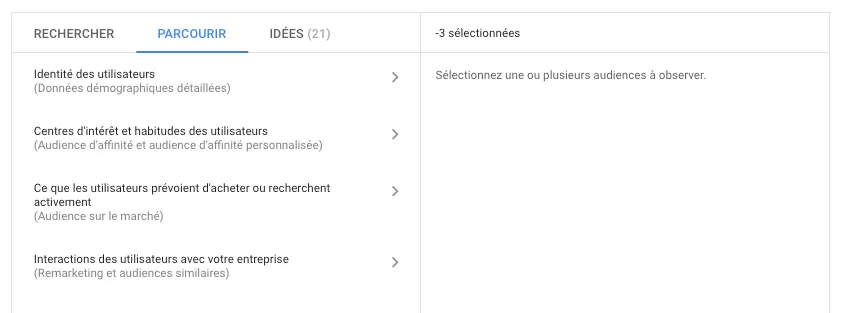
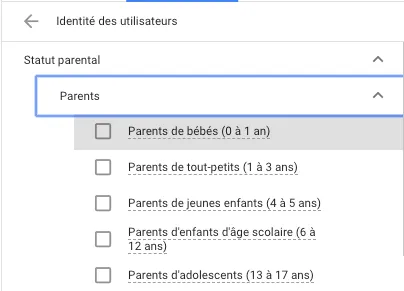
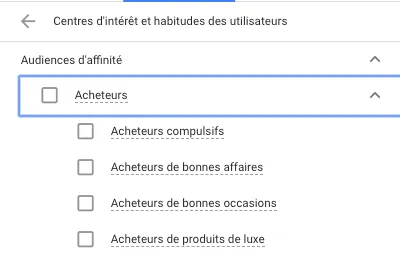
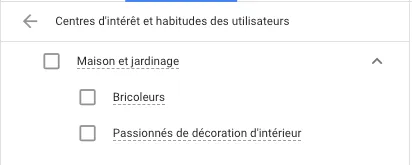
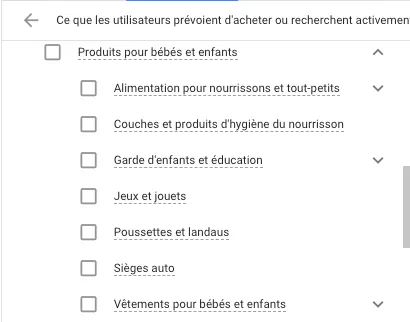
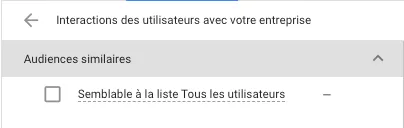


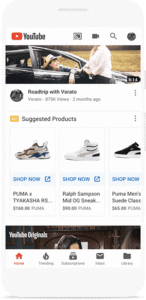
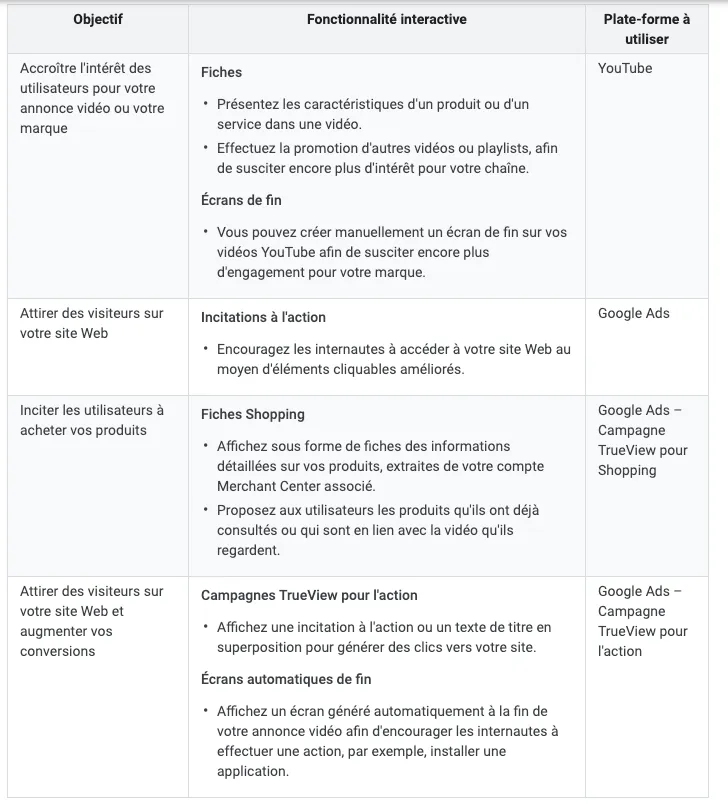
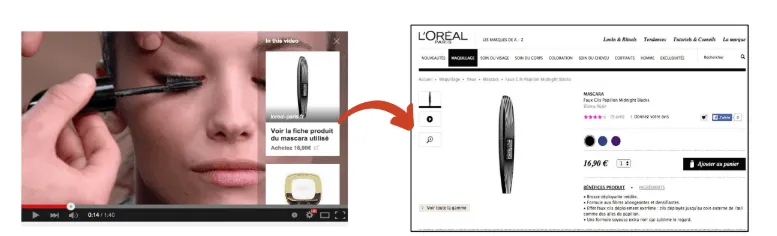


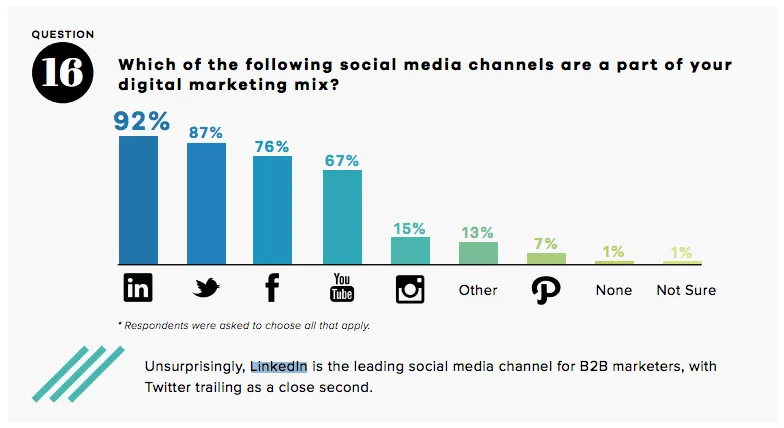
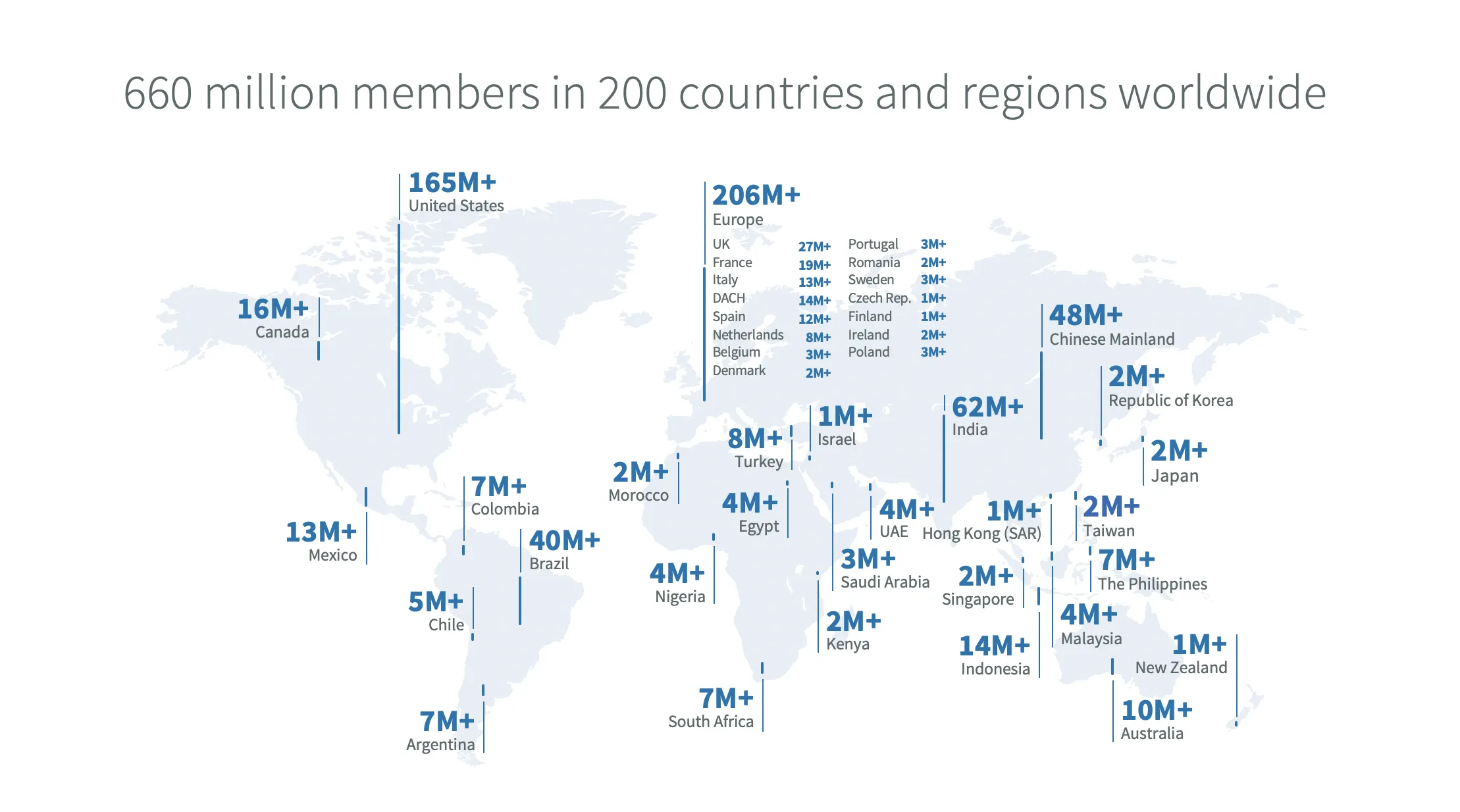
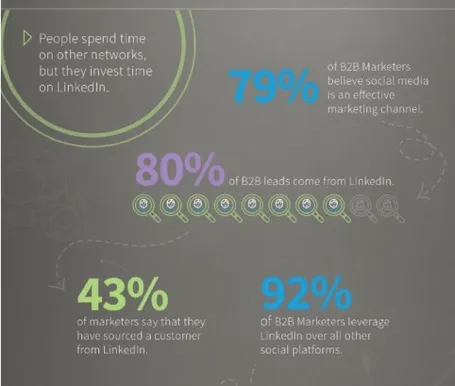
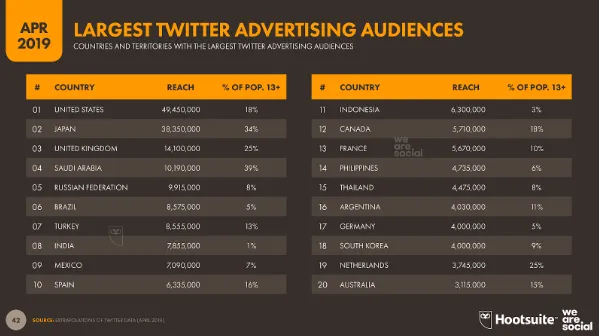
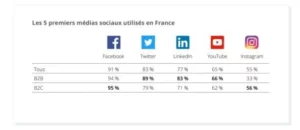





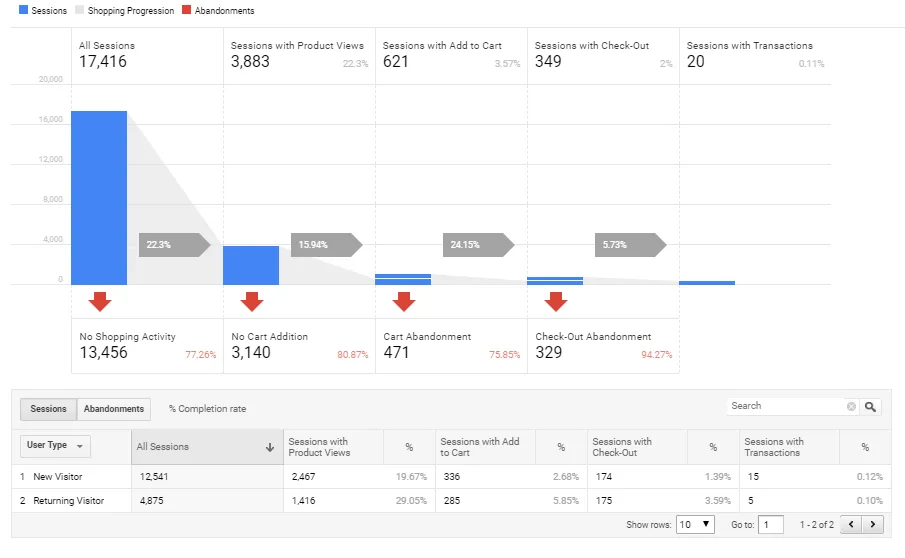

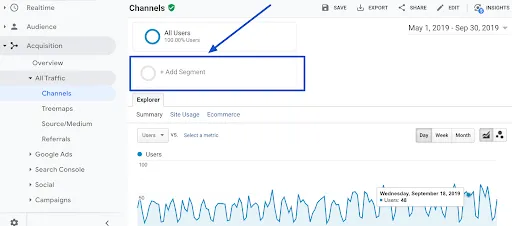
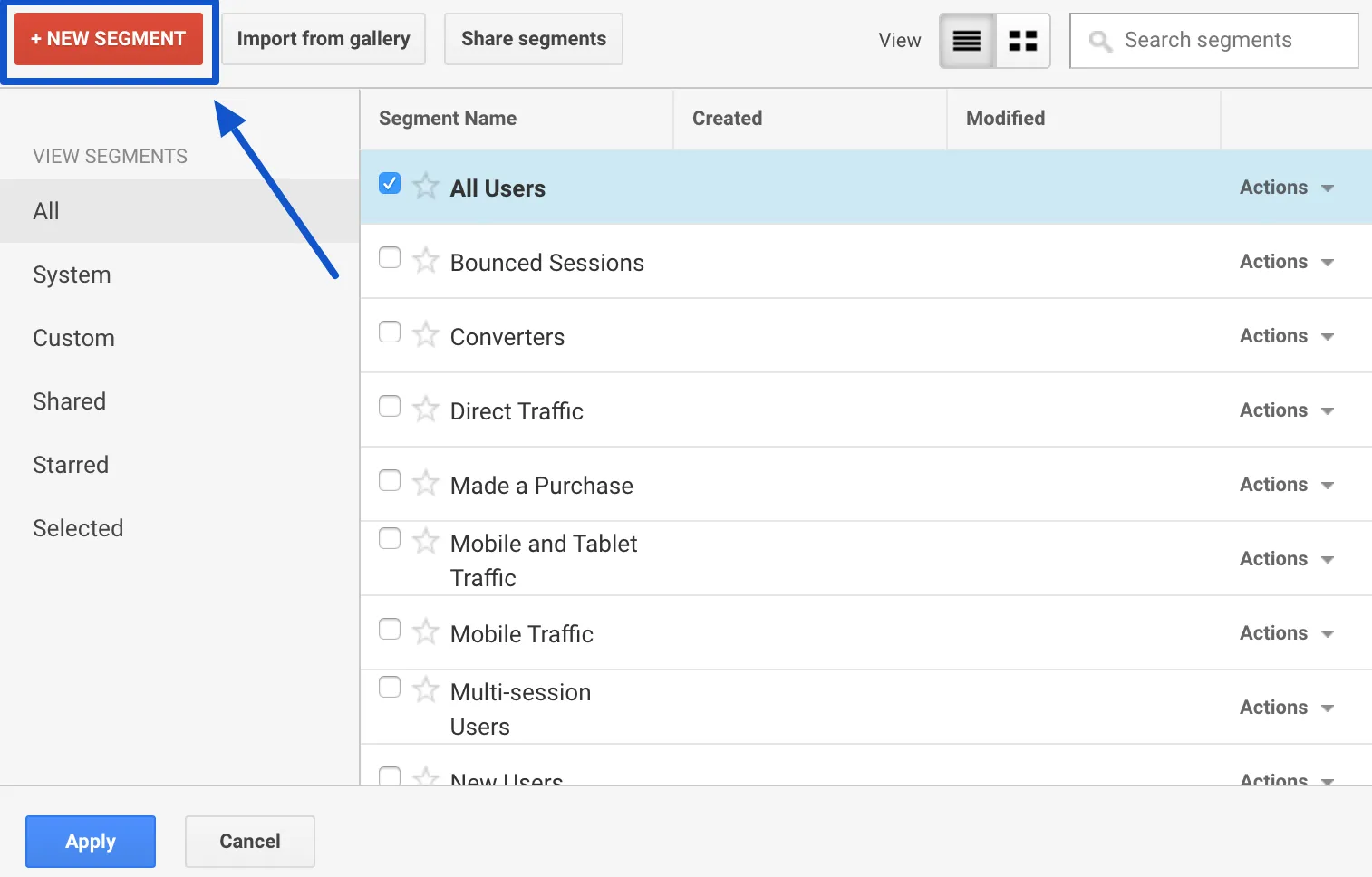 Then click on “Conditions in the “Advanced” menu on the left.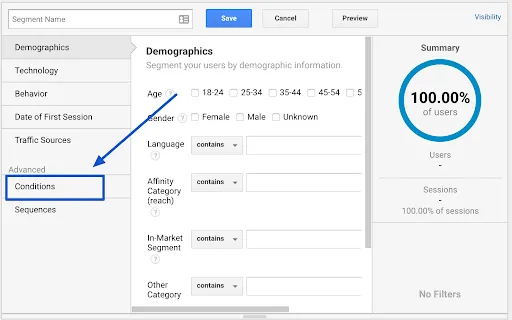
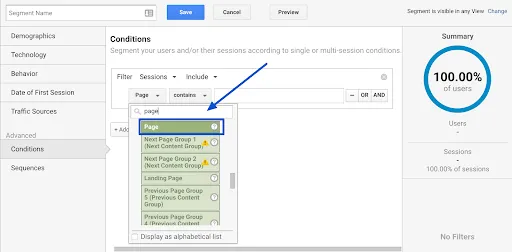
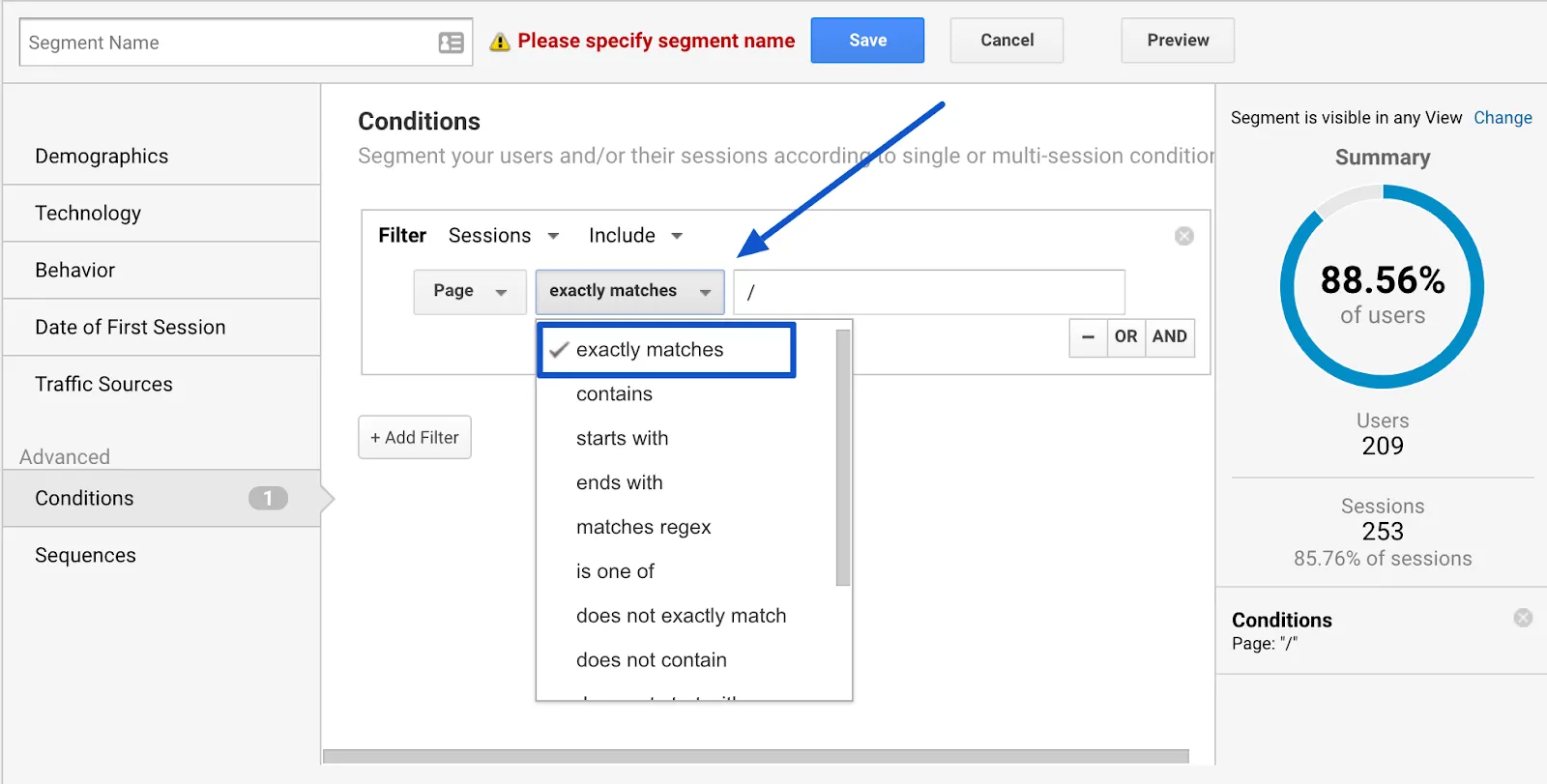
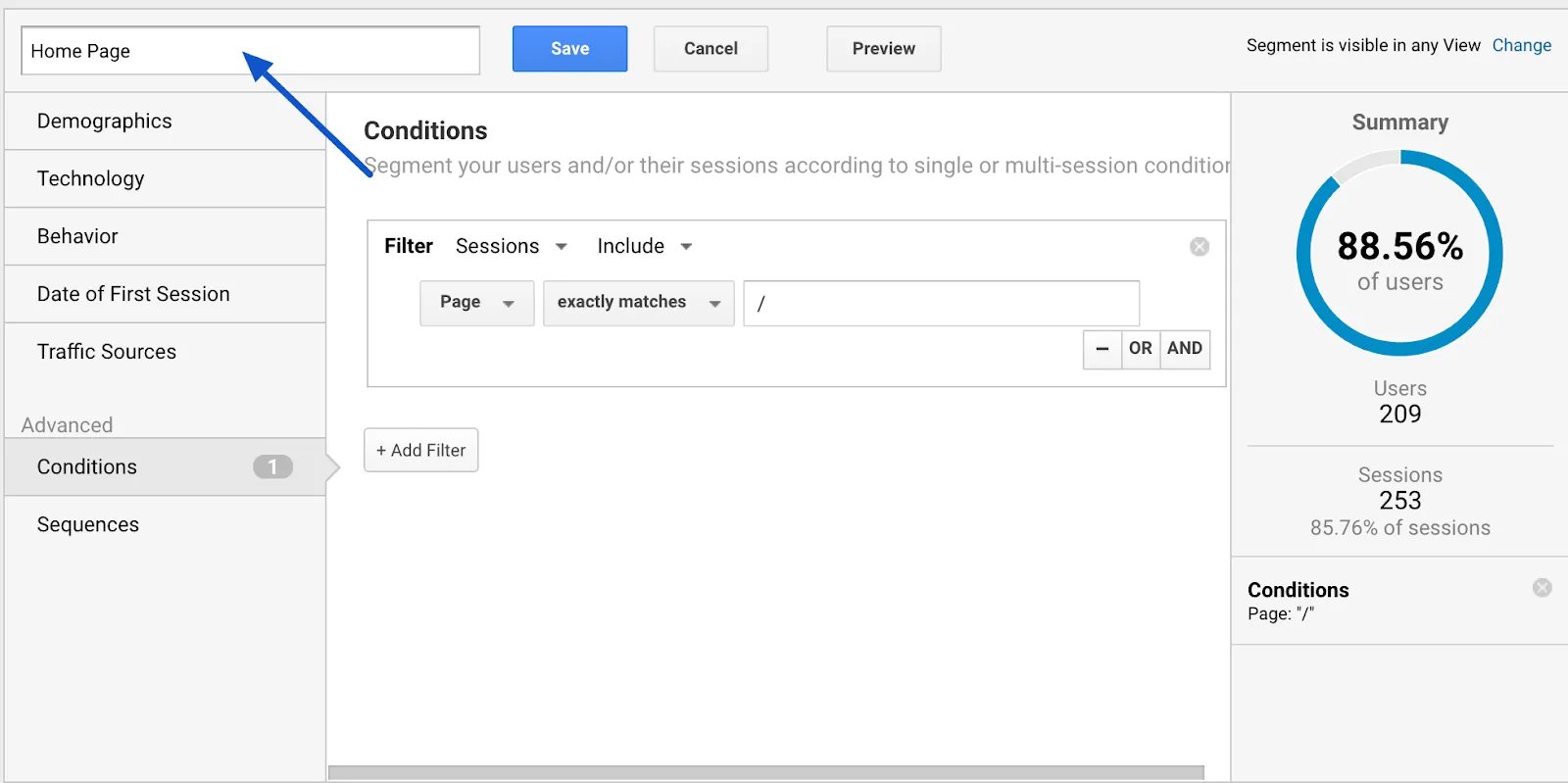 Name your segment explicitly: here, “Home Page”.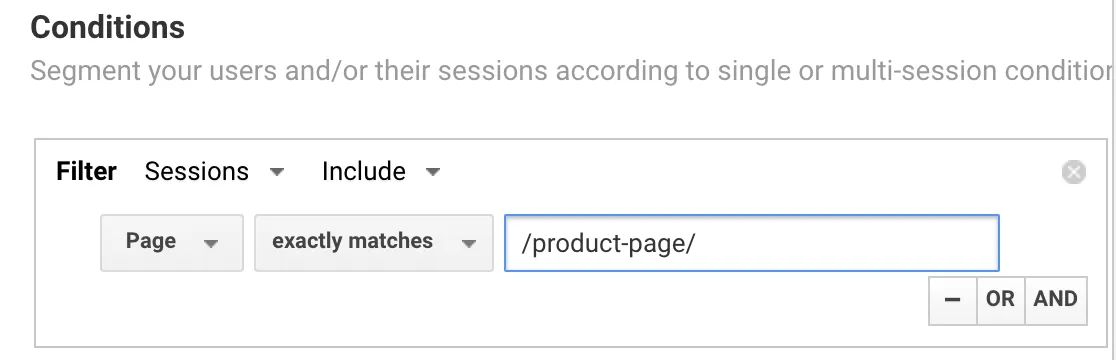
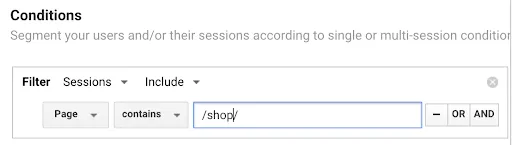
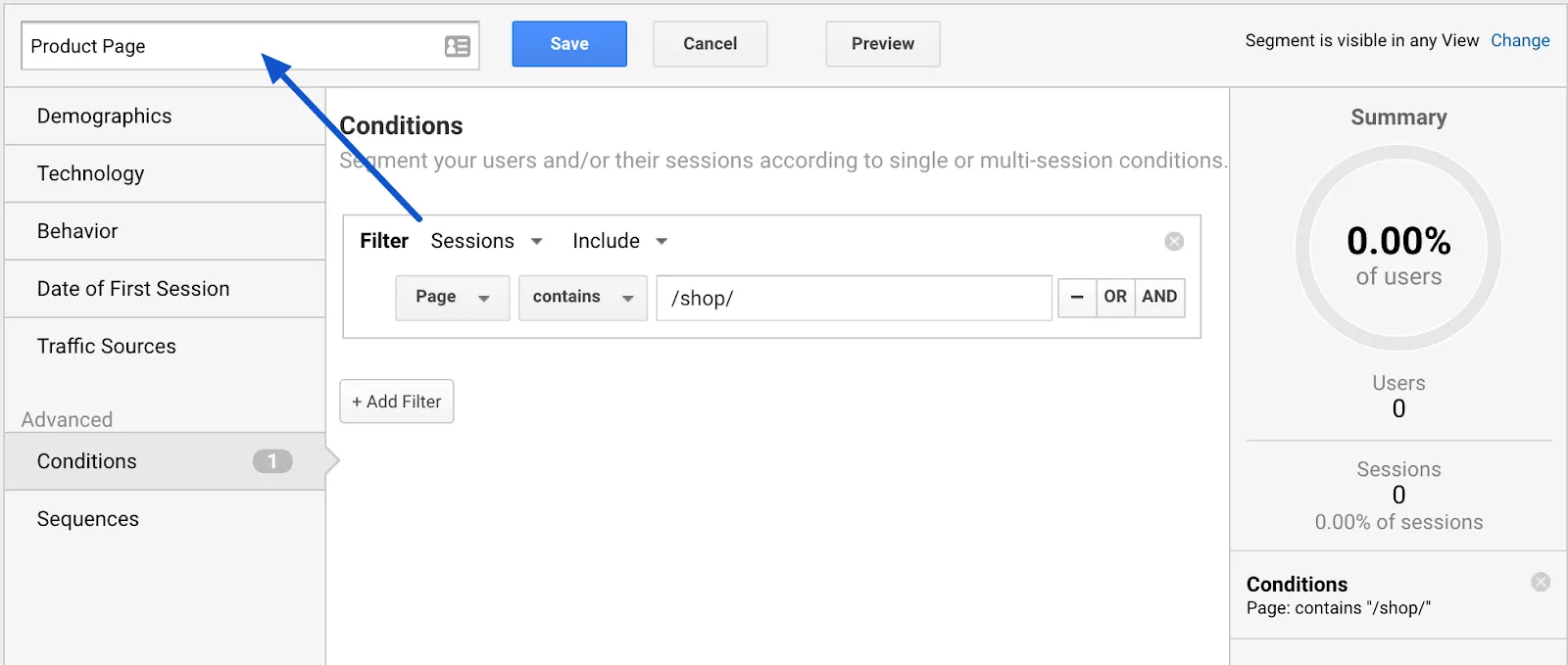 Save the segment as “Product Page” and save.
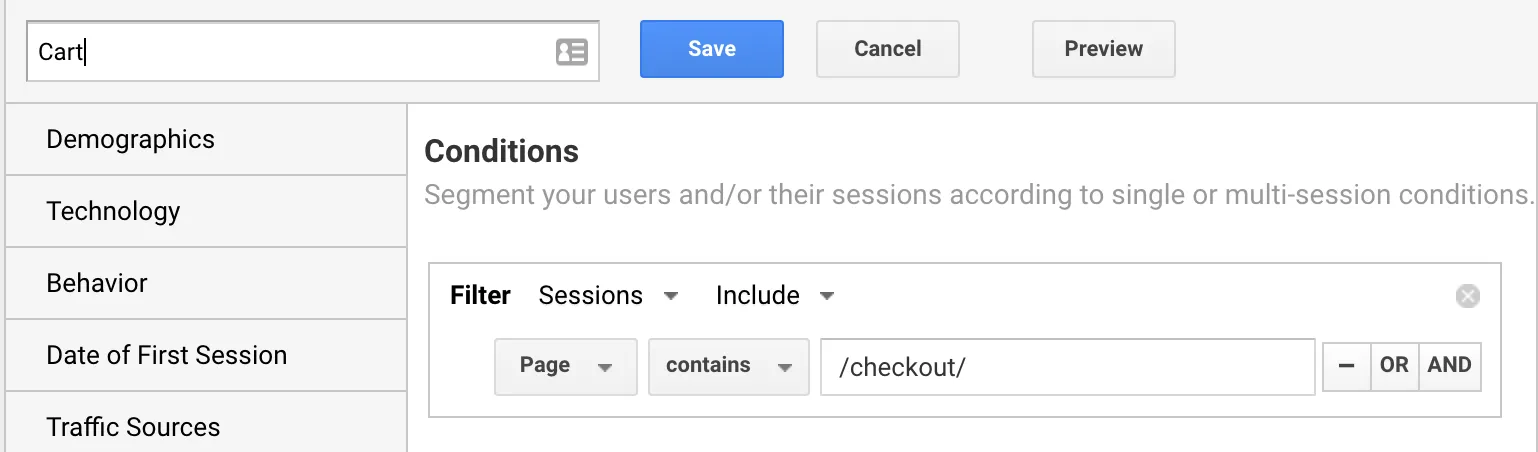 Shopping Cart” page segment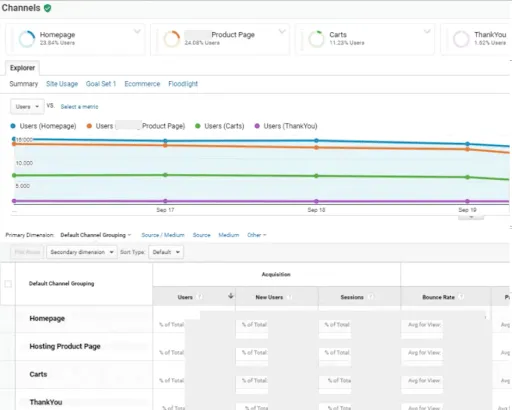
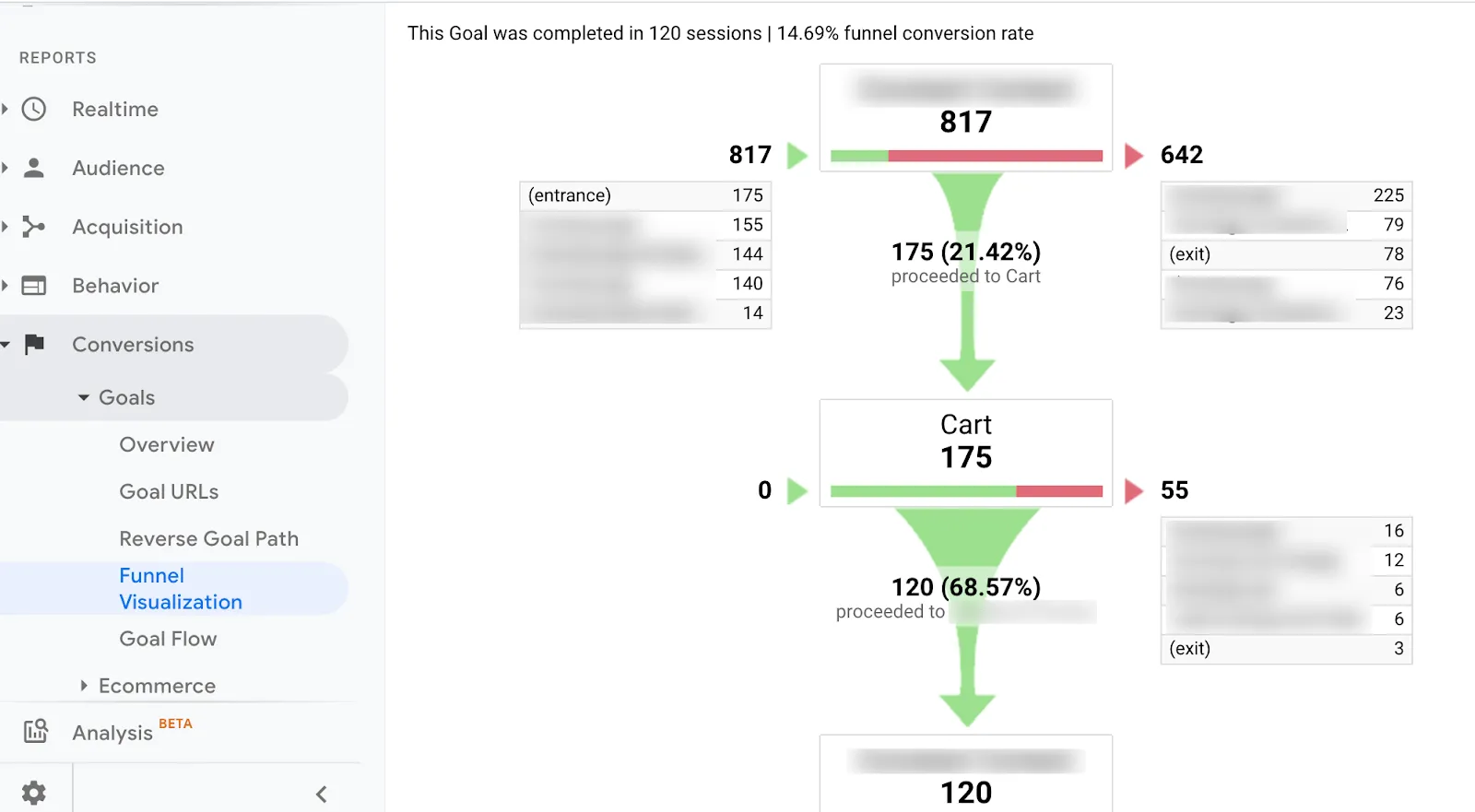
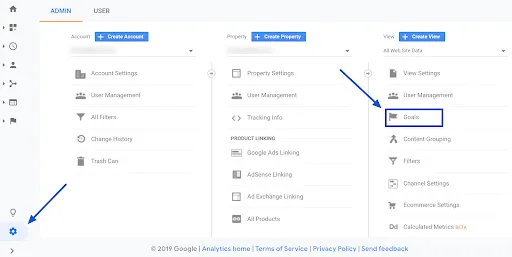
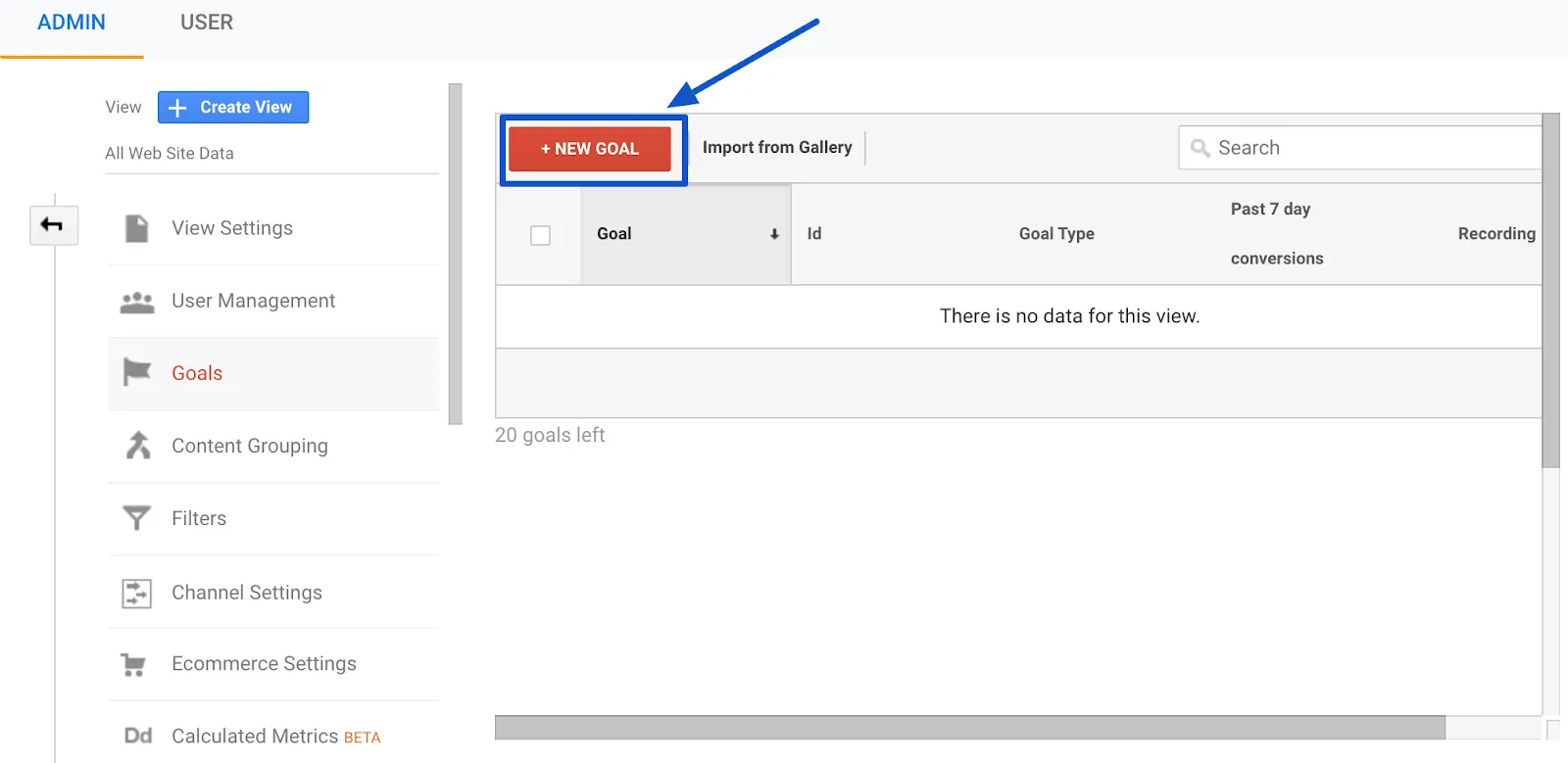
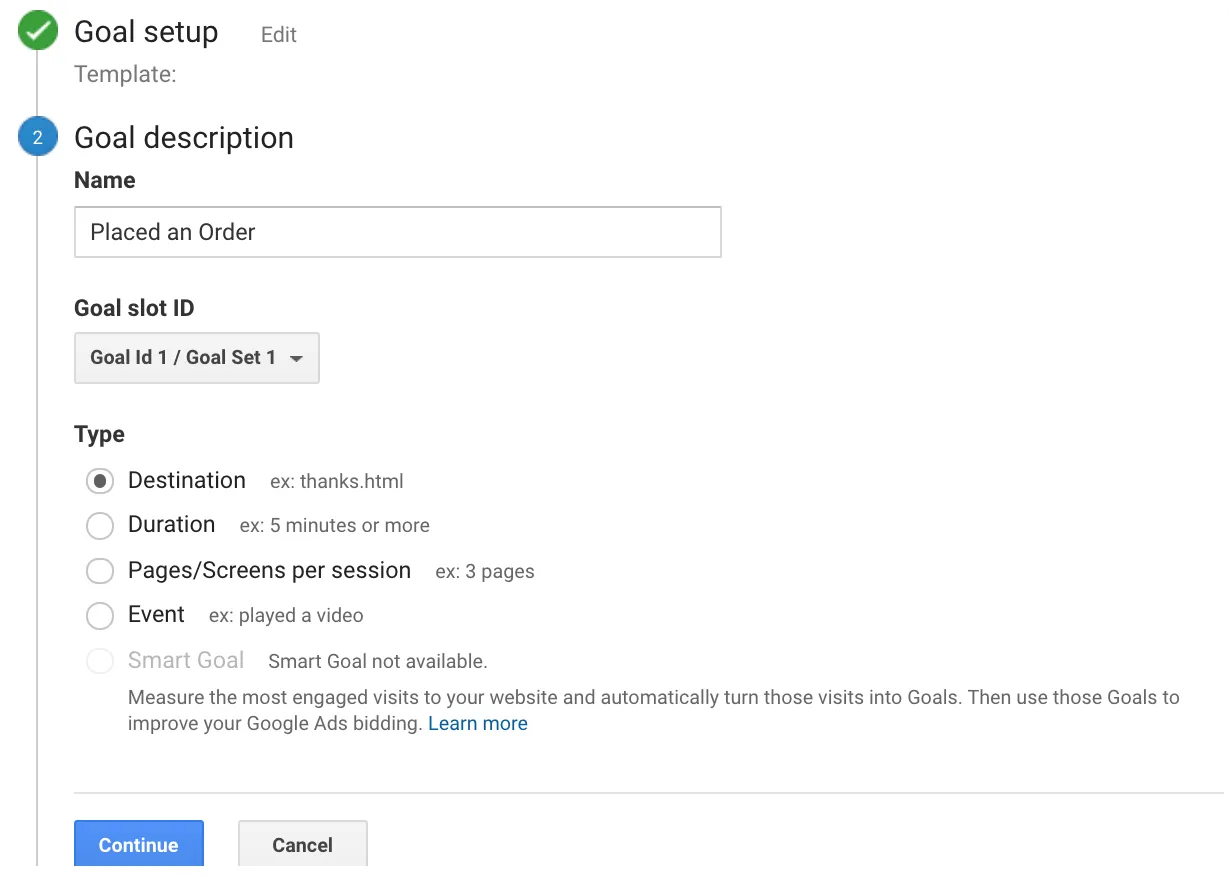 In the last screen, we’ll use our thank-you page as the URL and select “Equals from the drop-down menu:
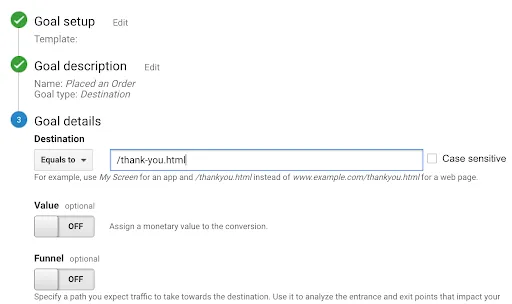 You now have the option of defining a value for each conversion. If you use your website primarily for lead generation, your revenue is probably not captured by Google Analytics. You can still estimate it by setting the Value field to ON, then specifying an amount. For example, if you’re using this goal to track white paper downloads, you can assume that, on average, each download is worth $100 to your business, so you should enter that. Again, this field is optional.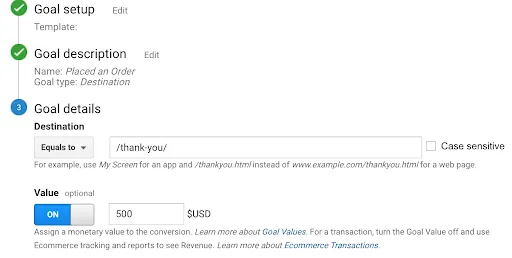
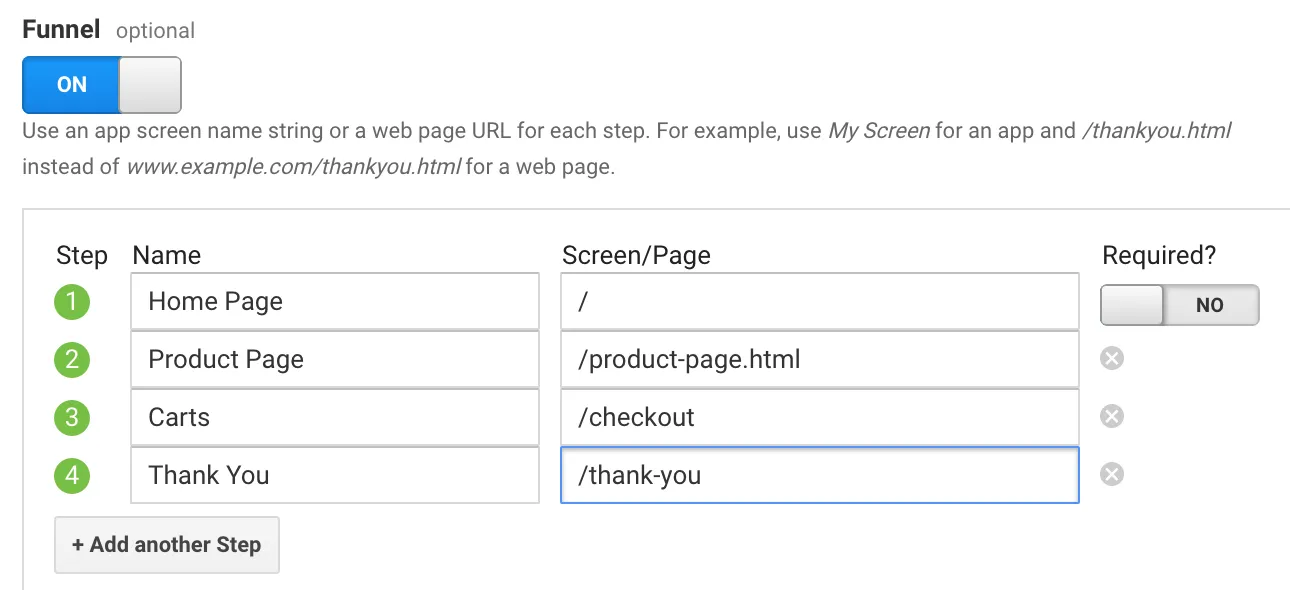 Finally, click on “Check this goal” to verify your work. Next, return to Conversions > Goals and you’ll see that you can now view the Funnel Visualization report where it shows you a visual representation of your funnel: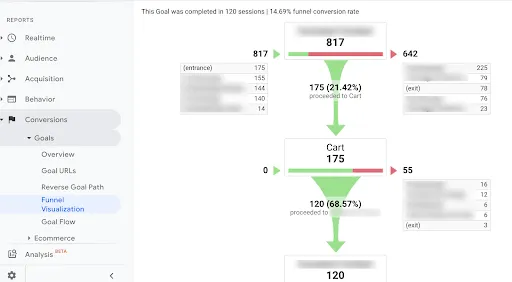
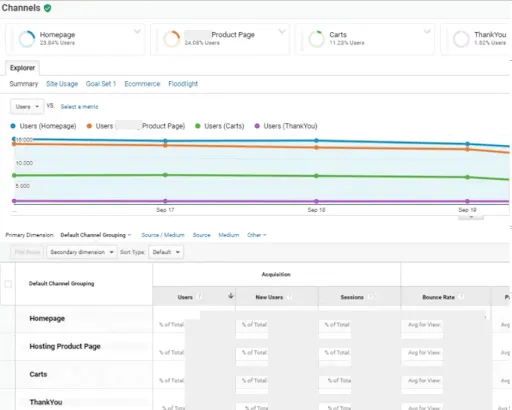

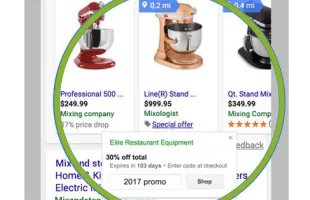
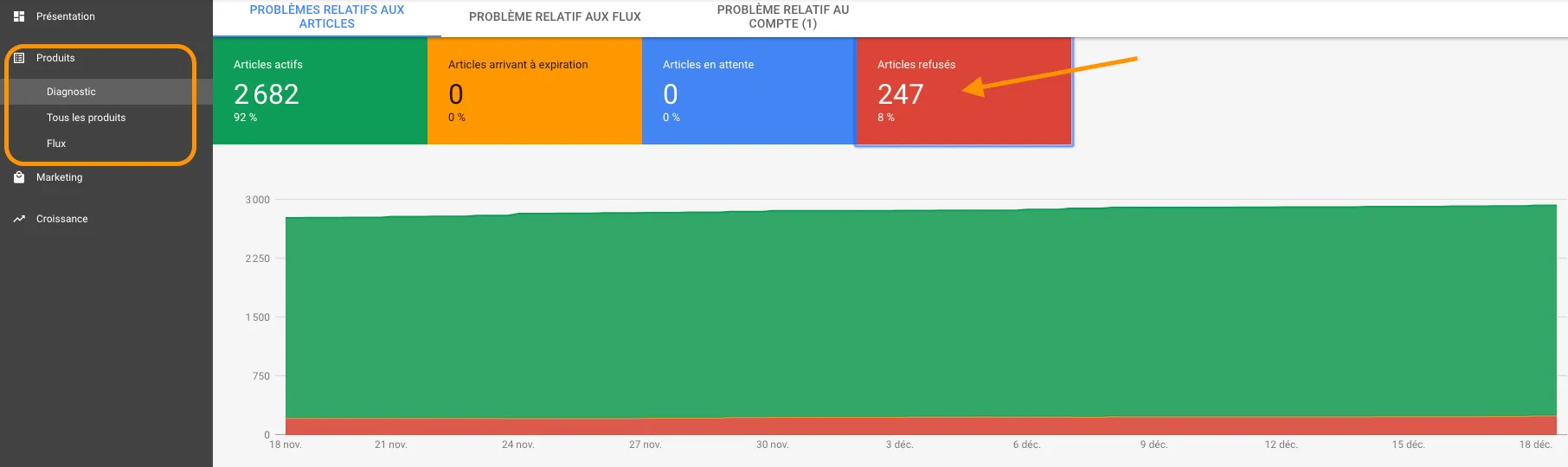
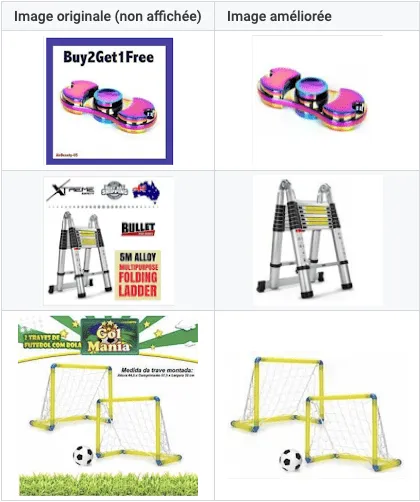 To do this, go to your Merchant Center and activate the “automatic image enhancement” option.