

How can you use Instagram Insights to create a high-performance strategy for your ecommerce business?

The data provided by Instagram Insights (or Instagram Statistics) helps you understand your users.

They tell you how they do things, what they prefer and who they are. You can certainly make business decisions based on intuition, but you’re much more likely to achieve your goals by validating your assumptions with hard facts.

Measurement: the sinews of war!

The data and analytics provided by Instagram Insights (or Instagram Stats) help you measure the impact of your marketing efforts to determine whether you need to act differently, for example by targeting a different audience, posting at a certain time of day or experimenting with a new content format.

Social media is no different from other aspects of your marketing strategy in that it can be measured and improved continuously.
In this article, we explain how to use Instagram Insights to build a more effective Instagram strategy

Download our white paper
Marketing Cover

What is Instagram Insights?

Instagram Insights is a feature that allows users of professional accounts to see analytics related to their profile and posts. From this data, you’ll be able to identify what your audience likes and engages with most, so you can improve your Instagram strategy.

Here are the key data marketers need to know, understand and use.
How do you convert your Instagram profile into a professional profile?

To understand how to use Instagram Insights, you first need a professional profile.

If you already have a personal account, you can switch to a professional profile.

Here’s how to convert your account in just a few simple steps.
1. Create a professional Facebook profile

An Instagram business profile will give you access to additional features and tools to help you grow your audience. However, in order to create a professional Instagram profile, you need to have a Facebook page for your business. It’s through Facebook that you add payment credentials and the like.

2. Make sure your Instagram profile is public

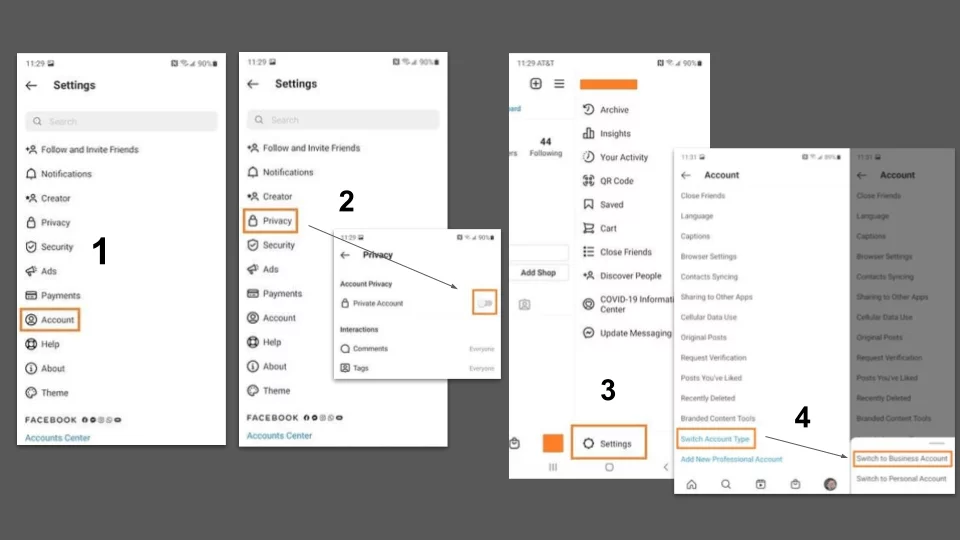
You want to grow your audience and get your posts seen by Instagram users who don’t know your brand. For this reason, your Instagram profile will need to be made public before you convert it into an official Instagram business profile. Here are the steps to follow:

Step 1: On your profile page, press the hamburger icon in the top right-hand corner.

Second step: press the cogwheel icon to access your settings.

Step 3: Select “Privacy”.

Step 4: Activate the checkbox next to “Private account”.

3. Return to your settings page and click on "Account".

Return to your Settings page by clicking on the hamburger icon and pressing the cogwheel icon. You can also use your phone’s back button to access it.

Press Account in the Settings menu.

4. Select "Change account type" and choose "Switch to corporate account".

By choosing Switch to Professional Account, you effectively convert your Instagram profile to a professional Instagram profile.

5. Configure your company profile

You’ll be prompted to review and edit your business details, including business category, contact information, and more. You’ll also be asked to select the Facebook page you’d like to associate with your profile (from step 1).

6. Press "Finish

Once you’re set up as a business account, you can start using Instagram Insights. Here’s how to get started.

How can I read the statistics on Instagram posts?

1. Open the hamburger menu and click on "Insights".

To view Insights on your entire Instagram account, start by going to your profile. Then, at the top, click on the hamburger icon and select Insights from the menu.
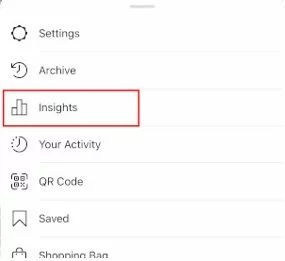
From here, you can access the recent highlights page, where you’ll find general information about how people are engaging with your profile, such as how many followers you’ve gained or lost in the past week.

2. Measure the reach of your posts with Instagram Insights

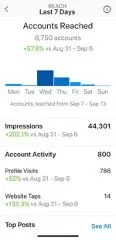
Click on the Reached Accounts section. Reach reflects the number of unique users who have seen one of your Instagram posts.

3. Track profile visits and followers

On the Reached Accounts page, under Account Activity, you’ll see Profile Visits. Profile visits show the number of times your Instagram profile has been viewed.

4. Determine website clicks

Website clicks can also be found in the Account activity section. This overview reflects the number of times the links you’ve included in your company profile have been clicked.

5. Track content interactions

Return to the Recent highlights section and press Content interactions. You’ll see a page showing how your content is performing in terms of engagement, with a breakdown of metrics by content type.

6. Follow your followers

Return to Recent highlights and click on Total followers. This takes you to the Follower Breakdown page.

This page reflects the number of followers you’ve gained or lost over the past week, as well as the average times of day your followers use Instagram – data that can be very beneficial when planning posts.

7. Learn what actions have been taken on your post

To view insights on a specific Instagram post, start by visiting your profile. Tap the post you’d like to focus on, then click View insights below the image.

This information indicates the number of actions users have taken on your profile after seeing your post – for example, visiting your profile, then taking an action such as clicking on your website link or following you.
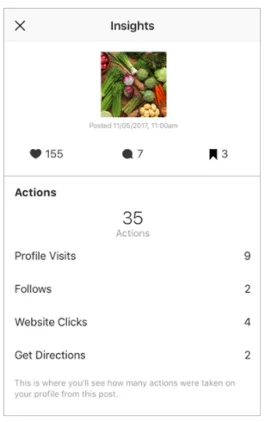
8. Use "Discovery" to see where your message has appeared in the feeds.

As the name suggests, this information shows where your publication has been seen – or discovered – most often, including how many accounts weren’t already following you when they first saw the publication.

This section includes impressions metrics, which reflect the number of times your post was discovered from a particular Instagram location, such as the user’s home feed, a search, your profile, a location tag or a hashtag.
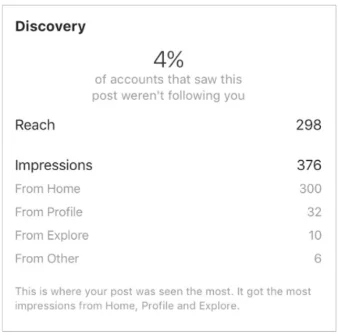
Discovery insights also include data on a message’s reach – which reflects the number of unique accounts that have seen your message.


9. View Story previews

Finally, Instagram users with a professional profile are able to view insights from their ephemeral Stories.
To view insights from your Stories, return to Insights and scroll down to the Content you’ve shared section on the Recent Highlights page.

Scroll down to the Story section, and you’ll be able to see information on older Stories, as well as those that haven’t yet expired.
Next, we’ll look at more specific information you can explore.

Impressions

This overview represents the number of times your Story has been viewed.
When viewing this information, remember that you can add multiple images or videos to your Story. In this case, each piece of visual content in your Story is counted as a single photo or video in your post.
Let’s say you add six photos to your Story. Whether someone views just one or all six, Instagram only counts your entire Story as having received an impression.
The same applies to Story content that has been viewed by a single user more than once. Instagram still only counts this interaction as the entire Story having received a single impression.

Forward jump

This preview reflects the number of times a user has touched the photo or video in your Story to move on to the next multimedia item.

Back to the past

This preview reflects the number of times a user touches the photo or video in your Story to return to the previous media item.

Answers

This overview reflects the number of times users send messages via the “Send message” text box in your Story.

Transfers to next account

This indicator reflects the number of times users swipe to move to the next account Story – not to be confused with “tap forward”, which reflects users moving to the next item in your Story.

Outputs

This overview reflects the number of times a user leaves the Stories section entirely to return to the home feed.

Measure your effectiveness with Instagram Insights

Now that you know how to use Instagram Insights to access user data, you can analyze that data and determine what works for your audience (and what doesn’t). From there, creating content that gets better engagement will be much easier. All the more reason to boost your digital strategy on Instagram!

Find out more about our digital marketing agency don’t hesitate to contact us

Smart Bidding: how do Google Ads’ automatic bids work?

Among the tools offered by machine learning are automatic bidding or Smart Bidding. This service, offered by Google, enables you to optimize the performance of your digital campaigns. But before embarking on an automatic bidding campaign, it’s important to understand how they work. Because while they can have a major positive impact, it can also be a negative one if you don’t control potential unforeseen events. What is Smart Bidding? What are its objectives? How can you avoid the pitfalls?

Download our white paper
Marketing Cover

What is Smart Bidding?

The question inevitably arises when you start looking at Google Ads bidding. What is Smart Bidding? According to Google itself, it’s “a subset of automated bidding strategies that maximize conversions or the value of conversions”.

Simply put, these intelligent auctions use machine learning to optimize your bids. The aim? Maximize both the number and value of conversions in your campaign. And within Smart Bidding, there are a number of different types of intelligent bids for optimizing CPC (cost per click) or maximizing conversions, among others.

Targeted strategies to meet specific expectations

Because not everyone has the same expectations when it comes to Google Ads auctions, a variety of strategies are available. They are sufficiently varied to meet every specific need:

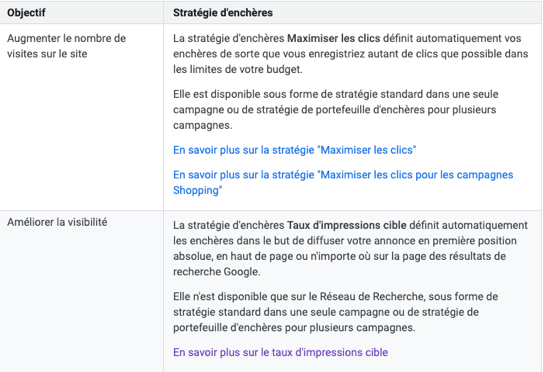
    • Improve visibility: the “Impression rate” bidding strategy automatically sets the bids for your ad to be displayed in the absolute top position.
    • Increase the number of visits to a site: “Maximize clicks” ensures that you get the most clicks for your budget. This bidding strategy can be applied to a single campaign or to several.
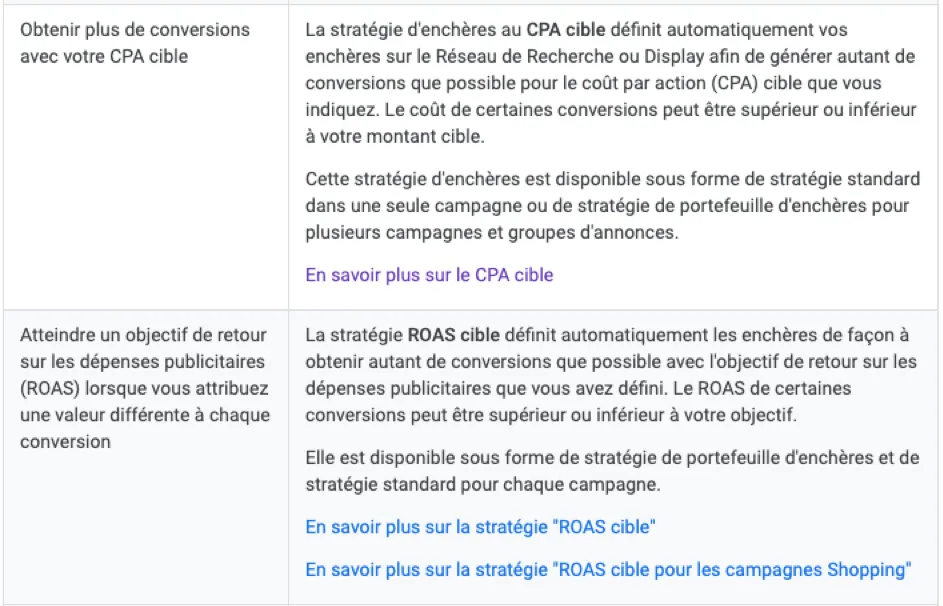
    • Achieving ROAS (return on ad spend): the ROAS strategy enables you to obtain as many conversions as possible based on a defined return on ad spend target. This bidding strategy can be applied to a single campaign or to several.
    • Get more conversions with a target CPA: the Target CPA bidding strategy automatically sets your bids on the Search (or Display) Network to generate as many conversions as possible for the target CPA you specify.
    • Achieve more conversions while using the entire budget: the “Maximize conversions” bidding strategy automatically sets bids so that a campaign generates as many conversions as possible, while using the entire budget.
    • Increase conversion value while leveraging your entire budget: the “Maximize conversion value” automatic bidding strategy automatically sets bids so that a campaign achieves the highest conversion value, while leveraging your entire budget.
    • How to choose: ROAS target or CPA target?

What are the criteria for Google Ads Smart Bidding?

Google Ads intelligent bidding strategies take a wide range of criteria into account when bidding. These include :

  • The device used ;
  • Time of day ;
  • Geographical area ;
  • The remarketing list ;
  • Language ;
  • OS (operating system), etc.

What are the main advantages of Smart Bidding for Shopping campaigns?

For people who want to optimize their shopping campaignsSmart Bidding has several strong points:

  • Benefit from Google’s ” Real-time bidding“, for optimized bidding speed.
  • The ability to focus on core objectives and let intelligent bidding strategies do the rest.
  • Being able to take advantage of historical performance data: simply enter the objective to be reached, and Smart Bidding does the rest, taking into account not only previously recorded clicks, but also conversion data.

The right questions to ask before getting involved in Google's Smart campaigns

While Google Ads Smart Bidding can be a great asset to your campaigns, it does require you to ask yourself a few questions before you get started. One of the first questions to ask is whether smart bidding strategies are compatible with your campaign.

If you want to switch to Smart Bidding, you’ll probably need to reorganize your account. For example? It’s not a good idea to keep your semantic field hyper-segmented into several ad groups. In fact, the best strategy would be the opposite, with a varied volume of words for machine learning to work with.

Volume and variety

To take full advantage of the possibilities offered by automatic bidding strategies, several criteria must be met:

  • Volume: we generally recommend a minimum of 3,000 impressions per week per ad group. And don’t overlook the volume of conversions per campaign.
  • Variety: multiply tests as much as possible to “feed” machine learning. The more keywords per landing page, the more effective you’ll be.

Conversely, it’s best to avoid campaigns structured by device, location or theme if the landing page is the same. This means taking the time to restructure your account beforehand, and not when you launch your Smart Bidding campaign.

Impression rate VS clicks: which to choose?

Smart Bidding: the right reflexes to have

Before launching a campaign, there are a number of things you should know, which will undoubtedly save you a lot of disappointment:

  • Don’t neglect A/B testing, to take into account the learning curve of the algorithms and try to set a strategy that will last over time;
  • Track your conversions and set up conversion tracking according to your objectives;
  • Take the time to study your campaign history.

Smart bidding yes, but not necessarily

You should also bear in mind that some markets may not be suitable for Smart Bidding. This is particularly true of highly competitive markets. A case in point? Using a bidding strategy such as “Maximize conversions” would be totally counterproductive in markets with a high average CPC.

Therefore, the golden rule is to carefully analyze your expectations and your market before deciding whether or not to switch to automatic bidding strategies. Another important point to remember if you decide to take the plunge: take the time to learn and adapt each campaign.

To do this, it’s not uncommon to need the support of a SEA specialist who understands your objective and can develop your campaign accordingly.

Please do not hesitate to contact us for further information and/or support.

Smart Bidding: “Impression rates” versus “Maximizing clicks”: everything you need to know


It’s not always easy to make the right choice when it comes to bidding strategies on Google Ads. While Smart Bidding allows you to take advantage of the power of Google’s machine learning, there’s a first time for everything: without campaign history, machine learning can do almost nothing for you. And in order to launch an effective campaign for your business, some bidding strategies make more sense than others. And often, it’s the “Target Impression Rate” and “Maximize Clicks” strategies that advertisers are most interested in. Should you start with the former or the latter? Which strategy might work best for you?

What about bidding strategies based on impressions and clicks?

Google Ads offers many different bidding strategies. These include impression-based bidding and click-maximizing bidding.

The “Target Impression Rate” bidding strategy offered by Google Ads allows you to automatically set bids in order to show your ad in absolute first position. This can be at the top of the page or anywhere on the Google search results page.

– The “Maximize Clicks” strategy is designed to deliver as many clicks as possible within a given budget. This strategy is available in standard form, in a single campaign, or as a bid portfolio strategy for multiple campaigns.

Smart Bidding: How Google Ads automatic bidding strategies work

What are your goals? What exactly are you looking for?

If you’re looking to make a name for yourself, the “Target Impression Rate” bidding strategy will enable you to benefit from Google’s virtually infinite pool of qualified potential customers ready to take action.

However, if you’re primarily looking to convert, wouldn’t the real issue be the quality of the traffic? What’s more, it’s important to bear in mind that Google also wants to make as much money as possible. The consequence? First and foremost, it wants to get as many clicks as possible. So the better your ads perform, the more clicks you’ll get, and the better Google will tend to rank you.

Photo by Scott Graham / Unsplash

The best strategy: the right audience

In short, it’s all a question of organization: first and foremost, finding the right ads for the right people to get the best possible click-through rate. If you haven’t yet determined your personas, now’s a good time to do so. Only then will Google position those same ads strategically, which will only increase the impression rate.

As is often the case, the prerequisite for a good bidding campaign is sufficient preparation, thanks to accurate demographic data, but also a good knowledge of Google’s affinity audiences, your market’s audiences, and so on.

Top 4 product flow errors that can sabotage your e-commerce campaigns

A new study by DataFeedWatch has revealed a number of product flow optimization tactics used by e-tailers to boost campaign performance – and where they’re going wrong. In fact, we at Adenlab have also analyzed all the flows and errors identified in the Merchant Center to compare the DataFeedWatch study with the flows we manage.

One of the first findings of the study relates to supply. Since the beginning of the pandemic, supply chain problems have caused panic among e-tailers.

On average, 16% of products are out of stock and cannot be purchased by Internet users.

Conversely, 39.40% of French e-tailers will be out of stock, hit at the start of 2022 by Omicron’s higher-than-expected inflation.

There are also major disparities between geographical zones. Latin America had one of the lowest levels of stock availability.

These DataFeed Watch statistics are based on information from 4.5 million products, 15,000 e-tailers and over 60 countries.

To conclude this report, we’ve identified some common trends and mistakes, as well as optimizations you can apply to your own product feed for Google Shopping.

What are the 5 most common errors in Google Shopping feeds?

Common feed problems often include missing or incorrect data and poorly formatted attributes. This information is fed back into Google Merchant Center reports and diagnostics.

It is therefore very important to check your Merchant Center account regularly.

Delivery information

Shipping information is responsible for 23.49% of all product rejections by Google Shopping (Merchant Center).

Shipping is the most troublesome aspect of product data configuration. The most common errors are: values that are too high, and unspecified attributes such as the missing shipping country.

🤓
Your product images

Image attribute problems are responsible for 20.32% of all refusals. The level of requirements and quality is high on Google Shopping, and the main image errors include :

  • Promotional overlays on images.
  • Images too small.
  • Missing or invalid images.
  • Generic visuals.
🤓
GTIN codes (EAN code for France)

GTIN problems account for 5.5% of errors. Sending incorrect GTIN values or omitting GTINs altogether accounts for just over 5% of errors.

🤓
Product titles

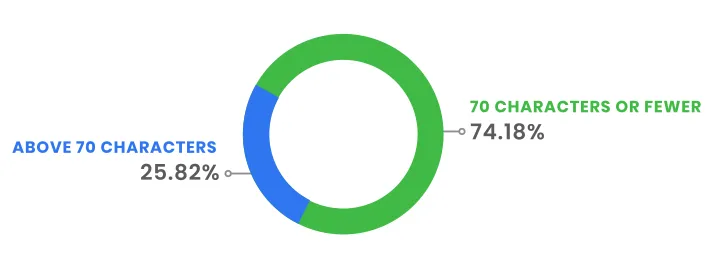
25.82% of ad and product titles on Google Shopping exceed 70 characters. This has an impact on the information displayed to the surfer, as the same title is then cut off in the ad.

In Google Shopping, product titles have a total length of 150 characters, but are cut off after 70 characters. Since 25.82% of Shopping titles exceed 70 characters, important product data may not be visible.

What are the recurring errors on Google Shopping feeds in Adenlab accounts?

The DataFeedWatch study was of particular interest to us, and we wanted to compare its data with that of the accounts we work on.

The study covers a large number of merchants and products: 4.5 million products for 15,000 merchants.

So, let’s start with this simple fact:

  • DataFeedWatch: 4.5 million products / 15 thousand merchants: 300 products per merchant
  • Adenlab: 425 thousand products / 40 active merchants: 10625 products per merchant

Of course, some accounts have many more products than others, but the fact is that we work on much larger catalogs. Too strong Adenlab 😉

And without boasting, let’s take a look at the rejected product rate:

  • 3% for accounts managed by Adenlab
  • data provided by the DataFeedWatch study (which, as a reminder, is not an agency but a tool for managing and optimizing your flows): the industry average is 7% of rejected items
In fact, what can we see in our accounts?
For this analysis, we have chosen to sort errors by the number of items concerned (and not by accounts affected, which would also have made sense).
  • The 1st type of error concerns “Non-respect of Google rules”, which accounts for 57% of rejected articles on all accounts.
  • the 2nd concerns images with missing values in the attribute, which would be the image link

What are the most commonly used Shopping flow optimization techniques?

Most e-tailers use flow tactics to boost the performance of their campaigns. When advertising across multiple channels, different feed data may be required, increasing the likelihood that advertisers will need to tap secondary data sources.

Whether you’re creating new titles or segmenting based on “best sellers” or margins, optimizing data feeds has a positive effect on campaign performance.

Product titles are the most optimized data elements in a product flow. Of all the stores whose data was modified, 14% of these changes concerned product titles. Advertisers either modified several keywords or rewrote titles from scratch.

Two out of five e-commerce advertisers use custom labels to optimize their campaigns. 13% of these advertisers create product groups based on whether the product is on sale or not.

When advertisers segmented their flows according to margins, they saw a 96% increase in ROAS.

64% of e-commerce companies filter out the least profitable products. In almost all cases where merchants cut products, it’s because prices fall below a certain threshold.

Price is the #1 reason for removing products from campaigns. When excluding products from paid advertising based on item price, 90.92% of marketers choose to remove products below a specified price.

Only 9% of marketers filter products by highest price.

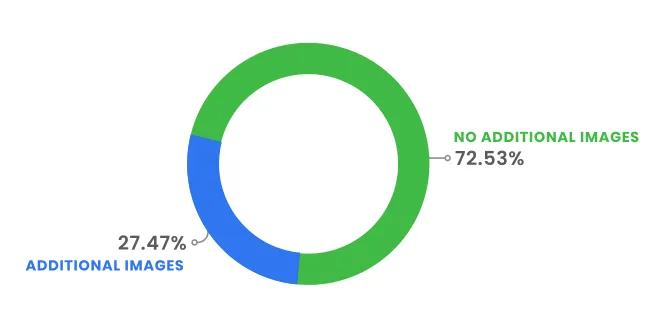
Over 25% of e-tailers provide advertising platforms with additional images. Additional images usually show the product from a different angle or with staging elements. This gives buyers the best possible idea of what they’re buying and how the product can be used.

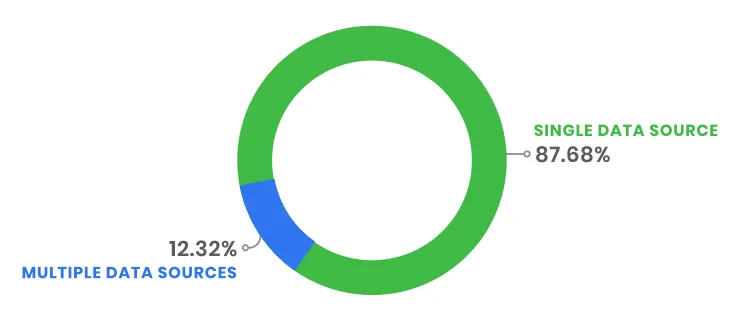
At least one in 10 e-merchant advertisers provides additional product information in the feed by leveraging secondary data sources. The types of secondary data sources used include:

  • Inventory management systems
  • Analytical
  • Google Sheets

You can download the full DataFeedWatch PDF report here. It includes more information on the current state of online shopping, including advice for advertisers on optimizing and improving their feeds, choosing the right platforms and best practices for paid advertising campaigns.

Smart Bidding: ROAS target or CPA target?

You’ve discovered Smart Bidding and would like to launch a Google Ads campaign?
There are a few prerequisites you need to take into account: without data, machine learning can’t do much for you. So, if you’re not sure whether to launch an automatic bidding campaign with a ROAS or CPA target, it might be a good idea to read these few lines first.

Here are the definitions of these 2 indicators:

  • CPA : “The average cost per action (CPA) is calculated by dividing the total cost of conversions by the total number of conversions.” This is very often the cost of your sale, or the cost of your new customer acquired via your Google Ads campaign.
  • ROAS : “ROAS” stands for “Return On Ad Spent” and is therefore a measure of the return on investment of an advertising spend. If your ROAS is 10 or 1000%, then this means that for every €1 spent via Google Ads, you have generated €10 in sales.Smart Bidding: How Google Ads’ automatic bidding strategies work

ROAS or CPA: how to use these indicators?

Google Ads automatic bidding offers several strategies, as different as whether you want to improve your visibility or increase the number of visits to your site. Among Smart Bidding strategies, two tend to stand out:

  • Achieve a target ROAS (return on ad spend):
    Google Smart Bidding’s ROAS strategy aims to achieve as many conversions as possible based on a predefined ROAS target. This smart bidding strategy can be applied to a single campaign or to several.
  • Get more conversions with a target CPA (cost per action) at a controlled cost:
    Smart Bidding’s target CPA strategy automatically defines your bids on the Search Network (also known as Display). The aim is to generate as many conversions as possible for the target CPA you set before launching your campaign.

Target ROAS or target CPA: what does Google have to say?

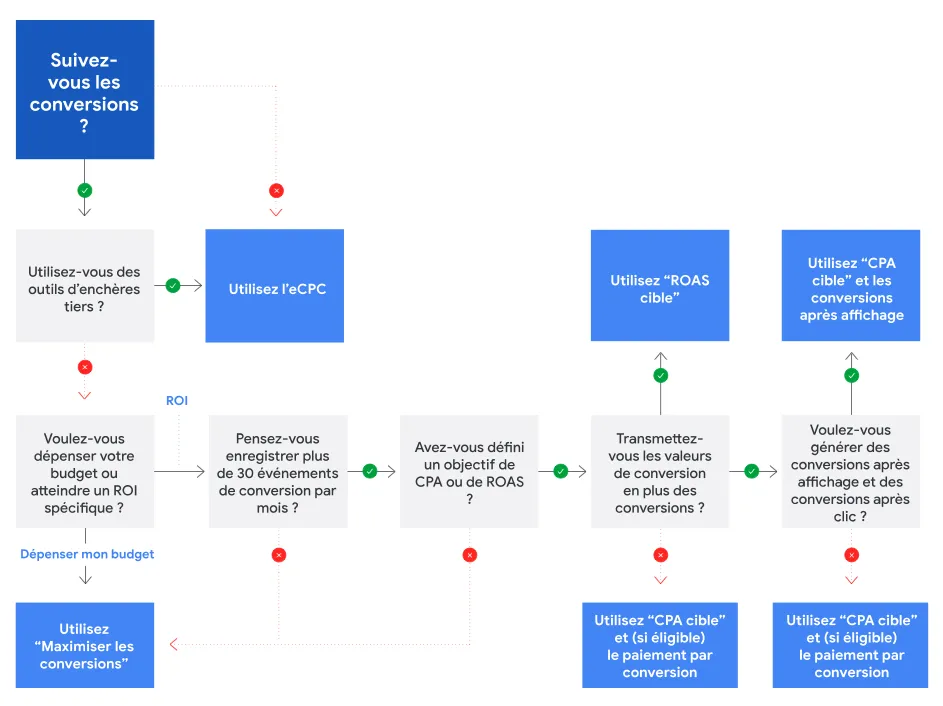
All automatic bidding strategies require a minimum number of conversions to work. In terms of ROAS and CPA, for example, Google recommends :

  • Target ROAS: as soon as a campaign has more than 100 conversions over the last 30 days;
  • Target CPA: as soon as a campaign has more than 30 conversions in the last 30 days.

The more historical conversion data you have, the more accurate Google’s algorithm will be.

Intelligent auctions at Target CPA, for whom?

The first thing you need to know is that using Smart Bidding with a target CPA strategy requires a thorough understanding of Google Ads. This implies that you’ve already launched several campaigns manually, and that you know the cost of a conversion.

What you want: to optimize the cost of your conversions.

What Google Smart Bidding will do: your campaigns will be adjusted automatically, which means that some acquisitions may cost you more, but in the end, your bids will be balanced.

The risk: not having enough historical data and not defining your target CPA correctly. The algorithm won’t help you at all.
Another “risk” is a lack of control over the products you want to sell first. This is a recurring problem we encounter with our customers and account managers. But you should know that we have solutions and methods to make the most of these “risks”.

Automatic auctions at target ROAS, in what context?

What you want: to optimize the profitability of your campaign.

What Google Smart Bidding will do: Google will automatically adjust your bids according to the target ROAS you’ve defined, in order to maximize the value of your conversions.

The risk: as we saw earlier, without sufficient data, you won’t get the results you want. In order for your campaign to be properly defined, you need to have gathered information and defined your average ROAS.

Conclusion

Target ROAS or target CPA: which to choose?

Because the ROAS target strategy remains complex to set up correctly (you need a lot of data), it’s advisable to start with a CPA target or a strategy aimed at maximizing your conversions.

Nevertheless, in the long term, especially if you have an e-commerce site, target ROAS probably remains the best solution for optimizing your campaign and above all your profits through machine learning.

Last but not least, bear in mind that while changes in the CPA ceiling may not necessarily influence Google’s algorithm, fluctuations in your market can have a very big impact on learning your target ROAS.

Servistores case study: +27% in sales

Servistores specializes in the sale of spare parts and made-to-measure products for awnings and roller shutters, with over 2,500 products listed on its E-Commerce site.

Discover how Adenlab and its teams have increased sales by +27% while optimizing ROI by +7%.

Optimizing user experience for e-commerce sites: the case of I-run

The e-commerce sector is constantly evolving, pushing online retailers to constantly improve their user experience (UX) to stay competitive. According to Contentsquare, the average shopping session involves 22 page views, leaving room for potential errors in the customer journey. UX is therefore essential to the success of an e-commerce site, as it influences purchasing decisions. This article focuses on UX best practices for e-commerce sites, using the website of sports equipment retailer I-run as an example.

BEST PRACTICE STARTS WITH THE HOME PAGE!

image_not_found

I-run applies several UX best practices. Firstly, a promotional banner at the top of the home page with a carousel presents five different offers, capturing customers’ attention and encouraging them to browse. The promotional code is then highlighted, either below the banner or integrated directly into it. On the home page, the flagship categories (running, trail and hiking) are positioned before the waterline, for quick and easy access.

image_not_found

A CROSS-SELL STRATEGY RIGHT FROM THE FIRST PAGE!

The home page also features leading products, selected according to criteria such as trends, bestsellers or popularity. They are displayed as carousels, grids or lists, with quality images and clear information. I-run also showcases competitively priced products, such as complete outfits from €65.

image_not_found

Promotions are included in the drop-down menu at the top of the home page, providing easy access to current offers. Category pages clearly display information such as crossed-out prices, two-installment payment options and the number of stars on item thumbnails.

image_not_found

INFORMATION-PACKED LISTING PAGES!

Products are ranked by “customer satisfaction” rather than relevance or popularity, emphasizing user experience and satisfaction. No-click quick item preview is also used, allowing users to see the name, price, discount and an image by hovering over the item with the mouse.

image_not_found

Last but not least, the product sheets follow best e-commerce practices, with clear, precise and useful information, benefits such as free delivery and advice on choosing the right size.

In short, e-commerce sites specializing in retail have adopted UX best practices to enhance the customer experience and facilitate the transition to purchase. These practices include clear, intuitive navigation, consistent layout and typography, detailed product information display, and the provision of customer reviews, purchase recommendations and filtered search options.

Performance Max’s new features for optimizing Google advertising campaigns

Since the launch of Performance Max, many key features have been added to help advertisers optimize their campaigns on Google. Thanks to optimized AI and Performance Max, advertisers can maximize conversions from their ads on the Google Search Network by combining broad query keywords with intelligent bidding strategies.

Performance Max also uses landing page content, assets and product flow to find new conversion queries and generate text ads relevant to the user.

OPTIMIZE YOUR INVENTORY RESULTS ON THE PERFORMANCE MAX SEARCH NETWORK

Keyword exclusion

Advertisers can also add keywords to exclude at account level to improve the relevance of their ads and exclude unwanted traffic.

Attention point: To optimize your coverage and performance, it’s important to carefully monitor the impact of exclusions on your advertising strategy. Be vigilant and don’t miss out on any potential conversion opportunities.

Also note that Google already takes steps to block ads related to sensitive topics, such as vulgar language and violence, so be aware of these restrictions

Page flow

The import of page URL feeds will improve results when using the final URL extension in a few months’ time. This additional feed will inform Google’s AI of the importance of these URLs, with no match limitation. If disabled, page feeds will simplify the addition of specific URLs for better performance in large-scale campaigns.

Note: Organize your URLs using thematic labels for more efficient management within a specific campaign or asset group.

MEASURE THE INCREMENTAL INCREASE IN CONVERSIONS WITH TESTS

Tests

Performance Max also offers tests to measure conversion incrementality by comparing a standard campaign with a Performance Max campaign.

Point of attention:

  • Formulate a clear hypothesis.
  • Choose one or two metrics to assess test success.
  • Use the same campaign parameters, bidding strategies and targets as other similar campaigns.
  • Run the test for at least 4 to 6 weeks.
  • Evaluate results with statistical relevance, taking into account time to conversion.
  • Draw reliable conclusions and decide whether or not to implement the new campaign.
  • Remember to consult the best practice guide for using Performance Max tests.
Video assets

Advertisers can also use the video creation tool directly in the “Assets” section of the Performance Max campaign workflow to easily create high-quality video assets.

Please note: For successful videos, be sure to select relevant, high-quality images. We also recommend importing as many relevant elements as possible and creating several videos using different templates. This will provide AI with a variety of videos to match the best option to a particular audience and context. Don’t forget to create videos in different formats for delivery to more relevant locations.

UNDERSTAND YOUR RESULTS WITH NEW INSIGHTS AND REPORTS

Asset Group Report and Budget Control Insights

Soon, new asset group reports and budget regulation insights will be deployed to help advertisers understand their results and optimize their budget and performance.

Point of attention:

  • Analyze the data to assess the impact of each asset group on your campaign’s performance. To improve results, add assets or asset groups to your Performance Max campaign to provide Google’s AI with more data, maximizing conversions and ROI.

  • Optimizing your budget for a multi-channel strategy is crucial. To find out more about multi-channel advertising and how Performance Max campaigns can improve your ROI, read the Google white paper on the subject.

By following these tips, advertisers can get the most out of their Google advertising campaigns using Performance Max.

What are the “signals” of Machine Learning to optimize your bids on Google Ads?

As you may know, Google Ads uses Machine Learning technologies to automatically manage your bids.

It’s the bids that determine the cost you’ll pay for a click and a visit from a potential customer. And more generally, good bid management will ensure your sales and ROI objectives.

To understand how and why your bids go up or down, you first need to understand which signals are valued by Google Ads.
Here are the explanations 😉

GOOGLE ADS MACHINE LEARNING

The aim of Google Ads machine learning is to make predictions about the future based on examples from the past. All to help you achieve your campaign objectives more easily.

When it comes to bidding, machine learning algorithms draw on large-scale data to help you make more reliable predictions for your account, including the potential impact of different bids on conversions or the value of conversions.

Google Ads’ algorithms will take into account a very large number of parameters affecting the performance of your campaigns, and probably far more than we could if we did it manually.

WHAT CONTEXT SIGNALS ARE TAKEN INTO ACCOUNT BY GOOGLE ADS ALGORITHMS?

To set your bids and make your ads visible to the right people at the “right” price to achieve your objectives, Google Ads’ algorithms take several criteria into account, right down to changing the price of your products!

When your ads and campaigns are live, Google Ads will take into account a large number of signals to optimize your bids.

These signals are attributes linked to a person or their context at the time of bidding. They may include attributes such as device and geographic area, as well as other signals, individually or in combination, specific to smart bidding strategies.

Here’s a list of important signals.

Device

Google Ads can optimize bids for target CPA or target ROAS strategies depending on whether the person is using a mobile, computer or tablet.

Example: In the case of a car dealership, bids can be adjusted if the person is searching on a mobile device, which means they are more likely to book an appointment at a dealership near them.

Geographical location

Google Ads can optimize bids according to a specific geographic area (as precise as a city), even if the advertiser’s geographic targeting is not as specific.

Example: In the case of a bank, even if the advertiser’s geographic targeting is Paris, bids can be adjusted if a person searches for “new checking account” from a city where the branch’s penetration rate is fairly high. It is more likely that this person will apply to open an account.

Geographic focus

Google Ads can optimize bids based on a person’s geographic intent, in addition to their physical location.

Example: In the case of a travel agency, bids can be adjusted if someone is actively searching for a vacation destination you offer (e.g. “vacation barcelona august”), even if they are not physically in that region.

Day of week and time of day

Google Ads can optimize bids according to a person’s local time and the day of the week in their time zone.

Example: In the case of a restaurant, bids can be adjusted if a person performs their search at 8pm on a Thursday, when they are more likely to make a reservation for the weekend, as opposed to 8am on a Monday.

Remarketing list

Google Ads can optimize bids on the Search and Display Networks, and Hotel Ads according to the remarketing list the user is on. The Search and Display Networks can also take into account the period since the user was added. In addition, the Search Network takes into account each list to which a user belongs, for a given campaign or ad group.

Example: In the case of an online clothing retailer, bids can be adjusted if someone has already viewed a product on a previous visit to the website, and whether or not they added it to their shopping cart the previous week (rather than the previous month). It’s more likely that they’ll want to buy it soon.

Ad features

Google Ads can optimize bids according to the version of an ad, even if the ad is displayed on a mobile application.

Example: In the case of a telecoms company, bids can be adjusted according to whether the ad shown is the “New Offers” or “Flexible Packages” creative, or whether it redirects to the mobile site or app, depending on which version is more likely to lead to a conversion. For campaigns on the Display Network, bids take into account ad sizes and formats that are more likely to generate a conversion.

Interface language

Google Ads can optimize bids according to the user’s language preferences.

Example: In the case of a Spanish course site, bids can be adjusted for the query “learn a new language” if the user’s language preference is English. The user is more likely to buy a tutorial if the language setting is Spanish.

Remarketing list

Google Ads can optimize bids on the Search and Display Networks, and Hotel Ads according to the remarketing list the user is on. The Search and Display Networks can also take into account the period since the user was added. In addition, the Search Network takes into account each list to which a user belongs, for a given campaign or ad group.

Example: In the case of an online clothing retailer, bids can be adjusted if someone has already viewed a product on a previous visit to the website, and whether or not they added it to their shopping cart the previous week (rather than the previous month). It’s more likely that they’ll want to buy it soon.

Browser

Google Ads can optimize bids according to the browser used by the user.
Example: In the case of a company offering health foods, bids can be adjusted if a person searches from Chrome, which has a higher conversion rate for this company than other browsers.

Operating system

Google Ads can optimize bids according to the user’s operating system.

Example: In the case of a game app developer, bids can be adjusted if someone searches for “puzzle game” on Google Play from an Android device running the latest version of the operating system. This user will be more likely to install the application than someone using a less recent version.

Real search query (Search and Shopping

Google Ads can optimize bids based on the text of the query that triggered the ad, not just the corresponding keyword.

Example: In the case of a shoe merchant, bids can be adjusted if a person’s search query is “leather boots”. This person is more likely to buy a new pair of shoes than someone searching for “repair boots”, even if both searches include the keyword “boots” as a broad query.

Research Network Partner (Research Network only)

Google Ads can optimize bids according to the Search Network partner site on which the ad is displayed.

Example: In the case of a FMCG brand, bids can be adjusted if the query comes from a more relevant search on an e-commerce site, which has a higher probability of conversion than a news site.

Web location (Display Network only)

Google Ads can optimize bids according to the site location on which the ad is displayed.

Example: In the case of a FMCG brand, bids can be adjusted if the ad is displayed on a popular site with high traffic, as its conversion probability is higher.

Site behavior (Display Network only)

Description: Google Ads can optimize bids based on a person’s activity on your site, including the number of pages viewed, the value of products viewed, the stage of the conversion process reached and other sites previously accessed.

Example: In the case of a furniture brand, bids can be adjusted if a person has viewed several expensive sofas, rather than lower-priced lamps.

Product attributes (Shopping only)

Description: Google Ads can optimize bids if attributes are similar for several products, including price, condition, brand and category.

Example: If you’re an outdoor equipment dealer, bids can be adjusted if you add to your product data a tent that resembles some of your existing items with a high conversion probability.

Hotel and stay attributes (Hotels only)

Description: Google Ads can optimize bids according to the hotel attributes and stays selected by the user.

Example: For a given hotel, bids can be adjusted if positive guest ratings, and the indication of user-selected arrival and departure dates (rather than default dates) are more likely to generate a hotel booking.

Mobile application reviews (coming soon)

Description: Google Ads can optimize bids based on the value and quantity of an application’s reviews.

Example: In the case of a fitness brand, bids can be adjusted if an application has excellent reviews and is more likely to generate an install.

Competitive pricing (Shopping and Hotel Ads only)

Description: Google Ads can optimize bids by comparing your rates with those of other advertisers taking part in the same auctions as you.

Example: If you’re a kitchenware retailer, your bids may be adjusted if you offer a better deal on a set of knives than other advertisers.

Seasonality (Shopping only)

Description: Google Ads can optimize bids according to performance trends at different times of the year.

Example: In the case of an electronics store, bids can be adjusted if someone is looking for a new TV around the festive season, when the probability of conversion is generally higher.

Conclusion

In short, the machine learning algorithms used in auctions are very useful for making reliable predictions for your account by taking into account a large number of parameters affecting performance.

Google Ads can optimize bids according to numerous signals, such as device, geographic area, geographic intent, day and time, remarketing list, price competitiveness and seasonality, for example.

Algorithms can help maximize the probability of conversion for different bidding campaigns based on relevant signals.