
Everything you need to know about Google Shopping campaigns

The article below is aimed specifically at acquisition managers and SEA campaign managers for Ecommerces, or for Ecommerçants wishing to work on Google Shopping.

We’ll take a detailed look at the different stages involved in launching this popular advertising format for e-merchants.

In fact, Google Shopping ads have the ability to boost site sales when campaigns are well-organized and well-managed.

As you know, Google remains the ideal medium for promoting your products via sponsored ads.

Adthena’s study “The Rise of Google Shopping” showed that Google Shopping accounted for 75% of clicks on all Google Ads campaigns by retailers.

And more recent data shows that mobile channels are responsible for even greater growth in click volume.

What we’re going to talk about below

  1. What exactly is Google Shopping?
  2. How to set up a Google Merchant Center account.
  3. The Google Shopping feed: how to create a product data feed and import it?

What is Google Shopping?

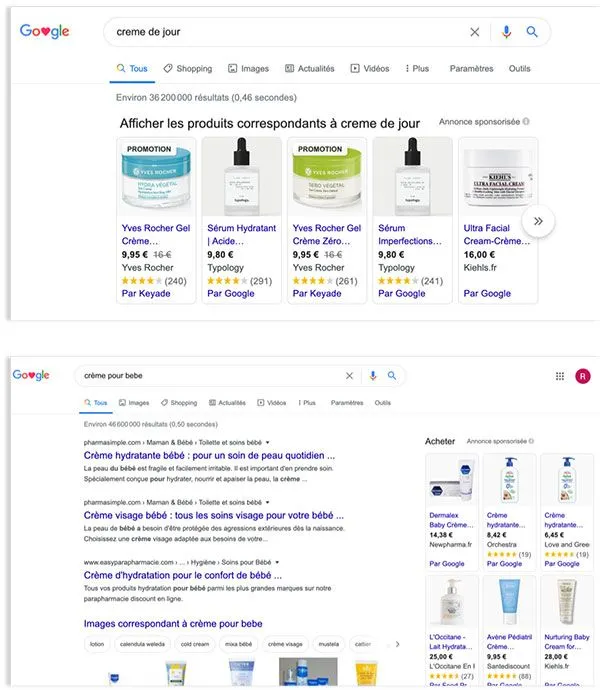
Google Shopping ads

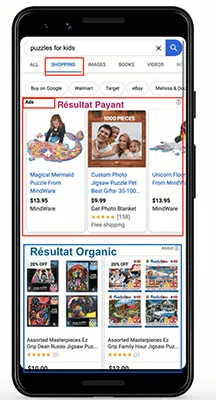
Google shopping ads (sometimes called PLA => Product Listing Ads) are for advertisers who have physical products to sell.

Advantage 1: they allow you to show right away what your products look like and how much they cost, even before the visitor arrives on your website.

Advantage 2: as these ads are more visual than text ads, the clicks they generate tend to capture visitors with a higher purchase intent than traditional text ads.

Advantage 3: For shopping campaigns, you don’t need to search for keywords to rank.

Against this backdrop, it’s hardly surprising that online retailers are investing so heavily in shopping campaigns. Budgets devoted to Google Shopping campaigns have grown steadily in recent years.

But how do ad settings work if you don’t have keywords to target like traditional text ads?

We’ll explain it below, because if you don’t have to select keywords, Google will automatically use the data from your Shopping Feed, which is hosted in the Google Merchant Center.

In fact, the first step in getting started with Google Shopping is to create a Google Merchant Center account.

Configure your Google Merchant Center account ?

Your Google Merchant Center is the tool that will centralize all your product data, so you can promote your entire offer.

It’s in the Merchant Center that you’ll integrate the products from your Ecommerce site that you want to promote via your Shopping campaigns.

When you log in to your Merchant Center account, you’ll find all the information you need about your products, including a diagnosis of their condition, as shown in the image below.

You’ll quickly see all approved products, unapproved products, clicks generated by your Google Shopping sponsored campaigns, as well as updates and recommendations on your account.
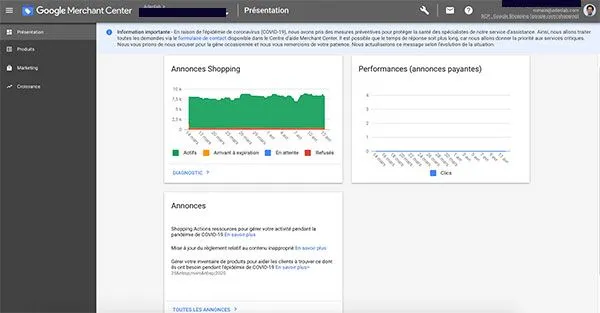
Merchant Center home

When you create your account(register with Google Merchant Center), the first thing to do is update your company details.

These include basic elements such as how you want your company name displayed, your website, your physical address and your account users.
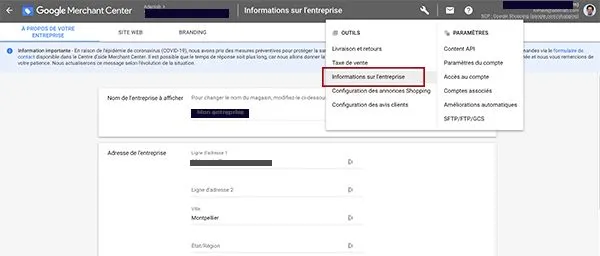
Administration Merchant Center

Validate and claim your website URL

Once your account has been created, you’ll need to validate and claim your website URL.

To achieve this, Google offers several methods:

Download HTML files
HTML tag
Google Analytics
Google Tag Manager

Each of these methods involves adding a piece of code to your website, which will be supplied to you depending on the choice you make.

It’s quite technical, and often requires the help of your developer or webmaster.
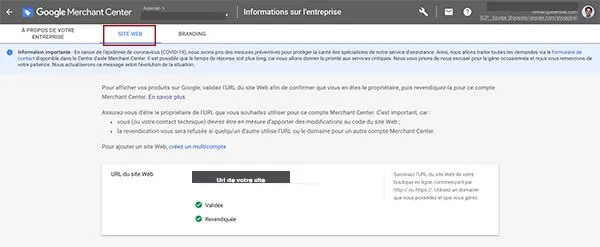
Once you’ve validated and claimed your site, your lights will turn green as above.

Google Merchant Center guidelines

Now that you’ve validated and claimed your website’s URL, you need to make sure your site complies with Google Merchant Center guidelines before running ads on Google Shopping :

Of course, you must have a secure payment system (https in the address bar, whenever someone is about to give you their payment details).

Internet users must be able to access your site from anywhere in the world.

Your website and product data must be in the official language of the country for which you are advertising.

The Google Shopping Feed: How to create a product data feed and import it

Before turning to this crucial topic, you should know that there are a few principles to respect on Google. To create a product in your feed, you need to meet all the specifications of Google’s product data.

What’s more, Google uses your product feed to match your ads to users’ search queries.

The attributes of your Shopping feed

Google’s requirements for your product feed will depend on the types of products you sell, but there are a few elements common to all that are required for every feed:

Here is the list of mandatory attributes:

id [identifier]: a unique identifier for all your products

title [titre]: a title; the name of the product

description [description]: a description of the product

link: the URL link to the precise, detailed page dedicated to the product

image_link [lien_image]: product image URL

availability:Availability of your product, in stock

price: the price of the product

Brand: the product brand

gtin [gtin]: the EAN code for Europe, the bar code (mandatory for all new products to which a GTIN code has been assigned by the manufacturer).

MPN[référence_fabricant]:Supplier reference (mandatory only if your new product does not correspond to any GTIN code assigned by the manufacturer)

condition [état] :the state of the product. Whether it is new, used, reconditioned, etc.

adult: adult or non-adult product (Required if a product includes adult content)

multipack [multipack]: the number of items contained in a single package (e.g. box of 6 candles).

age_group [tranche_d’âge]:age range of potential recipient (Mandatory for all clothing products Ex: [infants] / [children] / [adults])

color: product color if applicable (mandatory for all apparel products, as well as for products available in different colors).

gender: you can choose between male and female.

unisex[unisexe]. This attribute is mandatory for all clothing products, as well as for gender-specific products.

size: mandatory for all clothing products, as well as for products available in several sizes.

item_group_id [identifiant_groupe]: Mandatory if the product is a variant

shipping: shipping costs

Although the above list is long and there are over 40 attributes for a Google Shopping Feed.

However, these elements are generally part of the information you already have in your site’s back office and product sheet manager.

Import your product flow into Google Merchant Center

To import your product flow into the Merchant Center, Google offers several options, and the method you choose will depend on the size of your catalog.

The simplest option is to import your products via a Google Sheet (Google’s Excel) andsave a spreadsheet in Merchant Center. This method is suitable for “small” catalogs.

To do this, go to the left-hand menu, “Products”, then “Feeds” and “Add a main feed”.
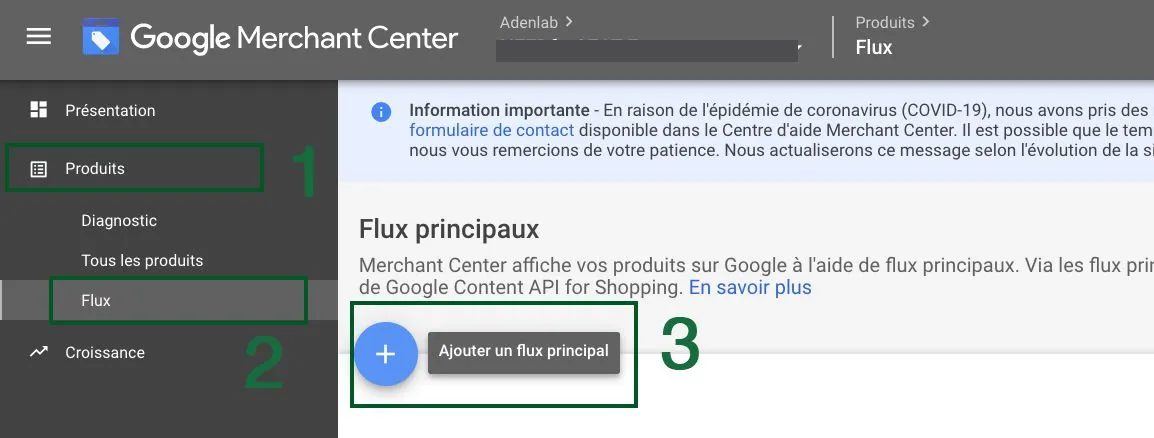
In the steps below, you’ll find the import steps.

In step 3, you can choose between a spreadsheet template, or select the Google Sheet you’ve created.
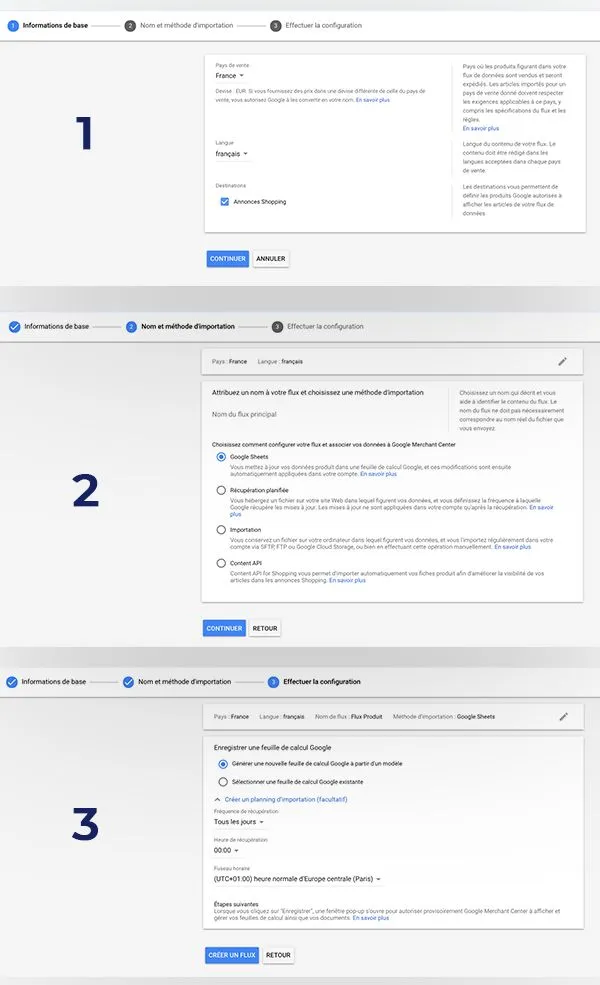
Add a Product Feed

Last but not least, you can set the frequency at which your data is updated.

This is all the more important as Google requires you to present your complete product data feed every 30 days, even if your ‘inventory’ has not changed.

If your inventory shows strong variations, Google gives you the option of refreshing your data up to 4 times a day.
How to optimize your Google Shopping feed.

A number of tests and optimizations were carried out by various specialists, including Adenlab.

Very often, it’s the optimization of product titles that produces the most positive effects on Shopping campaigns.

Improving the relevance of a product’s title has in some cases led to a 10-fold increase in traffic volume.

We strongly recommend that you read our article onoptimizing your Shopping feed.

Product title

The title of your product is certainly the most important attribute; improving your title is one of the top priorities of feed optimization.

Include the Top Keyword: in fact, the main term or keyword on which you want to position yourself, should be present in the title and rather at the beginning of the sentence.

Include product type: if your product is a “knife sheath”, include this term in the title. This is pretty obvious, but it’s also very useful, because by including the product type in your title, you’re describing the very product you’re selling.

Color, brand, size, gender: these are elements found in other feed attributes, but which can be added to the Title. In fact, having a Title that’s as close as possible to your customers’ searches will enable you to rank on more precise terms.

Product description

Although the description is not often seen by web users, it plays an important role in your feed.

In fact, the description (up to 5,000 characters) will enable you to complete the information in the Title and thus work more on the long tail and more precise queries.

Precision: although you can include a lot of content in the description, the aim is above all to be concise and precise. A clear product description is the most effective.

Keywords and searches: think about the keywords your customers will search for to find your product; these terms must be included in the Description.

Google Product Category

Google has created a list of product categories and sub-categories, allowing you to “classify” each product in your catalog.

This flow attribute is recommended, but mandatory in certain sectors;

Use Google categories from among the +6000 categories and sub-categories. You can download the Google taxonomy here

Choosing the right category: to gain in quality, it is always in your interest to be as precise as possible when choosing your category.

The images

Images are one of the most important factors! In fact, they’re the 1st element your future customers will see before clicking on your ad. Your photo must be attractive and realistic.

**Light background **: Google requires the product photo to be on a light background. Generally speaking, a white background is best.

Image size: 800×800 pixel images are recommended. The minimum is 250×250 pixels for apparel products and 100×100 for other products.

No text or logo: only the product image should be visible. Do not add promotional text to your image.

Merchant Center has implemented an automatic image enhancement option. You can activate this setting in your Merchant Center account in :

Click on the Tools icon (the wrench at the top right of your account) > Settings > Automatic enhancement.

Improve your product titles with search term reports

Thanks to Google Ads’ search term reports, you’ll have access to the queries made by Internet users who have searched for your products.

These reports will help you better understand the expressions used by your potential customers. And, of course, identify recurring terms.

Examining search reports will enable you to find the words and phrases that most often lead to sales of your products.

Once you’ve identified these “conversion” keywords, you’ll adapt your product title to include these words/phrases.

And don’t forget: the closer the term is to the beginning of the product title, the more Google will give it priority.

To make the most of semantic optimization, regularly review your search term reports.

Conclusion

At this point, you should feel ready to launch your Google Shopping campaigns. You’ve learned how to create a product flow from A to Z.

Now that you’ve familiarized yourself with Google’s various rules and obligations, you’re ready to launch your first campaigns.

You also know that among the many attributes of the product flow, it’s the product title that counts the most.

Now that you’ve familiarized yourself with the various Google Shopping settings, keep in mind that :

Analyze your products, making a clear distinction between those that earn you the most and those that earn you the least
Don’t leave your current shopping campaigns in the lurch, especially when you’re working on granular campaigns
Optimize your shopping campaigns according to your audiences’ purchase intentions

If you have any questions or comments, please do not hesitate to contact us.

If you need more information and advice on your acquisition, our team ofGoogle Ads Experts is available to talk to you.

Free Google Shopping? your products will appear in organic Shopping results!

Google announced on April 21 that it will display your products in the “Shopping” tab free of charge. For the time being, these changes will take effect in the United States before the end of April, and will roll out worldwide before the end of the year.

(Update October 12, 2020: the worldwide launch of Google Shopping Free listings is officially scheduled for mid-October. See our article on the subject and the Google Free Shopping program update)

Paid ads will continue to appear in ad slots and will function in the same way as current Shopping ads.

Natural results from Google Shopping

Google’s announcement comes as something of a surprise, given that retailers who use Google Ads invest heavily in Google Shopping ads to promote their products.
Why make this feature free? What’s in it for Google? And what’s in it for merchants?

Why does Google make Google Shopping free?

In general, online shopping and the user experience on Google’s platforms have been major issues since the company decided to launch its “Shopping Action” Marketplace to compete with Amazon.

One might think that this is a throwback to Google Shopping, when “Froogle” was free back in 2012 at its launch. But it seems more accurate to say that it’s an enrichment of Google’s database.

More products = more purchasing opportunities = more product searches on Google and therefore less on Amazon.

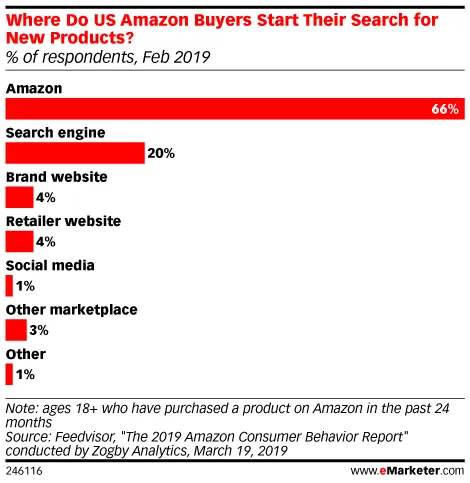
Opening up Google Shopping and making it free of charge would be a way of capturing more buyers on Google and not leaving room for Amazon and other marketplaces. Some studies have already shown that Amazon captures more buyers than Google. According to Feedvisor’s March 2019 study, two-thirds of American shoppers generally start their search for new products on Amazon;

Source: Emarketer.com – Feedvisor study “The 2019 Amazon Consumer Behavior Report”.

Making Google Shopping free for merchants seems to have 3 objectives for Google:

  • Expand product database in the face of Amazon.
  • Showcase merchants who don’t run Shopping campaigns, and thus capture future customers for Google Shopping campaigns.
  • Retain and acquire new users who currently prefer to search for products on Amazon and other marketplaces.

What are the benefits for merchants of participating in the Google Platforms program?

For merchants and e-tailers, the benefits are quite simple. It’s all about making your products visible and acquiring more customers through Google’s search engine, and more specifically through Google Shopping.

Merchants who don’t yet run Google Shopping campaigns will be able to discover the benefits of this visual ad format, which is already highly effective for those who do run paid Google Shopping campaigns.

What’s not certain, however, is how Google will select which products will be displayed as natural.
Some ads indicate that these will be “popular” products. But will it be SEO popularity: i.e., counted by the number of external links pointing to your page, popular because of the number of sales on your products, or popular because it’s a product with a lot of positive reviews?

How can I join the Google Platforms program?

To take part in the program, you must of course comply with Google’s prorgamme distribution rules. In order for your products to appear in Google Shopping’s natural results, you must meet one of the following two criteria:

  1. Work on your SEO, as your products will appear in Google Shopping’s “natural results”. You don’t need to have a Merchant Center account. Google will automatically retrieve product information via their structured data tags if these are present on your site. Our teams are available to help you with your SEO project.

Links:
=> Structured tags
=> Tools for creating structured tags

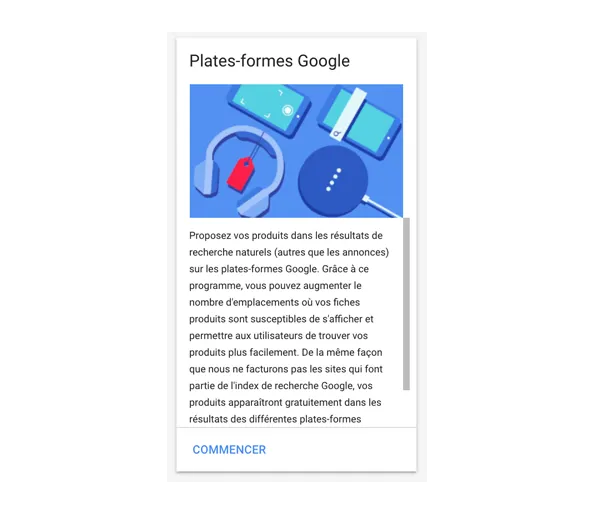
  1. Activate the “Google Platforms” program in your Merchant Center account. As soon as the program is active in France, you’ll need to add a new “destination” in the Flux import parameters. In the Merchant Center, under the “Growth” tab, you’ll find the link to “Manage programs”. Google Platforms” will then be displayed.

For the second option, in the Merchant Center, in the “Growth” section, you will find the link for “Manage programs” which redirects you to the functions and options in which you can participate (such as Google Shopping, Shopping Action, Avis Client …):

Google Platforms program

For the moment, as the program is not active in France, adding products to “Google Platforms” is not yet possible.
On the other hand, you’ll soon need to add a new “destination” to your feed. ” Destination: Google Platforms”.

Conclusion

In any case, we strongly recommend that you add rich content (or structured data tags) to your site and product sheets in the coming months if you wish to benefit from this free option.

As for the question of how products are displayed and search engine optimized on Google Shopping, we still don’t have all the answers.
Google talks about “popular” products, but this definition is very vague.

Are they popular products because they’re in high demand, or because they’re products with high sales, a lot of reviews, or because there are a lot of links pointing to this product page?…
We’ll keep a close eye on developments in the program and keep you informed. I hope these elements have given you a little more information on the subject!

We welcome your questions and comments. If you need more information or advice on your acquisition, our Google Ads Certified agency and our team of Google Ads Experts are available to discuss your requirements.

See you soon

Need to evolve your digital strategy?

We carry out a complete diagnosis of your strategy and campaigns.

Fully supported by Adenlab, you pay nothing.

Our free preliminary audit will give you a clear picture of the current state of your campaigns. It will enable you to identify and plan the evolution of your performance on your acquisition channels.